
Upgarde to the Complete Video Toolkit
Record, covnert, edit, enhance, and repair videos. Get professional results at every stage of your video workflow.
Lifetime Free Upgrade
Money Back Guarantee

You do not need complicated setup steps.
These simple optimizations can greatly improve recording performance.
Best Recording Settings
Set 1080p and 60FPS for gameplay recording. Or you can set up to 120 FPS to capture ultra-fast motion (Windows only).
How to Avoid Lag
Close unnecessary programs and overlays. You can also lower bitrate settings and recording resolutions.
Audio Setup Guide
Turn on the toggle buttons before System Sound and Microphone. Moreover, test the audio before recording.
GPU Acceleration Setup
In the Preferences window, go to the More section. Make sure “Graphics Card Acceleration (Hardware Encoding)” is selected.
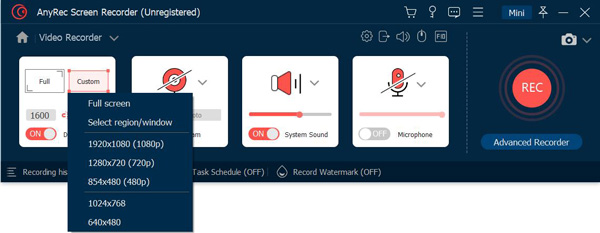
Choose Recording Mode
Choose the recording mode first, and then you can set the recording area, volume, and more.
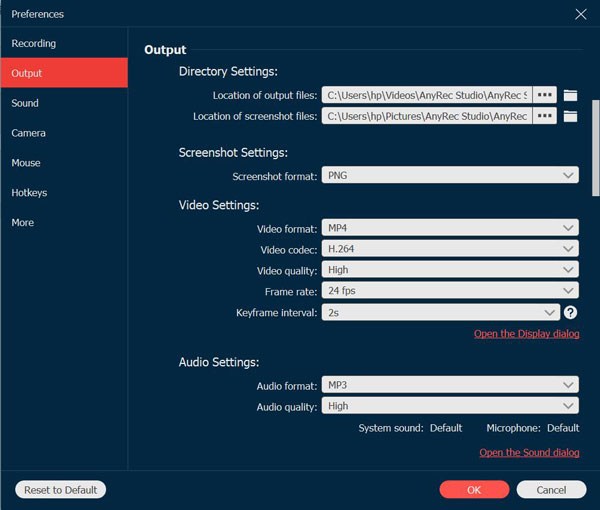
Set Output Settings
Click Preferences menu and set the output format, quality, frame rate, etc. in Output pane.
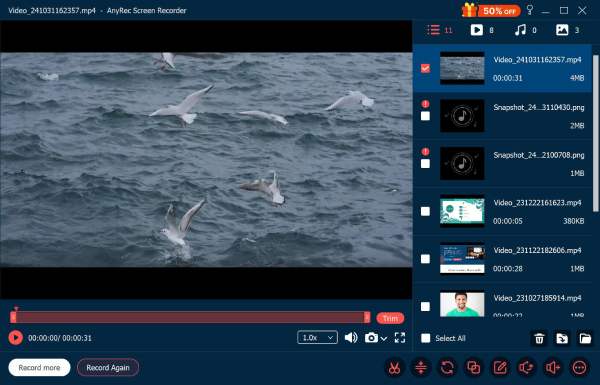
Start and Save Recording
Click REC to start recording with real-time drawing. Then, stop and trim it as you like.
Record Video

Record Audio
Record Gameplay
Screenshot

Get Support
If you can’t find the answer to your question, just contact our support team – we will be happy to help.
Contact Us follow us on Facebook
 follow us on X (Twitter)
 follow us on YouTube
Copyright © 2026 AnyRec Studio. All Rights Reserved.