

1 Month for 1 PC
$16.00 $20.00
1 Year for 1 PC
$39.95 $240.00
Save $200.85
Phone Mirror + PhoneMover
$69.45 $89.90
Save $20.45
Use these quick guides for smoother phone mirroring and better screen quality.
Mirror iPhone for Presentations
Connect iPhone to PC via the wireless or USB mirror. Enable screen mirroring. Now you can open presentation content for a larger display.
Record Mirrored Phone Screen
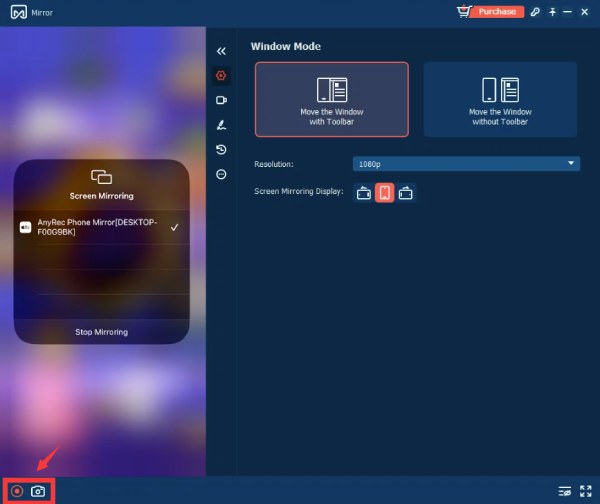
Start the phone mirroring. Click the “Record” button in the lower left corner of the program. Now you can save the mirrored content.
Play Mobile Games on Bigger Screen
Go to P references to adjust display quality. Make sure hardware acceleration is enabled. Now you can start low-latency mirroring.
Improve Mirroring Stability
Close unnecessary apps on your phone. It is suggested to use the USB Mirror mode for no-delay phone mirroring.
Connect iPhone/Android to PC
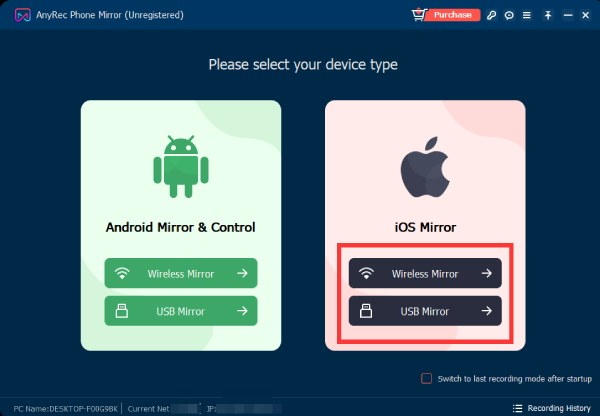
Open AnyRec Phone Mirror. Choose from "Wireless Mirror" or "USB Mirror" under the "iOS Mirror" and "Android Mirror & Control" sections.
Cast phone screen video and audio
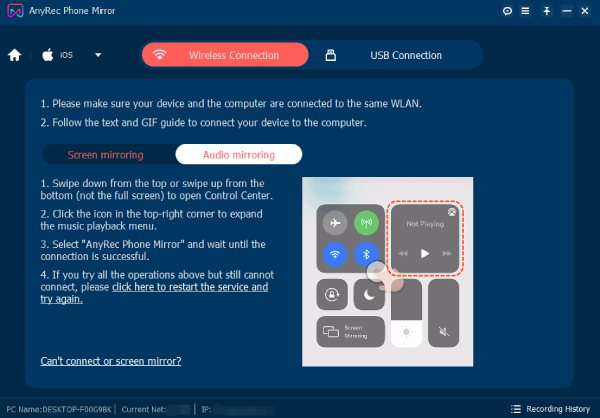
Follow the on-screen guide of "Screen mirroring" and "Audio mirroring" to mirror your iPhone or Android to the Windows computer.
Enjoy phone mirroring
You can record iPhone and Android screen video and audio during mirroring, as well as taking screenshots. Moreover, you can highlight, add text and shapes within the program.

Get Support
If you can’t find the answer to your question, just contact our support team – we will be happy to help.
Contact Us follow us on Facebook
 follow us on X (Twitter)
 follow us on YouTube
Copyright © 2026 AnyRec Studio. All Rights Reserved.




