
Upgarde to the Complete Video Toolkit
Record, covnert, edit, enhance, and repair videos. Get professional results at every stage of your video workflow.
Lifetime Free Upgrade
Money Back Guarantee

Use these beginner-friendly setup guides for better enhancement results.
Make Blurry Videos Clearer
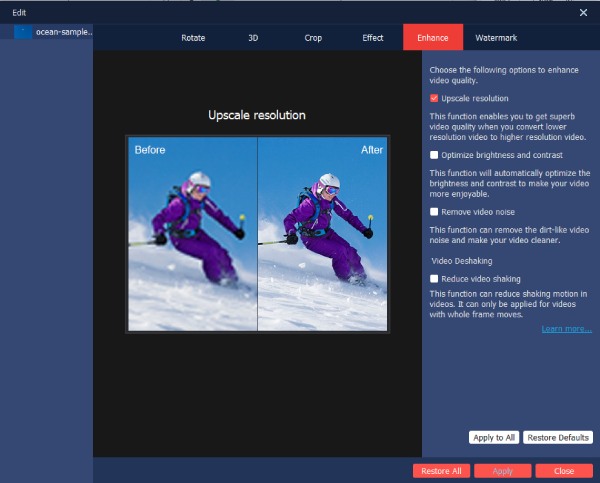
Import your video. Tick the checkmark before “Upscale Resolution”. Now you can export this video in higher quality.
Fix Grainy Night Videos
To improve the video brightness, tick the checkmark before “Optimize brightness and contrast”. Preview the result and export the video.
Reduce Camera Shake
Open the Enhance window, use the “Reduce video shaking” button to get smoother footage.
Upscale Old Videos to HD or 4K
Enable the “Upscale resolution” option. Moreover, choose 1080p or 4K in export to upgrade old videos.
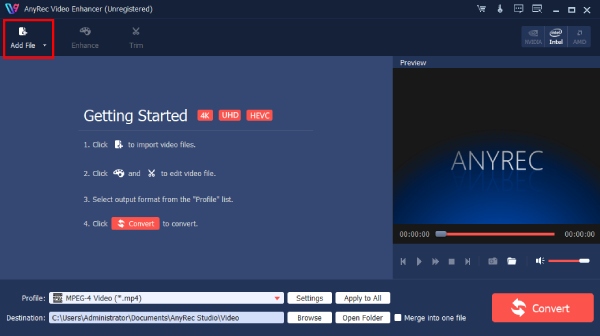
Add Video to Enhance
Follow the guide to click Add File on the top-left corner to upload the desired video/audio files.
Improve Video Quality
Click Enhance to improve the resolution, optimize the brightness/contrast, remove noise, and reduce shakiness.
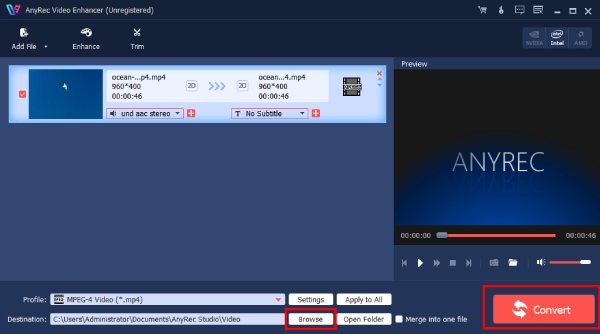
Edit and Save
Do more editing according to your need, and go back to main interface. Change output settings and click Convert.

Get Support
If you can’t find the answer to your question, just contact our support team – we will be happy to help.
Contact Us follow us on Facebook
 follow us on X (Twitter)
 follow us on YouTube
Copyright © 2026 AnyRec Studio. All Rights Reserved.