Upgarde to the Complete Video Toolkit
Record, covnert, edit, enhance, and repair videos. Get professional results at every stage of your video workflow.
Lifetime Free Upgrade
Money Back Guarantee

Whether your video is too large, unsupported, or blurry, these quick settings can help.
Convert Videos for iPhone or Android
In the “Output Format” list, switch to the “Device” section. Choose from Apple and Android profiles.
Convert Videos Without Quality Loss
You can choose the “Same as source” profile to keep the original settings. Or you can use H.264 or 4K export presets.
Make Conversion More Stable
Click the “High Speed Conversion” button. Turn on toggle buttons before 120x Faster Lossless Conversion and NVIDIA/Intel/AMD Hardware acceleration.
Make Videos Smaller
Choose the Video Compressor from Toolbox. Or you can reduce video resolution, bitrate, and other output settings to shrink the file size.
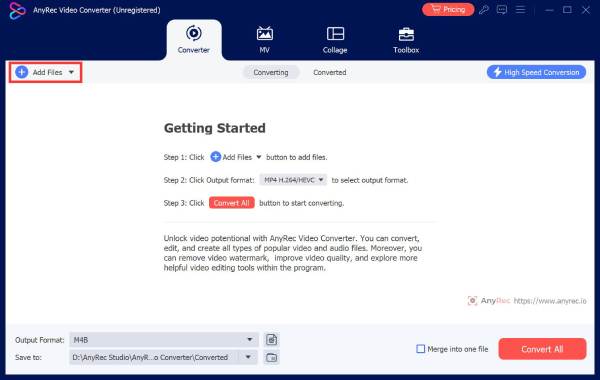
Upload video
Click the "Add Files" button to import your videos.
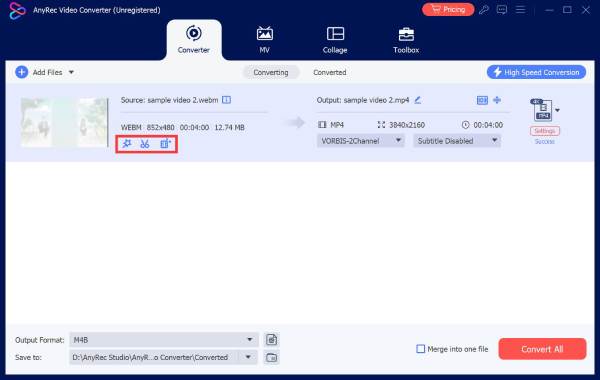
Edit video
Click the related Edit buttons under your video file. You can trim, cut, merge, compress, rotate, and do more editing.
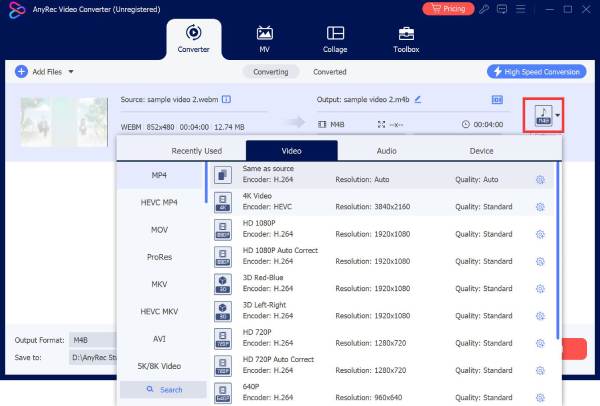
Convert video
Select the output video format or profile. At last, click the”Convert All” button to complete video conversion.

Get Support
If you can’t find the answer to your question, just contact our support team – we will be happy to help.
Contact Us follow us on Facebook
 follow us on X (Twitter)
 follow us on YouTube
Copyright © 2026 AnyRec Studio. All Rights Reserved.