
6 Workable Solutions to Removing TikTok Watermarks

Removing TikTok watermarks can be a necessary skill these days, as they are automatically added to downloaded videos. Although the initial intention is to protect the copyright of original creators, they are not always ideal for reposting, editing, or offline viewing. Besides, you may find that TikTok watermarks sometimes appear in different ways, making it hard to clear them in the same way. Therefore, different removal strategies are required. This guide organizes the most practical solutions based on real usage scenarios, helping you choose an effective method without compromising video quality.
Guide List
Things You Should Know Before Removing TikTok Watermarks How to Remove TikTok Watermarks for Different Situations FAQs About Removing TikTok WatermarksThings You Should Know Before Removing TikTok Watermarks
Before removing a TikTok watermark, you need to learn the basics about them. It is a crucial preparation, as watermarks actually mean that there are possible limitations. Many factors should be considered. And if you are not sure about them, you can look through the contents below:
1. Respect Copyright and Usage Rights
The primary purpose of TikTok watermarks on videos is to protect the copyright of the videos and the fundamental rights of their creators. If you simply want to save or back up the video for your own collection, removing the TikTok watermark is generally not a problem. However, removing someone else's TikTok watermark without permission and using the video for commercial or other purposes may violate platform rules or copyright laws.
2. Identify the Watermark Type
TikTok watermarks come in many forms. If you frequently save TikTok videos, you might notice that sometimes the TikTok watermark is not fixed in the same position. Understanding the watermark type helps determine which method is most effective for watermark removal.
3. Preserve Video Quality
Removing the TikTok watermark isn't your only task in this process, as you'll find that some poor editing tools can make videos blurry. This significantly reduces the viewing experience even without the watermark. Therefore, choosing a powerful enough tool to remove the TikTok watermark is essential.
How to Remove TikTok Watermarks for Different Situations
TikTok watermarks don't always display the same way. Some watermarks are fixed in the corner of the screen, while others move from one side to the other. Therefore, finding an all-in-one solution becomes a relatively complex task, as it must be able to handle TikTok watermarks flexibly. If you have similar needs, then AnyRec Video Converter is a reliable choice. Offering a variety of editing functions, AnyRec Video Converter can handle all types of TikTok watermarks without requiring additional tools.

Quickly remove the TikTok watermark without affecting the overall quality of the video.
Effectively remove all forms of TikTok watermarks, no matter whether they change positions or not.
Preview to view the effect after the TikTok watermark is removed from your video.
After removing the watermark from TikTok, further editing of the video can be done.
Secure Download
Secure Download
How to Remove a Normal TikTok Watermark from the Corners
When a TikTok watermark stays in a fixed corner, the process of removal is usually straightforward. There are multiple workable solutions from cropping to covering. All these techniques can be applied with minimal impact on the main content. And AnyRec Video Converter can deal with any one of them. If you don't know how to perform the removal of TikTok watermarks easily, the approach below works best for videos where critical visual elements are not located near the edges.
Step 1.Launch AnyRec Video Converter and click the "Video Watermark Remover" button under the "Toolbox" button.

Step 2.When you see a window pop up, click the "Add Files" button to import your TikTok video with a watermark.

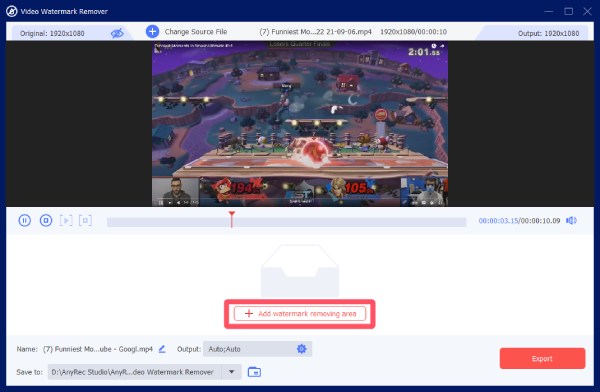
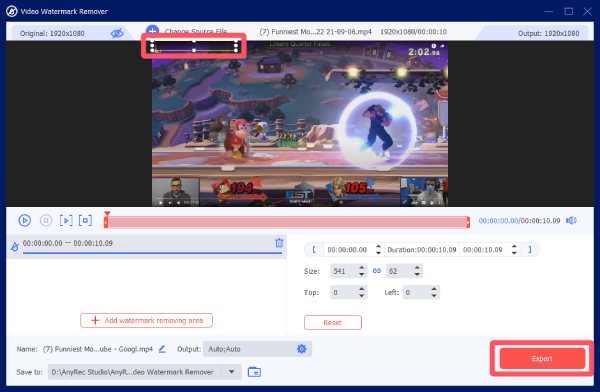
Step 3.Click the "Add watermark removing area" button to select the area where the TikTok watermark exists to remove it.
Step 4.Once finished, click the "Export" button to save your TikTok video with the watermark removed.
How to Remove TikTok Watermarks That Switch Positions
Sometimes, TikTok watermarks can switch their positions, alternating between corners. In this situation, the removal can be troublesome yet not totally impossible. A more advanced tool is required to remove the watermark frame by frame using the timeline. This method focuses on preserving the whole video frame while minimizing visible artifacts like TikTok filters.
Step 1.Launch AnyRec Video Converter and open the video watermark remover. Add your TikTok videos to start the process.
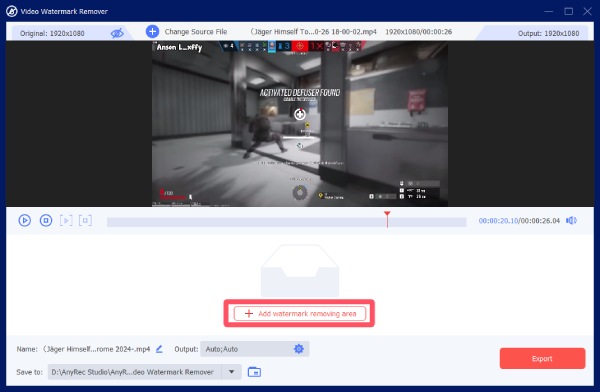
Step 2.Click the "Add watermark removing area" button and click to adjust the timeline, locating precisely before the TikTok watermark switches its position.
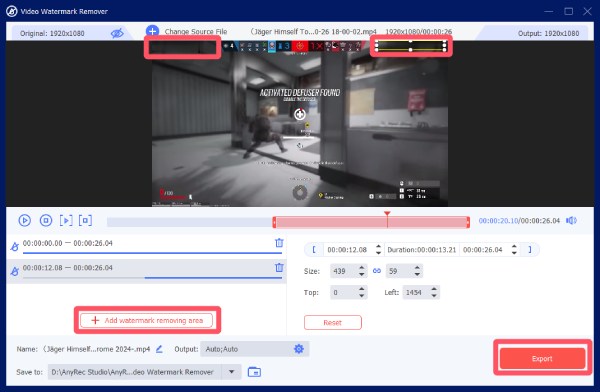
Step 3.To remove the TikTok watermark in the new position, click the "Add watermark removing area" button again to select a new area.
How to Add Your Own Watermark to Replace a TikTok Watermark
In fact, using one's own watermark to replace an existing TikTok watermark is a convenient method. In this way, you can better carry out your own processing based on this TikTok video. This approach helps maintain branding, avoids awkward blank areas, and delivers a more polished result. It is beneficial for content creators who plan to repost videos across platforms with the need to remove a TikTok watermark. When your TikTok videos go viral, you will find that your own watermark can help a lot.
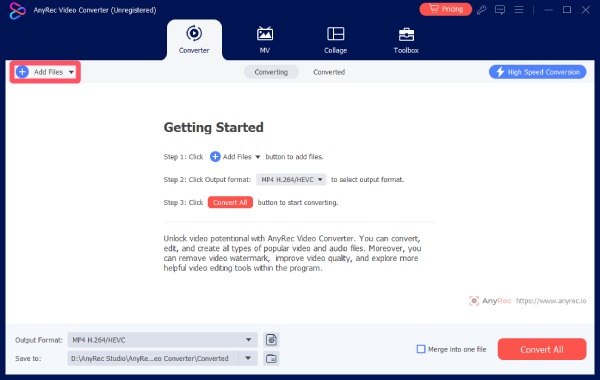
Step 1.Launch AnyRec Video Converter and click the "Add Files" button to import your TikTok video. Then, click the "Edit" button.
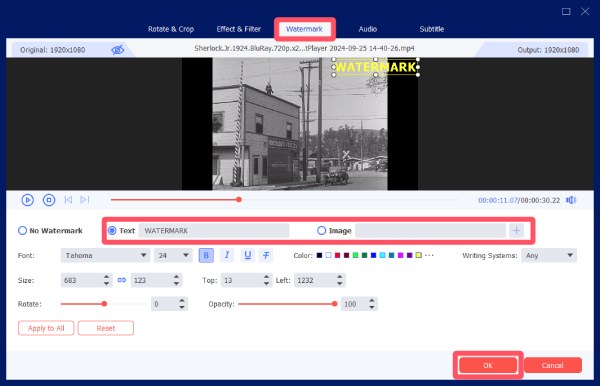
Step 2.Under the "Watermark" tab, click the "Text" button or the "Image" button to put your own watermark above the original TikTok watermark.
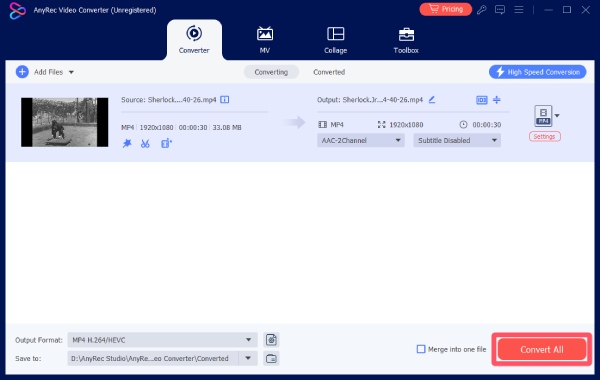
Step 3.Click the "OK" button. To save the TikTok video with your own watermark, click the "Convert All" button.
FAQs About Removing TikTok Watermarks
-
1. Is it legal to remove TikTok watermarks from videos?
Generally speaking, if you remove the TikTok watermark solely for your own use or for non-profit purposes, then this action is acceptable. However, once it involves commercial activities and other matters, it will inevitably lead to legal issues related to copyright and TikTok’s terms of service.
-
2. Will removing a TikTok watermark reduce video quality?
The impact on quality depends on the method and tools used. Simply put, cropping to remove the TikTok watermark does not affect video quality beyond aspect ratio. Other removal methods, however, will affect video quality to varying degrees. Generally, more powerful tools tend to reduce video quality less.
-
3. What is the best way to remove TikTok watermarks?
Covering the TikTok watermark is the most recommended method. This is because cropping will alter the original aspect ratio of the video, which may result in the loss of crucial information. And watermark replacement may potentially raise issues related to copyright.
Conclusion
No matter how a TikTok watermark appears, AnyRec Screen Recorder can work well as a TikTok watermark remover to remove it efficiently without affecting the original quality of the video. If you need it, download it now to remove the TikTok watermark quickly.
Secure Download
Secure Download
Related Article
About Our Author




