
Hot

AnyRec Screen Recorder
Capture every moment. Record like a pro.
Secure Download
TikTok Filters: Where, What, How to Use [for Beginners]

If your TikTok videos look flat, washed out, or inconsistent, filters are usually the missing piece. Compared with TikTok effects or lenses, TikTok filters can smooth skin, fix dull lighting, or add a clean vibe. It is a good way to make a video pop using good filters on TikTok. However, finding the right one isn't always easy. Want to know where, which, and how to use filters on TikTok? Please continue reading.
Guide List
Where to Find TikTok Filters What Are Trending TikTok Filters in 2026 How to Use TikTok Filters (before/after Uploading) Troubleshoot TikTok Filters Not Showing or MissingWhere to Find TikTok Filters
Here are easy steps to access filters on TikTok. And you can know what filters are used in someone's TikTok video.
How to Search for a Specific TikTok Filter
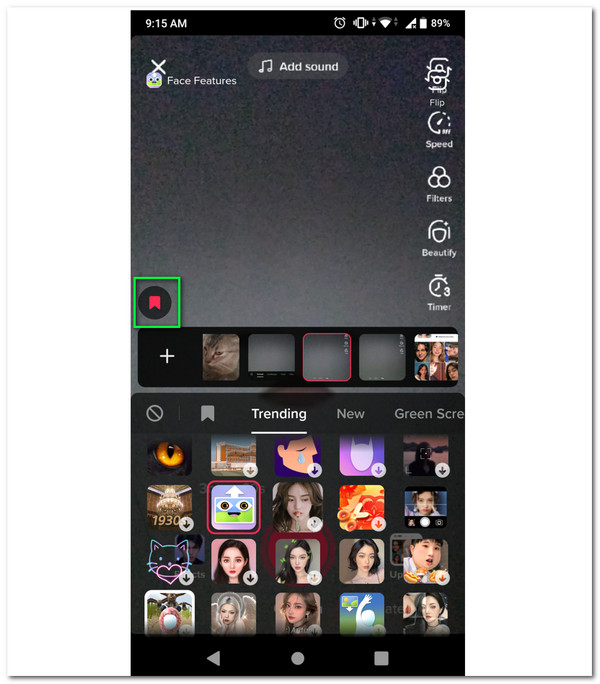
- 1. Open the TikTok app. Tap the "+" button to create a video.
- 2. Tap the "Filters" button on the right side of your phone screen.
- 3. Here you can choose TikTok filters from Portrait, Landscape, Food, Vibe, Nature, and more. Scroll down to see all.
How to Find a Filter Used in Another Video
- 1. Open the target TikTok video.
- 2. Find and tap a yellow sticker icon with text above the creator's username.
- 3. Tap the "Try This Effect" button to apply the filter immediately.
- 4. Or you can tap the "Add to Favorites" button for further use.
- 5. If there is no filter, you can tap the "Effect" button to see it.
What Are Trending TikTok Filters in 2026
So what users actually use? You can check the following list to make your TikTok video go viral.
1. Beauty & skin filters
The highly realistic "Bold Glamour" and AI-powered skin-smoothing effect are popular. And the brown eye filter is trending, too. Those filters can adjust skin tone, smoothness, and facial structure in real-time. It is widely used in live streams, talking videos, storytime content, and more. To avoid your skin looking "plastic" and over-smoothed, you can use TikTok beauty filters lightly, not full-length.
2. Color & Aesthetic Filters
Do you like watching daily vlogs? If Yes, then you have seen those two filters. TikTok color and aesthetic filters are commonly used in lifestyle videos, vlogs, Instagram-style reposts, and more. If you want to create a stunning and radiant look, you can use the Bling effect, Glow X1 Pro, and Crazy soft filter.
3. Retro, VHS, and Film Filters
Those vintage TikTok filters trend often but fade fast. Throwback content, music clips, and fashion videos usually use the vintage magic filters. If you want to revive your video with captivating 90s overlays, you can take a look at 80s/90s nostalgia, analog grain, and low-fidelity camera aesthetic. Though some users report that the filters can reduce video quality, especially on Android devices.
How to Use TikTok Filters (before/after Uploading)
To get more views on TikTok, you can apply trending TikTok filters. By doing so, you can boost content visibility, engagement, and virality by aligning with current user interests. Follow the steps below to add filters to a video before or after posting to TikTok.
Apply or Change a Filter While Recording [Suggested]
- 1. Tap the "+" button at the bottom of the phone screen to open the TikTok in-app camera.
- 2. Tap the "Filters" or "Effects" button before starting to record. (before recording)
- 3. You can tap the "Filters" or "Effects" button or swipe left/right while holding the record button to switch TikTok filters in the mid-recording. (during recording)
- 4. Once you pause recording, you can select a new TikTok filter or effect. Later, you can resume TikTok recording to change the look. (mid-recording)
Apply a Filter to an Existing TikTok Video
Many filters only work during recording on TikTok, such as face and lighting filters. But you can still add some color filters to the uploaded TikTok video. Just follow the steps mentioned above. However, once a video is posted on TikTok, you cannot remove or change a filter. It is also not supported to adjust the filter intensity.
You can download TikTok videos by tapping the "Share" and "Save Video" buttons. But if the creator has disabled downloads, you can use AnyRec Screen Recorder to record and save videos without watermarks.
Secure Download
Secure Download
Troubleshoot TikTok Filters Not Showing or Missing
Some TikTok filters are region-limited, iPhone-only, or even removed. The outdated TikTok app and cache bugs can cause the problem. Sometimes TikTok tests new filters on limited accounts. So the filter disappears temporarily or permanently. Try those solutions below.
- • Update the TikTok app.
- • Restart the TikTok app.
- • Log out and then log back in to your TikTok account.
- • Clear TikTok cache.
- • Try with another phone. (It is suggested to use different phone brands.)
Conclusion
Before using TikTok filters, here are some tips and practices you had better consider. Test filters in different lighting. And don't reply on filters to fix poor lighting. Overusing filters will make people feel worse. Please stay consistent and use the same filer style for your niche. As for a 100% working downloader, AnyRec Screen Recorder is highly recommended. You can save videos on TikTok for offline watching by clicking its "REC" button. Please don't share or sell those content without creators' permission.
Secure Download
Secure Download
Related Article
About Our Author




