Repair damaged videos from phones, drones, cameras, computers, and more with these beginner-friendly steps.
Fix Videos That Won’t Play
Add the damaged video. Then upload a sample video. Click the “Repair” button and preview the result.
Repair Black Screen Videos
Import a black screen video. Add a working sample video. Click the “Repair” button and export the repaired footage.
Fix Audio Out of Sync
Upload your problematic video and sample video. Start the video repairing process. You can preview and save changes.
Fix Choppy or Glitchy Playback
Add your laggy video. Then import your sample video. Run the video repair. Preview it. At last, save the smoother video.
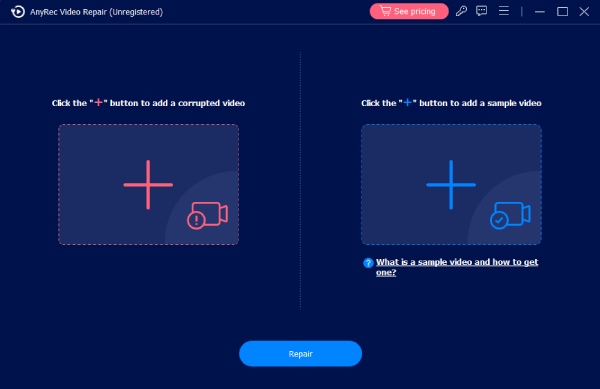
Add Two Videos
Click Add button to upload your damaged video and a sample video simultaneously.
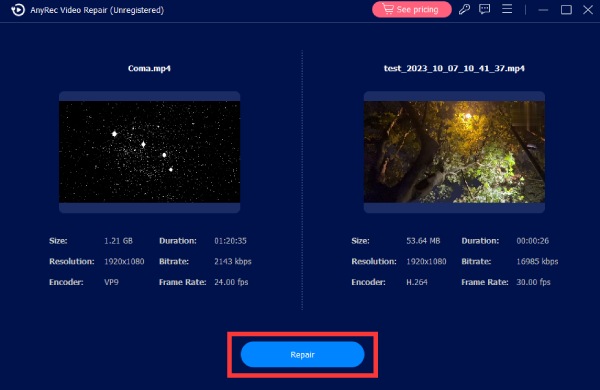
Repair Damaged Video
Please make sure the two videos are in the same format. Then, click Repair to start fixing.
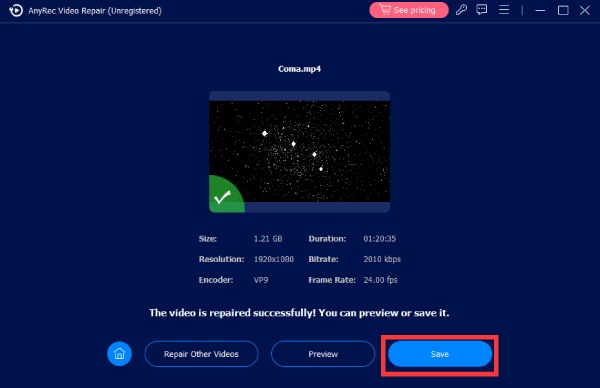
Preview and Export
After fixing, you can click Preview to check the video, and then click Save to export.

51% OFF

Get Support
If you can’t find the answer to your question, just contact our support team – we will be happy to help.
Contact Us follow us on Facebook
 follow us on X (Twitter)
 follow us on YouTube
Copyright © 2026 AnyRec Studio. All Rights Reserved.