
Hot

AnyRec Screen Recorder
Capture every moment. Record like a pro.
Secure Download
6 Best Messenger Call Recorders [with Recording Step & Tips]

Facebook Messenger is widely used for video and voice calls, making it a well-known platform for online meetings and conversations. In many cases, you may want to know how to record Facebook Messenger calls for future reference or documentation. However, the app does not have built-in recording capabilities on either desktop or mobile. Thus, this post introduces six Messenger call recorders alongside particle tips to capture calls clearly and safely.
Guide List
Top 3 Messenger Call Recorders for Windows and Mac Top 3 Messenger Call Recorder Apps for iPhone and Android How to Record Facebook Messenger Calls Tips for Clear Messenger Call RecordingTop 3 Messenger Call Recorders for Windows and Mac
Recording Messenger calls on a desktop needs more than a basic recorder, as the tool must be able to capture both system sound and microphone audio. It is also necessary to notify all participants before recording any conversations.
For Windows and Mac users, you must have a tool that offers stable performance, especially for long voice or video calls. With that in mind, here are the top three Messenger call recorders for desktop that deliver reliable results.
1. AnyRec Screen Recorder
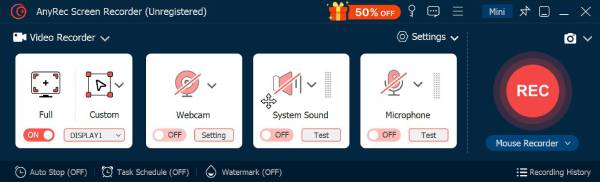
To start, here's AnyRec Screen Recorder for you. This tool is one of the most reliable tools for recording Messenger calls on both Windows and Mac. Here, you can capture system audio and mic sound simultaneously, ensuring both ends of the conversation have been recorded clearly. In addition, it offers adjustable audio settings, which help reduce noise and prevent echo during calls. This Facebook Messenger call recorder also guarantees high-quality recording for both voice-only and video Messenger calls.
Can record Messenger voice and video calls with high-quality audio.
Allows custom recording areas such as full-screen, selected window/region.
Provides real-time preview and basic trimming tools before saving.
Includes noise reduction and mic enhancement for clearer voice capture.
Secure Download
Secure Download
2. OBS Studio
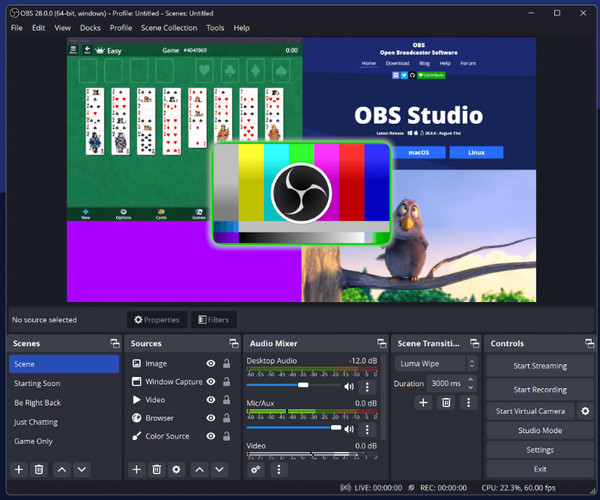
Moving on, OBS Studio works as an open-source FB Messenger call recorder that has complete control over audio sources. With its level of customization, the program is suitable for longer calls, interviews, and professional recordings. Despite its learning curve, OBS delivers stable performance and high-quality output once configured correctly.
3. QuickTime Player
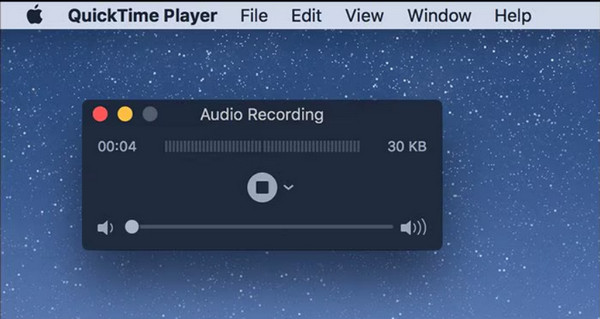
At last, a built-in recording tool such as QuickTime Player can be used to record Messenger calls on Mac. This tool is convenient as it comes pre-installed and requires no extra download. Using this Messenger call recorder is ideal for short or casual recordings rather than long or critical calls.
Top 3 Messenger Call Recorder Apps for iPhone and Android
Recording Messenger calls on mobile devices is restricted, mainly due to privacy and system limitations. Not all recorders can capture both sides of the conversation. Compare the following apps to record Facebook Messenger video and audio calls.
1. AZ Screen Recorder
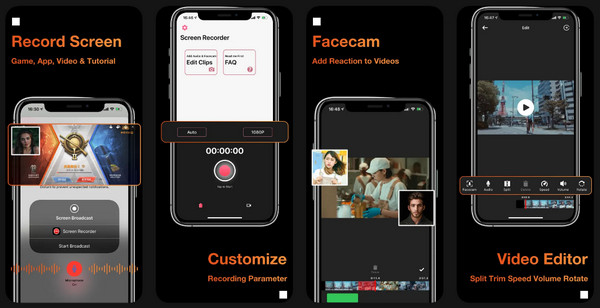
A popular screen recording app, AZ Screen Recorder, works well for recording Messenger video and voice calls. It captures on-screen activity alongside mic audio, making it ideal for Messenger video calls and online meetings. This Messenger call recorder supports HD and Full HD recording and lets you pause and resume recordings without interrupting the call.
2. Cube ACR
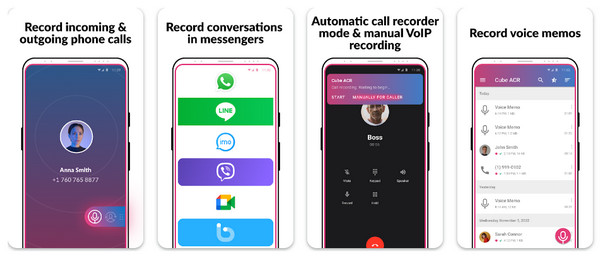
Next is Cube ACR, a Messenger call recorder that automatically detects app calls and begins recording. It offers audio enhancements. You can level up call clarity and minimize background noise during Messenger call recording. However, its inconsistent performance and hardware limitations reduce your call recording experience.
3. Record Messenger Calls
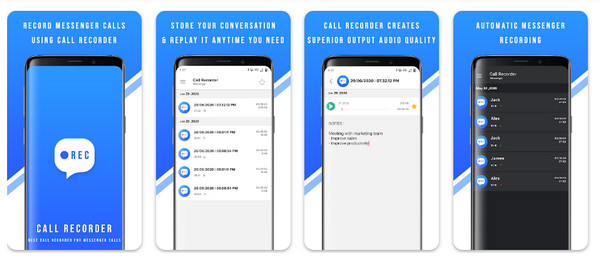
Lastly, use the Record Messenger Calls app if you only need Messenger call recording without any extra features. This messenger recording app captures calls through the microphone and saves them locally for later playback. With its lightweight design, this app makes it easy to install and use, even on lower-end mobile devices.
How to Record Facebook Messenger Calls
With the Messenger video call recorder list for desktop and mobile, AnyRec Screen Recorder offers a simple and effective solution for recording Facebook Messenger calls on Windows and Mac. Download the software first.
Secure Download
Secure Download
Step 1.Launch AnyRec Screen Recorder on your computer. On your browser or desktop, open Messenger and go to the target conversation.
Step 2.Choose from "Video Recorder" or "Audio Recorder" modes to record video or voice calls on Messenger online.
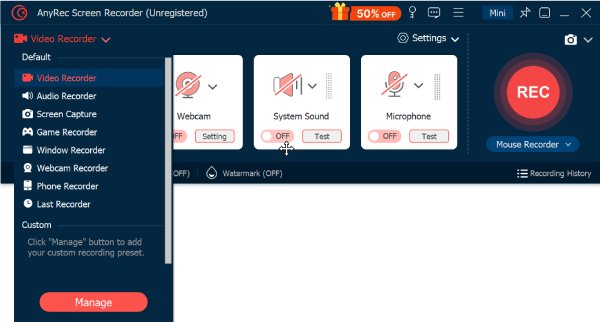
If you're going to capture a video call, choose between "Full" and "Custom" for your recording area.
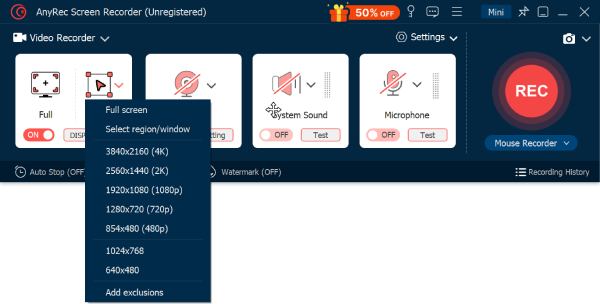
Step 3.Next, turn on the toggles buttons before "System Sound" (to capture the participant's voice) and "Microphone" (for your own voice). Adjust both volume levels before clicking the "REC" button.
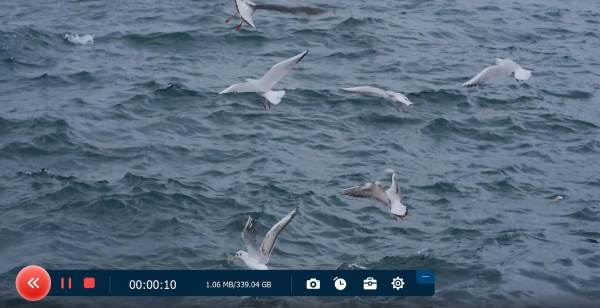
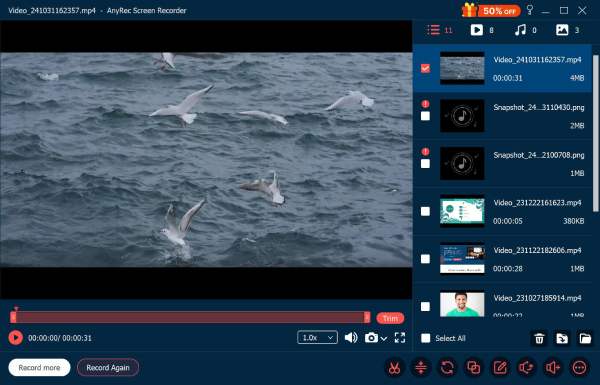
Step 4.During the call, you can pause or resume the recording. Later, click the "Stop" button to finish it. Preview the Messenger call recording, edit if necessary, and save the file.
Tips for Clear Messenger Call Recording
Aside from the features of a Messenger call recorder to successfully capture a conversation, you also need to prepare things before the call starts. Take a moment to check the practical tips to ensure a clear and high-quality Messenger video call recording.
- • Use headphones/earphones to lessen the echo and avoid picking up the speaker output.
- • Check internet connection to ensure a stable recording to avoid call drops or lag.
- • Test audio settings to confirm both the system and mic sound are being captured.
- • Adjust the microphone sensitivity to make your voice sound clear.
- • Choose a quiet environment to minimize background noise during the Facebook Messenger call recording.
- • Close background applications to reduce system load and improve the recording performance.
Conclusion
As discussed, recording Facebook Messenger calls on both desktop and mobile is made possible with the right tools. Desktop recorders have more stable performance and better control over audio options, while mobile messenger recording apps are more limited. Although it is essential to choose a Messenger call recorder, always keep in mind to notify all participants before recording private conversations. If you wish for a reliable, high-quality desktop solution, AnyRec Screen Recorder is a strong recommendation. It captures both system sound and mic audio clearly, and is easy to use for anyone, making it perfect for everyone who values clarity, stability, and control.
Secure Download
Secure Download
Related Article
About Our Author




