A Comprehensive Guide on VanceAI Image Upscaler: Review & Alternative

VanceAI image enhancer is a picture processing tool under the brand of VanceAI. As a brand that has been engaged in editing various media formats for a long time, VanceAI has launched a series of tools that can assist you in handling videos and images. And VanceAI photo enhancer is specifically designed to enhance the quality of images. This post will provide you with a detailed review and alternatives to VanceAI Image Upscaler, helping you quickly understand this tool.
Guide List
A Brief Introduction to VanceAI Image Enhancer How to Use VanceAI Image Enhancer on Desktop An Online Tool Provided by VanceAI Image Enhancer A Powerful VanceAI Alternative with Excellent PerformanceA Brief Introduction to VanceAI Image Enhancer
VanceAI Image Enhancer is an image enhancement tool based on AI models, launched by VanceAI. The AI model of this tool has acquired highly effective enhancement effects for low-resolution photos by identifying and learning from a large database of materials. No matter what type of photos you want to process - portraits, landscapes, text, or other types, even AI-generated images - it can make the details in the pictures appear clearer.
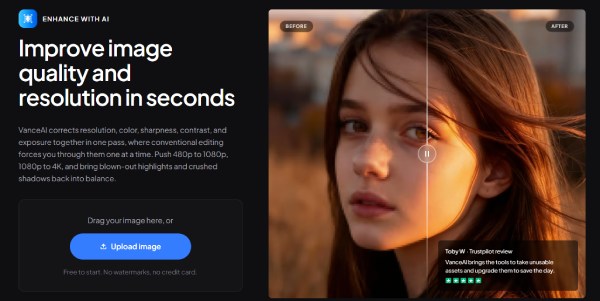
VanceAI offers both desktop and web versions for the photo enhancer, providing users with a much wider range of choices. For complex workflows, the desktop version offers more powerful processing capabilities, while the web version enables you to complete some quick tasks. Regardless of the form, VanceAI offers a variety of image enhancement options, including enlargement, denoising, and sharpening.
Pros
1. Enhance any image to 4K Clarity
Blurred faces, indistinct landscapes, illegible characters, etc, these low-quality images always prevent one from seeing more clearly. However, with the help of VanceAI Image Enhancer, you can quickly enhance the image to a resolution of 1080P or even upscale 1080P to 4K, making all the details reappear clearly.
2. Produce HD Product Photos with Details
When you are creating product promotion images, unclear details can be a headache for you. Product images with insufficient details are likely to fail to fully showcase the product, causing you to lose some potential customers. VanceAI Image Enhancer can provide more details for your product images.
3. Polish the Scenes with Natural Touch
Some landscape photos, after being processed by the camera, always seem not very realistic. VanceAI photo enhancer can help you effectively reduce this feeling. The AI model will automatically add some natural realism to your landscape photos after analyzing them.
4. Advanced Color Correction for Faded Images
The photo restoration of VanceAI is also worthy of attention. Old photos often lose many details due to the backwardness of the early equipment and the long-term effects of storage. Using VanceAI can effectively leverage the analysis capabilities of the AI model to restore many details that were previously difficult to repair.
Cons
1. Cannot Preview the Effect of Image Enhancement
After you upload the image to VanceAI Image Enhancer, you will find that you are unable to preview the enhanced effect of the image. This is extremely frustrating. This means that unless you immediately top up your account and purchase credits or licenses, you will be unable to perform any operations. VanceAI doesn't even offer a trial version, which makes it very inconvenient for users who want to verify the effect of image enhancement.
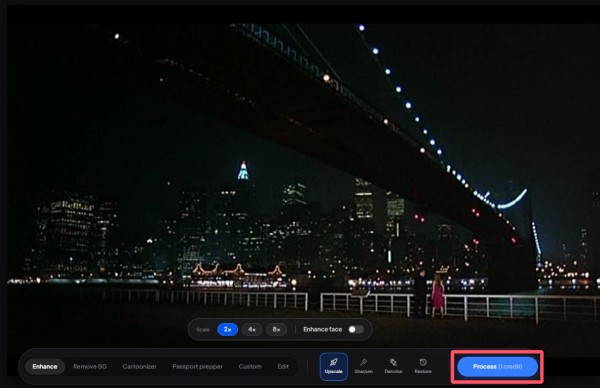
2. The Web Version Consumes Limited Paid Credits
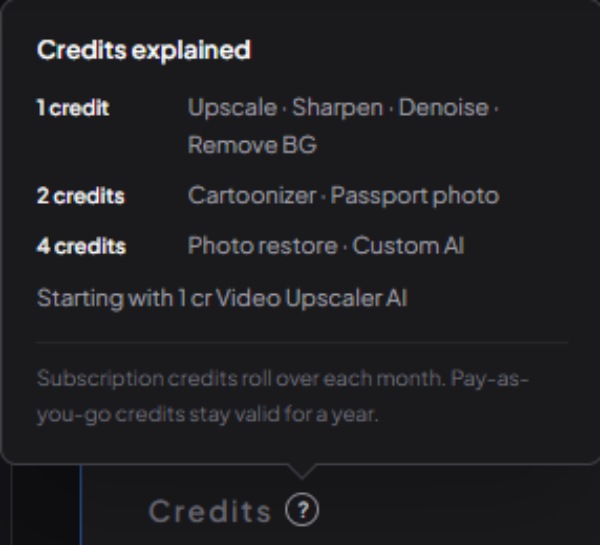
On the web page, the use of VanceAI Image Enhancer relies on credits. The price of credits is not low, ranging from $4.95 for 100 credits to $17.95 for 1,000 credits. That is to say, even if you have made a deposit, you still cannot freely carry out the enhancement work on the pictures. Different steps require different amounts of credits. For example, if you want to carry out further enhancement after restoring old photos, it will cost 5 credits. As a result, the credits will be consumed very quickly, and you will need to keep depositing.
3. Pricing for the PC Version is High
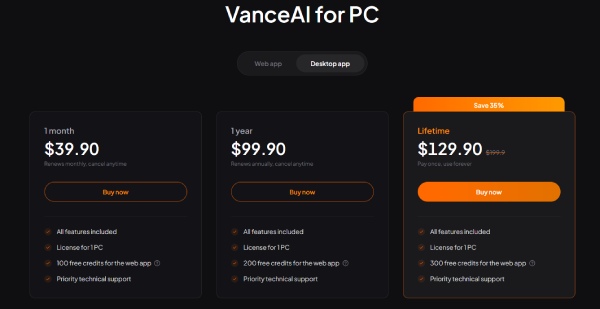
For those users who wish to purchase the desktop version of the VanceAI Image Enhancer service, many of them find the price equally prohibitive. Whether it's a one-month or one-year license, neither option is particularly cost-effective. This is because the former costs $39.9 while the latter costs $99.9. However, the lifetime license also costs $129.9. If your regular need for image processing is not significant, then this price is simply not worth it.
How to Use VanceAI Image Enhancer on Desktop
If you have purchased the desktop license, you can follow the steps below to use VanceAI Image Enhancer to depixelate the picture.
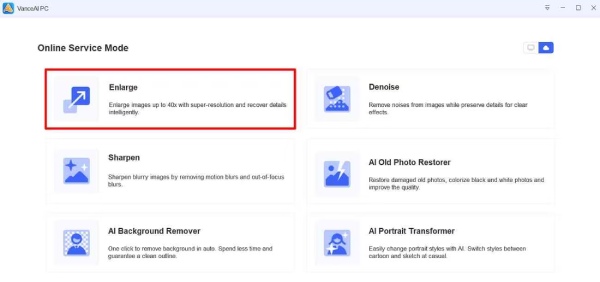
Step 1.Launch VanceAI Image Enhancer on your PC. After logging in, click the "Enlarge" button.
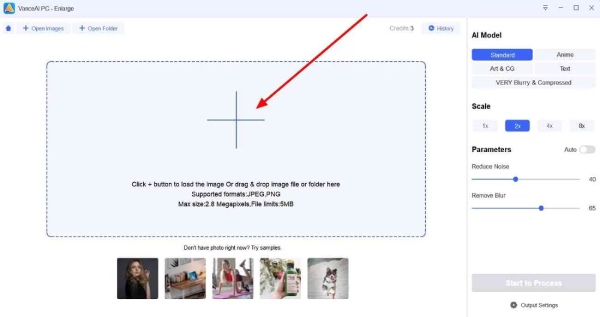
Step 2.Click the "Add" button to upload your images for enhancement within VanceAI Image Enhancer.
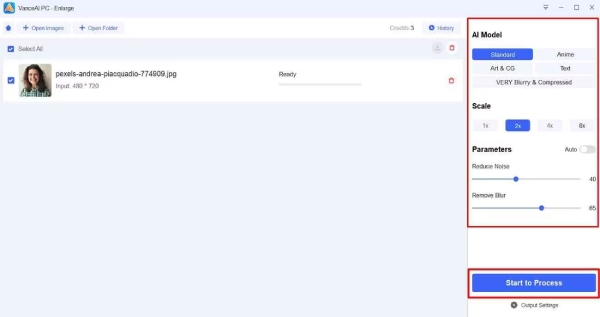
Step 3.In the new window, select the AI model and scale to adjust the enhancement. Finally, click the "Start to Process" button.
An Online Tool Provided by VanceAI Image Enhancer
If you have purchased some credits and want to complete some image enhancement tasks on the web quickly, then you can follow the steps below to operate and complete your task in VanceAI Image Enhancer.
Step 1.Navigate to the official website of VanceAI Image Enhancer using your browser. Click the "Upload image" button to select the image.
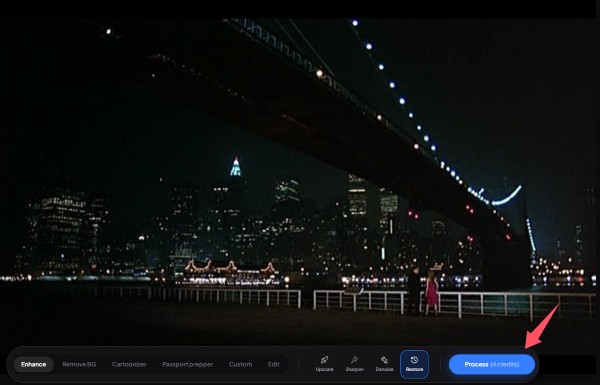
Step 2.In the new window, you can select the effects from the bottom and apply them within VanceAI Image Enhancer.
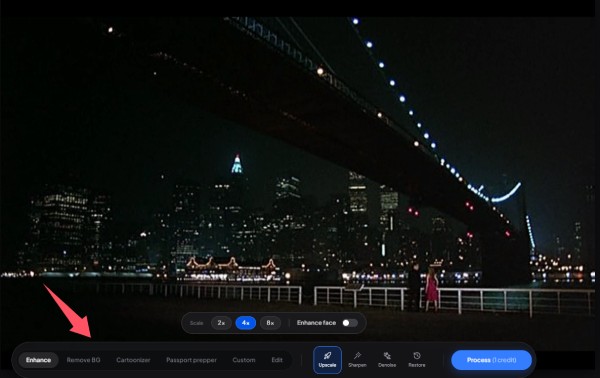
Step 3.Finally, click the "Process" button, and the tool will enhance your image automatically.
A Powerful VanceAI Alternative with Excellent Performance
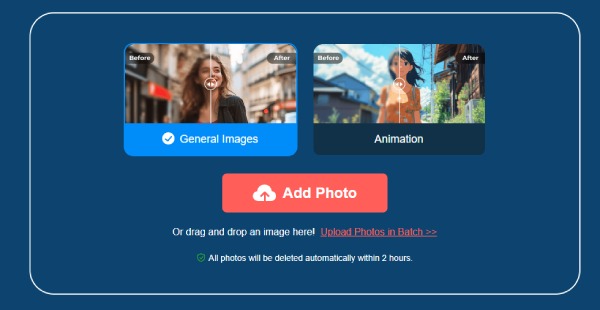
For those users who are looking for a suitable alternative to VanceAI, AnyRec AI Image Upscaler is undoubtedly the most appropriate choice. For image enhancement, it can achieve an effect up to 8 times and is equipped with multiple AI models. And its greatest advantage lies in providing a preview that allows you to check whether the enhanced effect of the image meets your requirements. You can upload pictures as many times as you like to view the enhanced effects of different types of pictures, and all of them can be exported completely for free without any charges.
Conclusion
This post provides you with a detailed introduction to VanceAI Photo Enhancer, including its main functions as well as its advantages and disadvantages. Although its performance is quite good, its high price inevitably makes it suitable only for users with a high demand for image enhancement. If you want to enjoy a more efficient tool that still offers high quality, AnyRec AI Image Upscaler provides you with a completely free option.
Related Articles
About Our Author