
You have installed AnyRec Phone Mirror successfully. Now you can mirror iPhone and Android to PC simultaneously and stably.
Payment Supported

Secure Guarantee


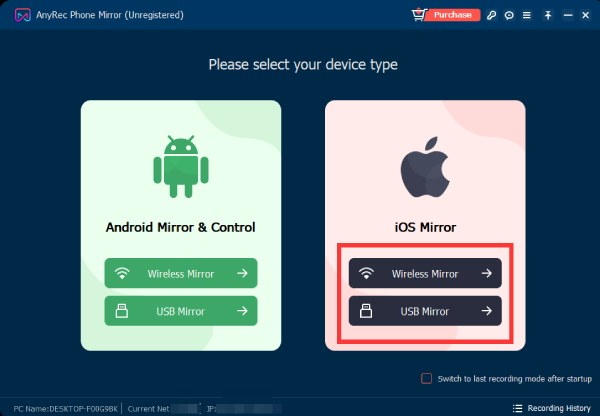
1Open AnyRec Phone Mirror
Free download, install, and launch AnyRec Phone Mirror on your Windows 11/10/8/7 computer. Click iOS Mirror or Android Mirror on the main interface.
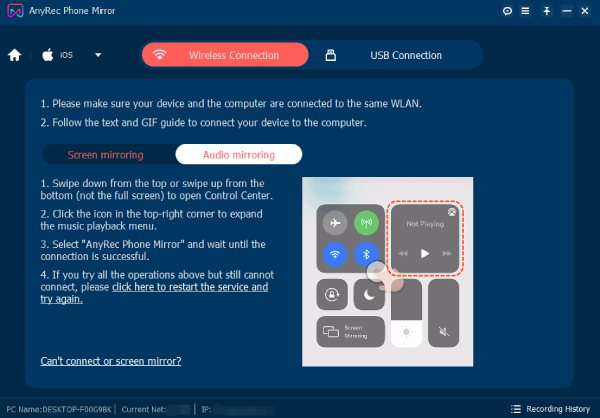
2Cast iPhone/Android Screen
Click Wi-Fi Connection or USB Connection based on your need. Later, click Screen mirroring or Audio mirroring. Follow the on-screen guide to connect your iPhone or Android this computer.
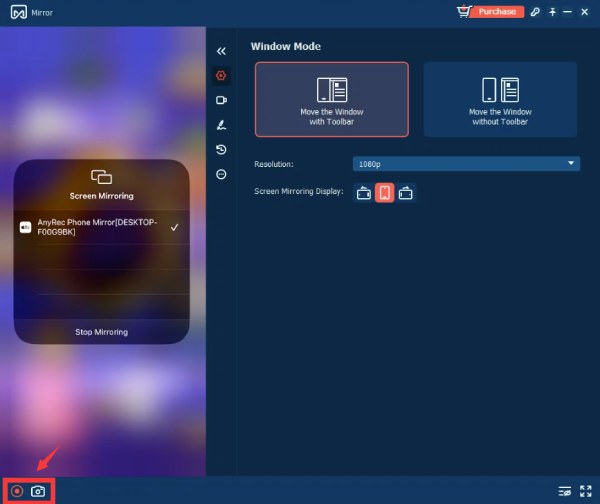
3Explore More Features
After casting iPhone or Android to PC, you can record screen video/audio and take snapshots within AnyRec Phone Mirror.
More Solutions & Information


Get Support
If you can’t find the answer to your question, just contact our support team – we will be happy to help.
See MoreCopyright © 2025 AnyRec Studio. All Rights Reserved.




