Hot

AnyRec Screen Recorder
Record and screenshot any video on Windows and Mac.
Secure Download
Can You Screen Record Crunchyroll? What You Need to Know

Can you screen record Crunchyroll? The answer is Yes. You can use built-in screen recording tools or desktop recording software, but protected Crunchyroll videos may show a black screen. This happens because Crunchyroll uses DRM for protected playback.
If your goal is simply to watch anime offline, Crunchyroll provides an official download feature on supported mobile devices and Nintendo Switch. However, PC downloads are currently not supported. See quick answers about Crunchyroll recording below.
| Question | Answer |
| Can you start a screen recording? | Yes |
| Will every Crunchyroll video be captured? | No |
| Why can the recording show a black screen? | DRM protection |
| Can Crunchyroll videos be downloaded? | Yes, on supported mobile devices and Switch |
| Can you download Crunchyroll videos to PC? | No |
| Best option for offline viewing | Official Crunchyroll downloads |
Guide List
Can You Record Crunchyroll without a Black Screen Screen Record Crunchyroll Anime Videos on Windows/Mac How to Screen Record Crunchyroll on iPhone and Android More Choices to Get Crunchyroll Offline Playback FAQsCan You Record Crunchyroll without a Black Screen
You’re trying to capture the perfect anime scene, but Crunchyroll only gives you a black screen when you record it. Why does ‘Crunchyroll black screen’ happen? Crunchyroll, like other streaming services, employs High-bandwidth Digital Content Protection designed to prevent the unauthorized copying of materials. Due to this, the video feed is blocked, or a black screen is shown instead of the content when you try to do Crunchyroll screen recording.
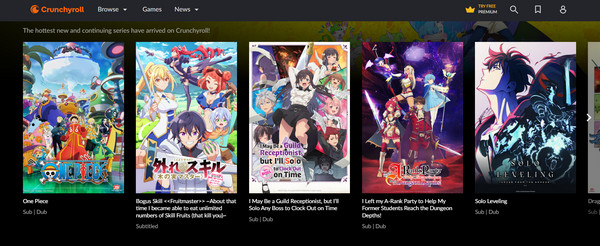
While this is a common issue, check out below the breakdown of potential workarounds to be able to screen record Crunchyroll without a black screen:
• Use a Dedicated Capture Card. With external hardware devices like a capture card, you may bypass the recording restrictions. Using it, you can record the Crunchyroll content without facing the DRM protections.
• Third-Party Recorder. Some recording software has a way to bypass the restrictions, helping you record Crunchyroll anime.
• Modifying Browser Settings. In some cases, adjusting the browser hardware acceleration settings might make a difference in recording; it's worth a quick check.
Copyright Issues and Legal Considerations
You may try the above tips to bypass Crunchyroll’s black screen. However, it is important to note that removing these protections is generally illegal. Shows on Crunchyroll are copyrighted, so recording them without proper authorization is a violation, whether it is for personal or redistribution. And the black screen is there to protect the rights of creators. The only safest and legal way to enjoy all Crunchyroll content is to subscribe and stream through its service.
Screen Record Crunchyroll Anime Videos on Windows/Mac
If you need to record content you own content or have permission to capture on Crunchyroll, AnyRec Screen Recorderprovides flexible desktop recording controls. You can choose the full screen, a specific window, or a custom area, and record system audio and microphone input.
Note: There is no guarantee of recording of DRM-protected Crunchyroll playback. If the video appears black, the content may be protected.
Capture Crunchyroll video and audio in stunning up to 4K resolution.
Record both system and mic audio at the same time without quality loss.
Custom hotkeys for starting, pausing, resuming, and more for easy access.
Smooth, uninterrupted recording with no black screen, ads, or watermarks.
Secure Download
Secure Download
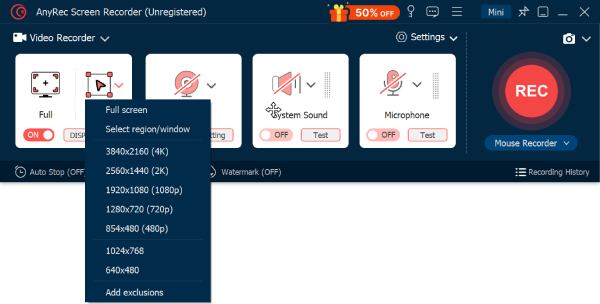
Step 1.Start AnyRec Screen Recorder and select "Video Recorder". Next, choose "Full" for the whole screen capture or pick "Custom" for specific area recording of Crunchyroll anime.
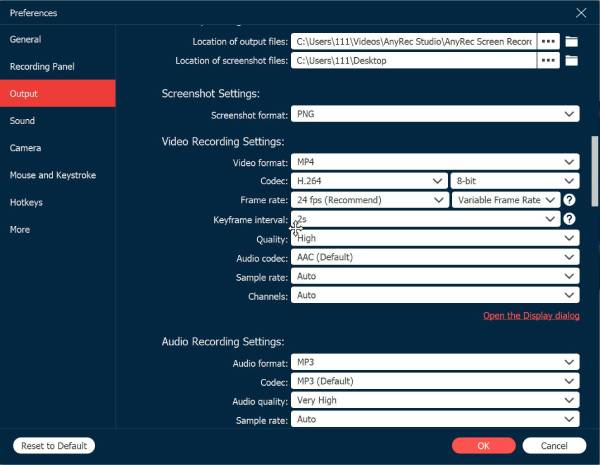
Step 2.To customize settings such as quality, format, and more output options, click the "Settings" button and go to the "Output" tab. In this way, you can keep high-quality output.
Step 3.Ensure the "System Sound" is toggled on to capture audio from Crunchyroll. If you’d like to add a voiceover, enable the "Microphone" toggle as well. Once everything’s ready, click the "REC" button to record video from websites.
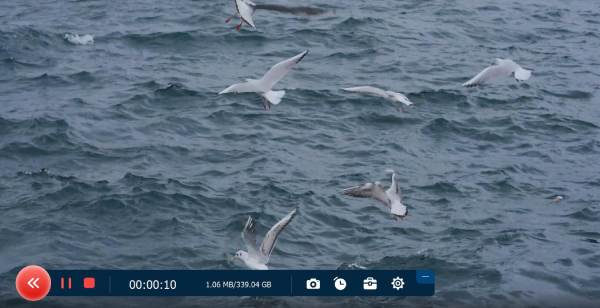
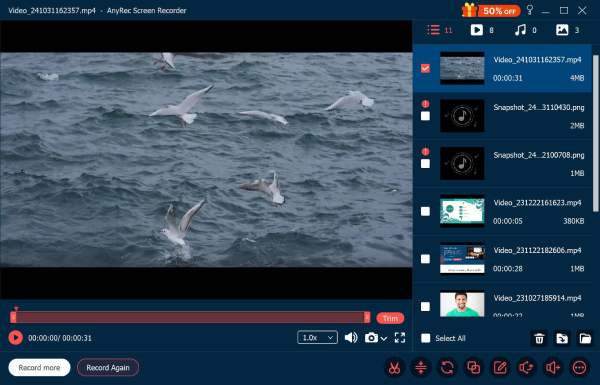
Step 4.After you’re finished, click the "Stop" button. This will bring up the preview window, where you can watch and trim the Crunchyroll recording. When satisfied, click the "Save" button to store the file.
How to Screen Record Crunchyroll on iPhone and Android
Knowing how to screen record Crunchyroll on your phone is as straightforward as doing it on your computer. iPhones and Android devices have built-in recorders, though the exact steps might differ slightly depending on your specific model.
How to Record Crunchyroll Videos on iPhone
- 1. Open the Crunchyroll app and find the video you want.
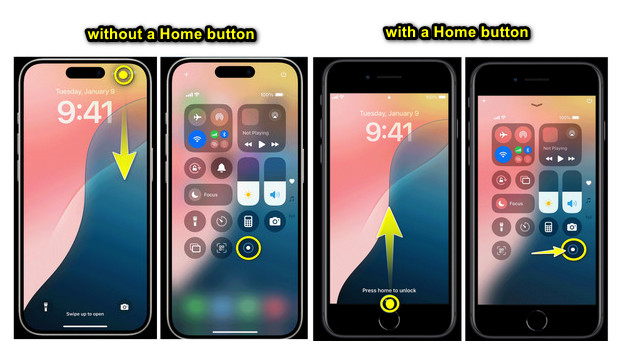
- 2. Access the "Control Center" by swiping down from the top right corner (on iPhones without a Home button) or swiping up from the bottom (on iPhones with a Home button), to begin.
- 3. Tap the "Screen Recording" button to capture video on iPhone. Once finished, tap the "red status bar" at the top and select "Stop Recording".
iOS may prevent protected streaming video from being captured. If the resulting video is black, use Crunchyroll's official offline-download feature instead.
How to Screen Record on Crunchyroll on Android
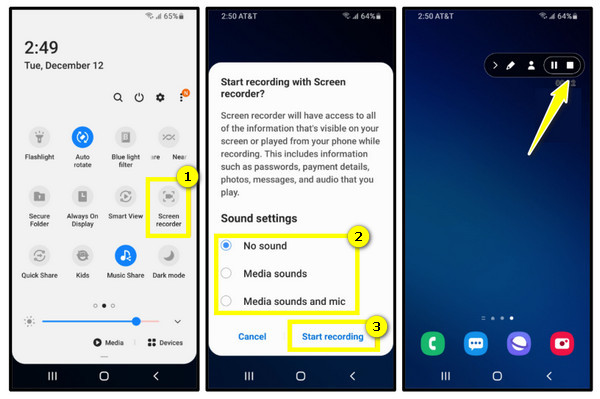
- 1. On your Android device, get your Crunchyroll anime ready and swipe down from the top to open the "Quick Settings" panel. Look for the "Screen Recorder" button there.
- 2. If ready, tap on it and give permission for audio recording. Controls will appear on your Android screen; tap the "Stop" button when you’re done.
Some protected content may not be captured correctly. Availability and behavior can also vary by Android device.
More Choices to Get Crunchyroll Offline Playback
Aside from screen recording Crunchyroll, there are more options to choose from to get that Crunchyroll offline playback. Here’s a comparison of the most used choices: Crunchy Premium Offline Downloads, OBS Studio, QuickTime Player, and third-party downloaders.
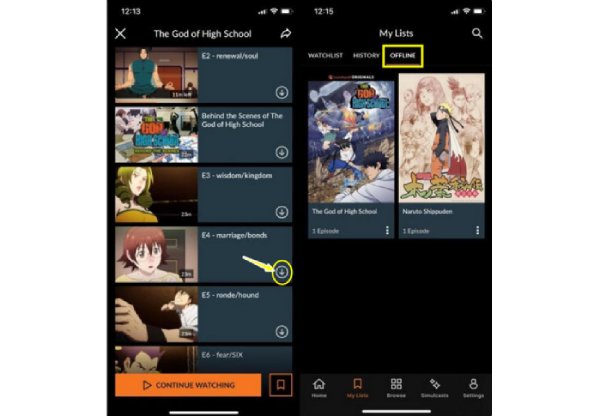
1. Crunchyroll Premium Offline Downloads
An official way to watch your most loved Crunchyroll anime, the platform offers offline downloads. It is by far the most reliable and legal way to watch Crunchyroll content anytime, anywhere. Both downloads for episodes and movies are available for iOS and Android devices and can be watched without ads as long as you subscribe to its premium plan.
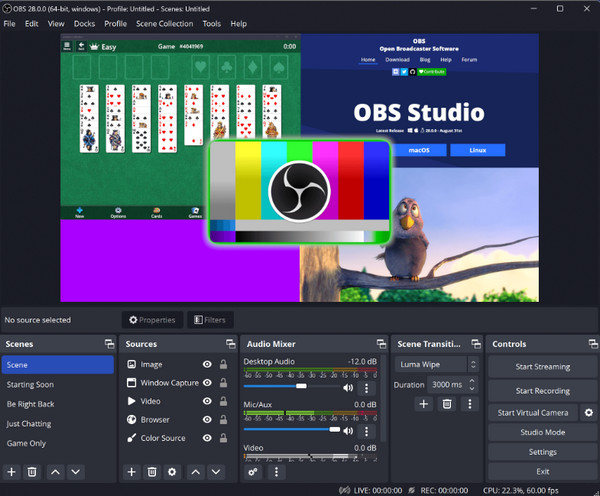
2. OBS Studio
Another option that is best for recording from a desktop is OBS Studio, which offers more flexibility to screen record on Crunchyroll, including streaming content from the streaming platform. Though not officially supported, unlike the first method and comes with potential legal risks, it lets you capture full episodes in real time without any loss of quality.
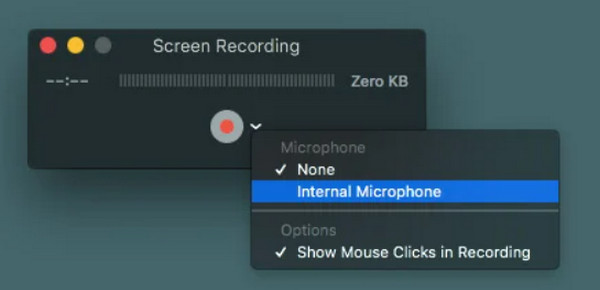
3. QuickTime Player
On the other hand, QuickTime Player is perfect for Mac users. If you wish for a simple screen recording Crunchyroll process, this tool is ideal as it is built-in already on Mac and does not need any software. However, like the previous recorder, using this tool involves bypassing the protection of Crunchyroll, which is not legally supported.
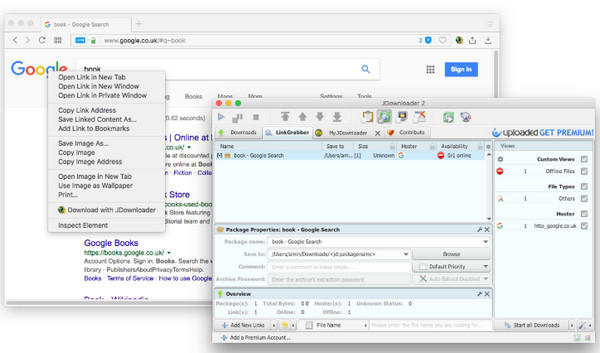
4. Third-party Downloaders
If you want to directly download video from streaming sites, you can use some third-party downloaders like JDownloader and similar tools. With tools like these, you can get the Crunchyrolll content you want and view them directly on your device anytime. However, using such software is against Crunchyroll's terms of service and may pose security risks.
FAQs
-
Why is my Crunchyroll recording black?
Protected playback can cause screen recordings to show a black screen. Crunchyroll has specific DRM requirements for supported browsers and devices.
-
Can you download Crunchyroll episodes?
Yes. Eligible Crunchyroll users can download supported episodes for offline viewing on mobile devices and Nintendo Switch.
-
Why can't my screen recorder capture Crunchyroll audio?
Check the system audio setting in your recorder. If the video itself is protected, changing the audio setting may not solve a black-screen recording.
Conclusion
Wrapping it all up, ways to screen record Crunchyroll anime are seen here today. However, before recording, you must take note of copyright issues and legal considerations as well. Anyway, if you want a reliable and high-quality recording solution, AnyRec Screen Recorder stands out as the best option. It combines friendly features with top-notch recording powers, letting you capture Crunchyroll content with ease and crystal-clear. Enjoy its 4K recording and more exciting features today!
Secure Download
Secure Download
Related Articles
About Our Author