
iMovie for Windows - 6 iMovie Alternatives to Edit Videos

Many users are looking for iMovie for Windows. As a well-known video editing tool, iMovie is favored by many Apple users for its simplicity and efficiency. However, since it is exclusive to macOS and iOS, Windows users often look for reliable alternatives that offer similar features and ease of use. Fortunately, there are many video editing tools available on Windows that can match or even exceed iMovie's capabilities. In this guide, you will discover some of the best iMovie alternatives for Windows and learn how to choose the right one for your needs.
Guide List
The Most Powerful iMovie Alternative for Windows 5 Tools Similar to iMovie for Windows 10/11 Tips for Selecting iMovie Editors for WindowsThe Most Powerful iMovie Alternative for Windows
If you are searching for a reliable and beginner-friendly alternative to iMovie on Windows, AnyRec Video Converter is a strong option. It combines video editing and conversion features in one tool, allowing you to trim, crop, merge, and enhance videos with ease. Its intuitive interface makes it suitable for beginners, while its advanced settings provide enough flexibility for more experienced users. This makes it an efficient choice for quick and high-quality video editing on Windows.
Provide built-in MV Maker and Collage for professional video editing.
Wide support of input/output formats, including MOV, MP4, WebM, AVC, and more.
Improve video quality by upscaling resolution, removing video noise, etc.
Provide various layouts and filters with essential tools like crop, rotate, frames, background music, etc.
Secure Download
Secure Download
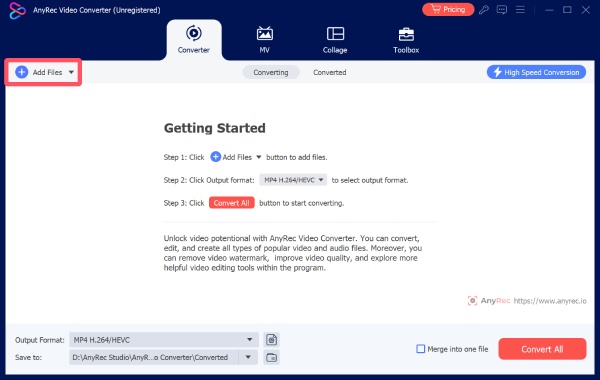
Step 1.Launch AnyRec Video Converter and click the "Add Files" button to import the video file for editing.
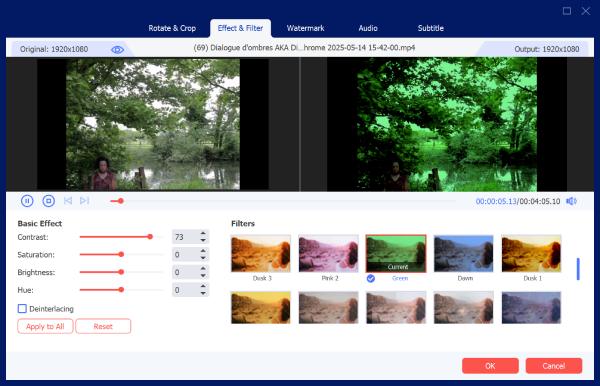
Step 2.In the pop-up window, select from abundant editing tools. Adjust the parameters and apply the effects to your video.
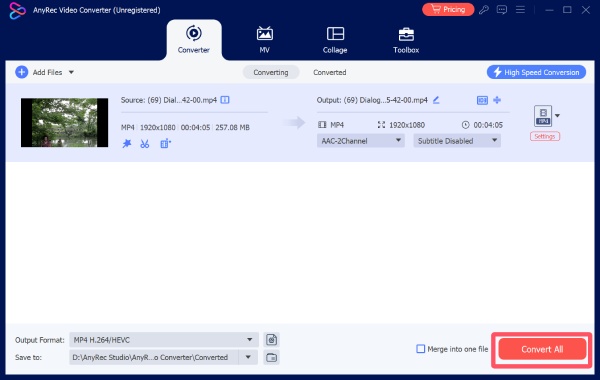
Step 3.In the main interface of this iMovie alternative for Windows, click the "Convert All" button to save the video file.
5 Tools Similar to iMovie for Windows 10/11
Apart from the aforementioned AnyRec Video Converter, there are also some apps similar to iMovie for Windows 10/11 that are reliable. They each have their own advantages and disadvantages, but they still possess basic video processing capabilities. You can choose the tools that suit you based on their respective characteristics as introduced in the following text. Below are five popular alternatives worth considering.
| Name | Fee | Editing Features | Ease of Use |
| Shotcut | Free (Open-source) | Basic to moderate editing, supports many formats, customizable interface | Moderate (learning curve) |
| OpenShot | Free | Basic editing, drag-and-drop, simple animations and keyframes | Easy (beginner-friendly) |
| VSDC Free Video Editor | Free (Pro version available) | Advanced tools, filters, effects, color correction | Moderate to Difficult |
| Filmora | Freemium (paid for full) | Rich effects, templates, transitions, text tools | Easy (very user-friendly) |
| DaVinci Resolve | Free (Studio paid version) | Professional editing, color grading, VFX, audio post-production | Difficult (steep learning curve) |
1. Shotcut
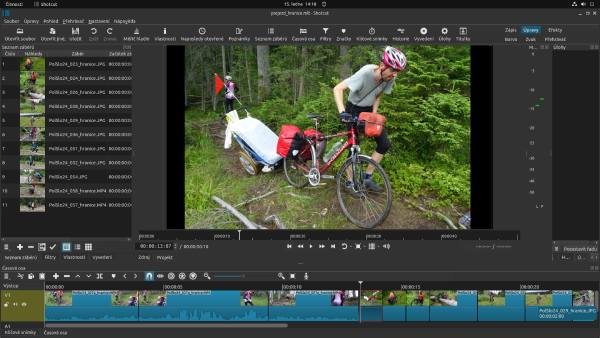
Shotcut is a free, open-source video editor that supports a wide range of formats and provides a clean, customizable interface. You will find that the operation logic of this tool has many similarities to iMovie. This is why many users choose Shotcut as an iMovie editor for Windows. Shortly, it’s a good option for users who want a no-cost solution with decent functionality, completing simple tasks like cropping videos in iMovie.
- Pros
- Free and open-source
- Many common file formats are supported
- Customizable interface based on your preference
- Cons
- The interface contains less information about tools
- Fewer advanced effects
- Learning curve for beginners
2. OpenShot
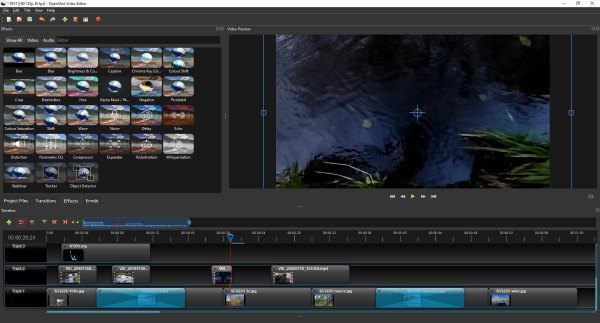
For beginners, a simple operation interface and a guided approach are the most important. For users who are not very familiar with video editing operations, OpenShot is often recommended for users to edit videos. Although it does not have very rich advanced features to meet professional editing needs, you will find that this alternative to iMovie for Windows can handle simple and quick editing tasks very well. Whether it's the drag-and-drop operation function or the keyframe animation function, it enables users to obtain a similar usage experience as iMovie on Windows.
- Pros
- Easy to use, even for beginners
- Straightforward guidance to help you
- Apply basic animations to your videos
- Cons
- Limited advanced features for polishing
- Occasional crashes during the process
- Slower rendering
3. VSDC Free Video Editor
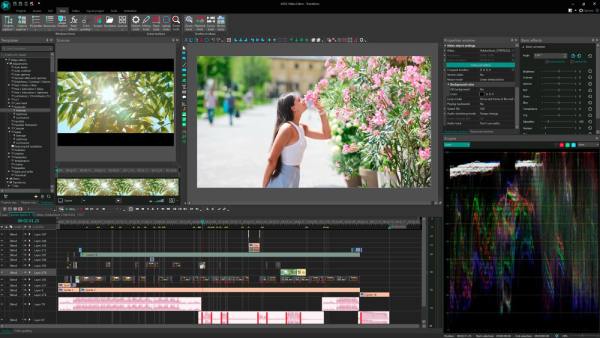
VSDC is a non-linear video editor that offers a wide range of editing tools, including effects, filters, and color correction. This alternative to iMovie for Windows is suitable for users who want more advanced features while still having a free option.
- Pros
- Feature-rich even on the free plan
- Manifold advanced editing tools applied
- Lightweight without a heavy download
- Cons
- Complex interface for the first time of use
- The tool can only run on Windows 10/11
- Upgrade to a paid plan for professional editing
4. Filmora
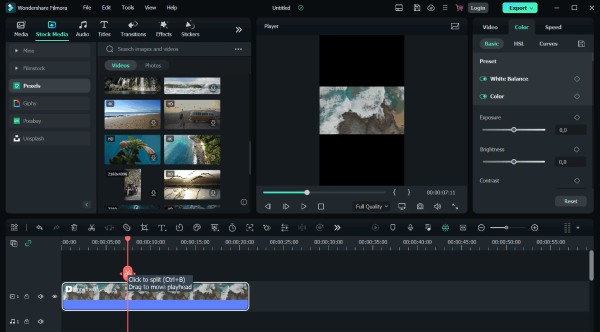
As a popular video editing tool, known as Filmora is often nominated as one of the best alternatives to iMovie for Windows. This is not only due to its efficient operation logic, but also because its rich effects library is an important reason why many users choose it. You can select from the abundant resources to improve your videos from adding text like iMovie to applying special effects.
- Pros
- Straightforward interface for beginners
- Rich effects and templates to choose from
- Smooth performance even for large files
- Cons
- Watermark in the free version
- Subscription required for advanced features
- Controls may not be very precise
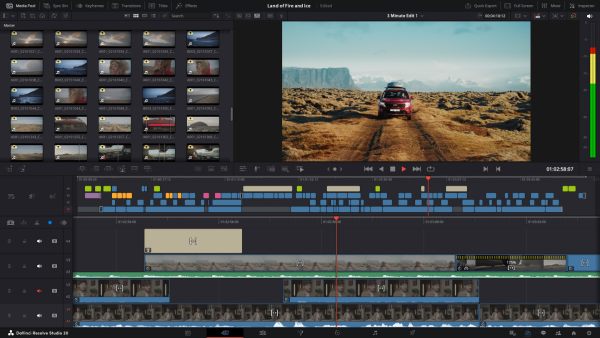
5. DaVinci Resolve
When it comes to powerful video editing software like iMovie for Windows, DaVinci Resolve is a popular choice among various professional-grade video editors. During the editing process, DaVinci Resolve offers advanced tools to provide you with a professional-grade output, including color grading, visual effects, and speeding up or slowing down videos in iMovie. It is suitable for users who want high-end editing capabilities similar to professional software.
- Pros
- Industrial-level features for professional use
- Powerful color grading
- Free version available for basic requirements
- Cons
- High system requirements for processing
- Steep learning curve for basic editing
- Consume considerable resources when working
Tips for Selecting iMovie Editors for Windows
Although there are many alternatives to iMovie for Windows to choose from, not all of them may be suitable for you. For effectively improving video quality and workflow, you need to make choices based on certain specific requirements. This section lists some points that are worth considering for you, helping you to quickly determine the most suitable tool for you.
- • Consider ease of use: If you are a beginner, choose software with a simple interface and drag-and-drop functionality. Tools that resemble iMovie's workflow can help you get started quickly without spending too much time learning complex controls.
- • Check feature requirements: Different editors offer different capabilities. If you only need basic editing like trimming and cropping, lightweight tools are sufficient. In simple terms, if what you are pursuing is simplicity and efficiency, then an online tool is usually the most convenient option. For professional-level video processing, specialized tools can ensure the quality.
- • Evaluate system compatibility: Some iMovie editors for Windows require high system performance. Some professional video processing software assumes considerable resources during operation, which can put a lot of pressure on your device. Make sure your configuration is adequate; otherwise, there is a high possibility of process crashes or interruptions, which could even affect the video files.
- • Look at export options and formats: Ensure the software supports the formats and resolutions you need. Especially when the platform you need to upload to, such as YouTube and TikTok, has specific requirements for video formats, you need to ensure that the iMovie alternative for Windows you are using supports the listed formats to avoid the problem of video files not being able to be uploaded.
Conclusion
In conclusion, many excellent iMovie editors for Windows provide similar or even more advanced features than iMovie on Mac. You can choose according to your own work requirements, whether it's simple tools or professional-grade tools. If you are not sure which one is better, then AnyRec Video Converter is the best choice as it can guarantee quality and efficiency.
Secure Download
Secure Download
About Our Author




