Hot

AnyRec Video Converter
Convert DAT to MP4 with high quality easily.
Secure Download
[Beginner-Friendly] How to Convert DAT File to MP4 Quickly

Many users are searching for a practical way to convert DAT files to MP4. If you have also encountered a DAT file and don't know how to access it, converting it to a more compatible format is the most practical solution. In this guide, you will learn what DAT files are and explore several effective ways to convert them into MP4 for better accessibility.
Guide List
What is DAT and Why Convert a DAT File to MP4 The Most Powerful Way to Convert DAT to MP4 How to Convert DAT to MP4 During the Playback A Quick Solution to Converting DAT to MP4 Online for FreeWhat is DAT and Why Convert a DAT File to MP4
Before changing the DAT file to MP4, you should know the main reasons and the key factors concerned so that you can get an ideal output. Simply put, DAT is a generic data file format that can store various types of information, including video, audio, or system data. This file format is often associated with VCD. However, this type of equipment is not widely supported by modern media players these days. So, you may encounter a situation where the DAT file cannot be played normally on your device.

In such cases, converting VCD or DAT files to MP4 becomes a practical solution. As one of the most widely supported video formats, MP4 files can be played in most modern devices. Whether you want to deal with an MP4 file with random media players, editing software, or online platforms, none of these will be a problem. In this way, you can easily play, edit, and share your videos without worrying about format restrictions or playback issues.
The Most Powerful Way to Convert DAT to MP4
If you want a fast and reliable conversion process of conversion from DAT to MP4, AnyRec Video Converter stands out as an excellent choice. It supports a wide range of formats, including DAT, and allows you to convert videos to MP4 with high quality. With its user-friendly interface and customizable settings, you can adjust resolution, bitrate, and other parameters easily, making it suitable for both beginners and advanced users.

Convert the DAT file to MP4 format to enhance the compatibility of your video file.
During the conversion process, select the video quality to be the same as the resource.
Preview to check if the MP4 video converted from DAT can be played normally.
Support adjusting detailed parameters during the conversion process.
Secure Download
Secure Download
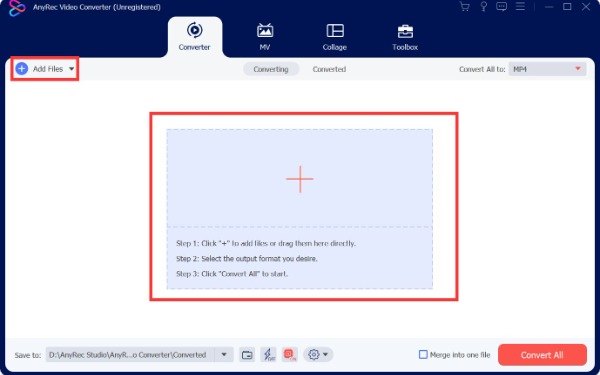
Step 1.Launch AnyRec Video Converter and click the "Add Files" button to import the DAT file that you want to convert.
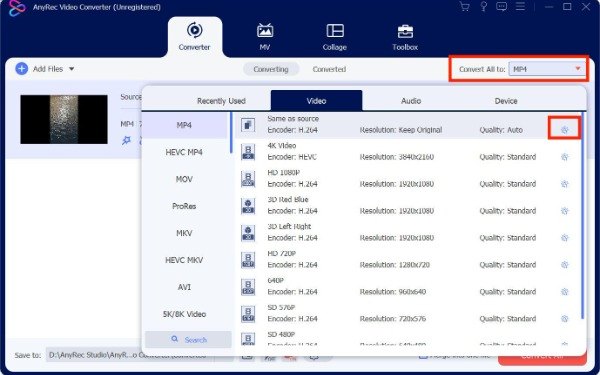
Step 2.Click the "Convert All to" button and click the "MP4" button under the "Video" tab to designate it as the output format.
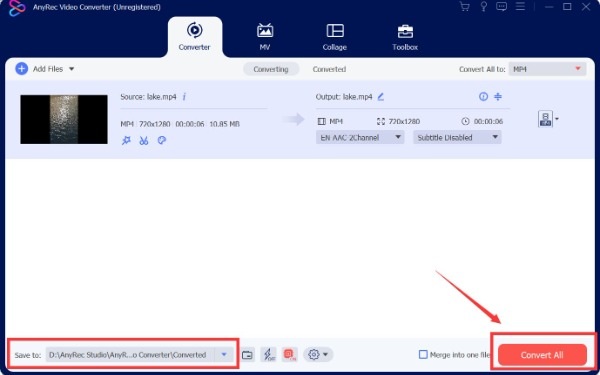
Step 3.In the main interface, click the "Convert All" button to convert DAT to MP4 and save the converted video file.
How to Convert DAT to MP4 During the Playback
For users who prefer a free and versatile solution, VLC Media Player can also be used to convert DAT files to MP4 while you are trying to play videos. While it's a well-known media player, many users can ignore its capability of dealing with basic conversion among various formats. This makes it a convenient option for users who already have VLC installed and want a quick way to convert VLC videos to MP4 format without additional software.
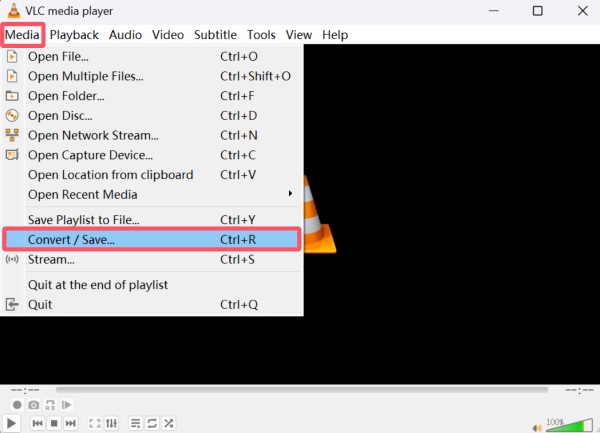
Step 1.Launch VLC media player and click the "Convert / Save..." button under the "Media" tab.
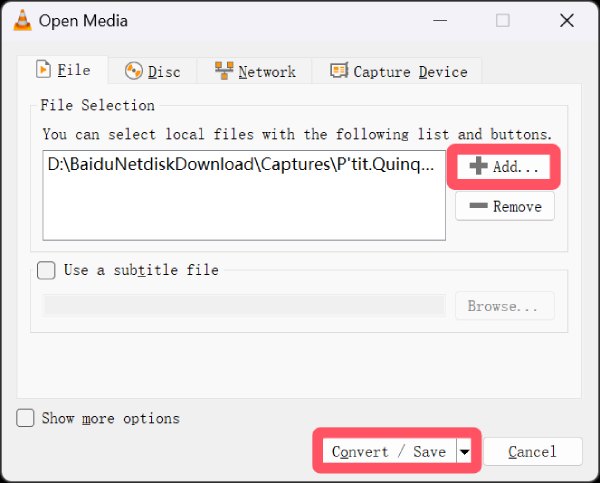
Step 2.Under the "File" tab, click the "Add..." button to import the DAT file. Then, click the "Convert / Save" button to proceed.
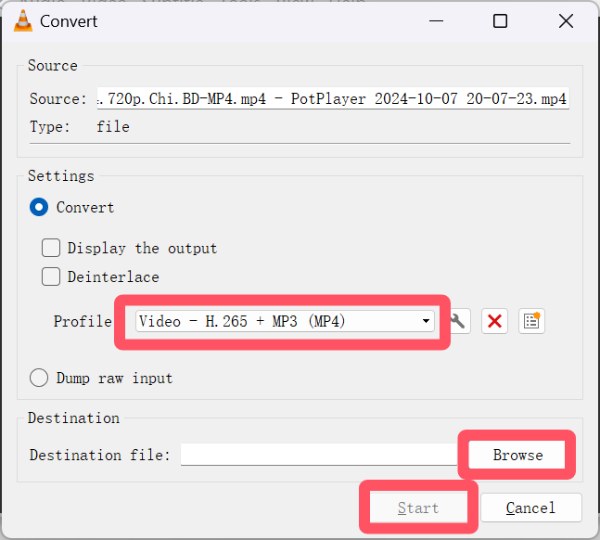
Step 3.Click the "Profile" button and then the "Video - H. 265 + MP3 (MP4)" button to convert DAT to MP4. Click the "Start" button once you select the destination folder.
A Quick Solution to Converting DAT to MP4 Online for Free
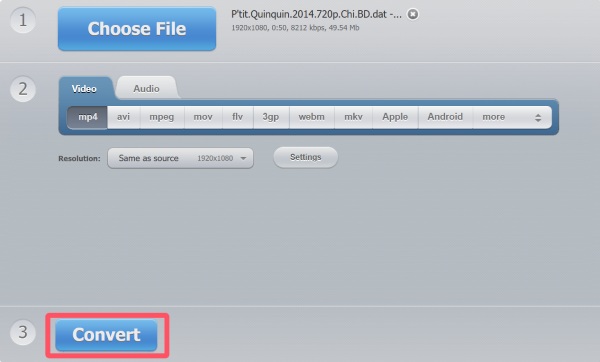
Online tools also provide a convenient way to convert DAT files to MP4 format. You don't have to install extra software; 123 Video Converter works directly on your browser. This online video editor with no watermark offers customizable settings such as resolution and codec selection, allowing users to control output quality. With its clean interface and cloud integration, it is suitable for both beginners and advanced users.
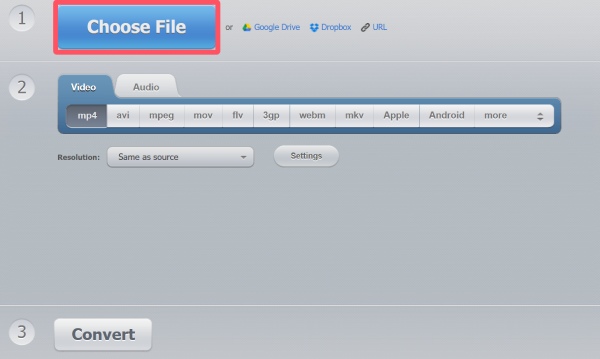
Step 1.Navigate to the official website of 123 Video Converter on your browser. Click the "Choose File" button to import the DAT file.
Step 2.Under the "Video" tab, click the "mp4" button to convert DAT to MP4 online for free.
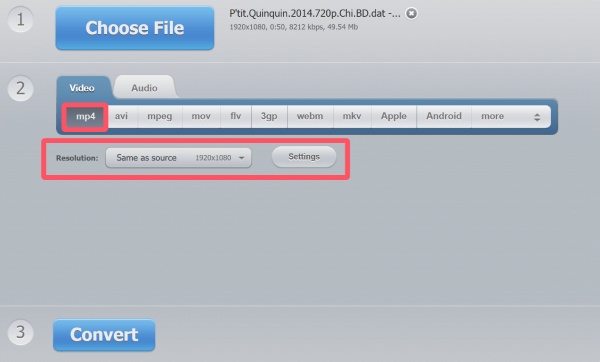
Step 3.Finally, after clicking the "Convert" button, the converted DAT file will be saved on your device.
Conclusion
In conclusion, it won't be a big deal to change DAT files to MP4. There are multiple ways to finish the job based on your preference. While many methods can be applied, some drawbacks do exist in media players and online platforms. To achieve the best result that balances the quality and file size, you can use AnyRec Video Converter to convert DAT files and enjoy seamless playback in no time.
Secure Download
Secure Download
About Our Author