
Trim Videos Online for Free - 5 Options for Beginners

The method of trimming videos online for free is a useful skill that many people like. This skill can help you make your video more concise by eliminating unnecessary parts and shortening video segments to highlight the key points. The advantage of online tools lies in the fact that they enable you to start working directly in the browser without downloading any software. However, not all online tools can help you complete the task. This post introduces you to 5 reliable tools that can help you trim a video online for free and meet your needs.
Guide List
5 Trustworthy Tools for Trimming Videos Online for Free A More Reliable Method Than Trimming Videos Online Tips: How to Trim Videos Online for Free with the Best Results5 Trustworthy Tools for Trimming Videos Online for Free
| Tool Name | Ease of Use | Additional Editing Features | Watermark-Free Export | Best For |
| Clideo | Very Easy | Basic | No (Free Version) | Quick trimming on any device |
| Kapwing | Easy | Extensive | Limited | Social media content creation |
| 123 Online Video Cutter | Very Easy | Basic | Yes | Fast one-time trimming tasks |
| Canva Video Trimmer | Very Easy | Moderate | Limited | Marketing and presentation videos |
| FlexClip | Very Easy | Moderate | Limited | Beginners and template-based editing |
1. Clideo Video Trimmer
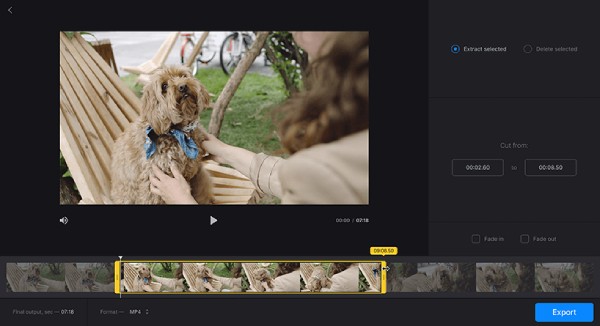
When it comes to tools that can help you trim a video online for free, Clideo Video Trimmer is a name that many people would mention. As a tool specifically designed for online video editing, Clideo offers a wide range of options to assist users in handling videos, and trimming videos online is one of them. Its advantage lies in its friendliness towards beginners, thanks to its clear and intuitive interface design.
- Pros
- Multiple video formats are supported
- Trim videos on iPhone, Android, and PC
- The operation is extremely easy, even for beginners
- Cons
- Watermark will be attached to videos on free plans
- The speed of uploading video files can be slow
- A license is required to apply extra visual effects
2. Kapwing
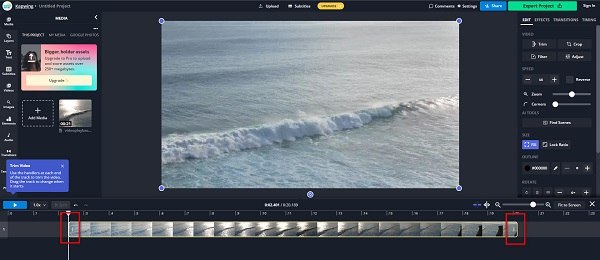
Also, as a comprehensive video editing tool, Kapwing can assist you in completing various tasks, including trimming or cutting videos online. Its accuracy is extremely high. You can precisely adjust the part you want to trim according to the timeline and preview to confirm in advance whether the result meets your requirements. However, for users who only want to trim videos, the interface of this program may seem a bit cumbersome.
- Pros
- Accurate trimming with a clear timeline
- Lots of editing tools are provided
- Support cloud-based collaboration
- Cons
- You need to log in to use its functions
- The quality of the exported video may not be very high
3. 123 Online Video Cutter
Many people may always choose the 123 series for video editing, and 123 Online Video Trimmer is the one that can help you trim videos online. Its interface is simple, intuitive, and free of any unnecessary complications. You will find that after entering the interface, there is only the option "Choose File". However, for those users who have additional editing requirements, this free video trimmer does not provide any editing tools.

- Pros
- An extremely straightforward interface with "Choose File" only
- Upload videos from Google Drive, Dropbox, or URL
- Easy and direct steps for beginners
- Cons
- No extra editing options offered
- Strong Internet connection required
- The processing speed can be slow
4. Canva Video Trimmer
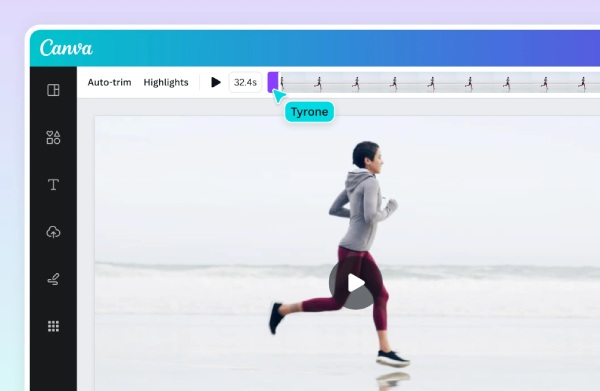
For many users who frequently deal with graphic design, the name Canva is surely not unfamiliar to them. Although you may frequently use Canva to complete tasks related to images, it can also be used for simple video editing work. When you use Canva to trim videos online, you will find that the advantages of its image design are carried over to video editing as well. A wide range of functions is provided to help you achieve better video quality for your videos. However, the relatively high price of Pro still deters many people from purchasing it.
- Pros
- Outstanding and rich visual enhancement tools
- It can be connected with the workflow of image design
- Very suitable for video trimming on social media platforms
- Cons
- To unlock most of the functions, you need to use Pro
- The interface might be too fancy for some people
- The process of exporting the video might be a bit slow
5. FlexClip
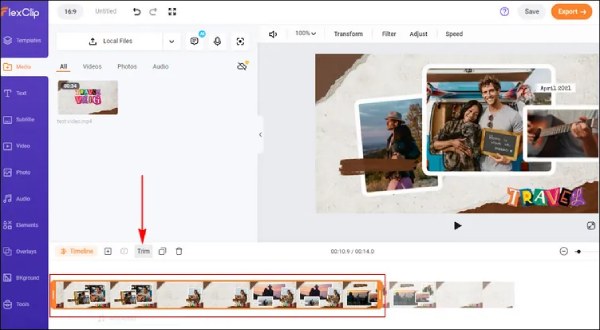
If you want to obtain a relatively refined result during the process of trimming videos online, then FlexClip is a good choice. In addition to the basic video trimming function, it also offers many built-in templates to help you enhance the visual quality of the video as a whole. For users with professional or commercial needs, it is a reliable online tool.
- Pros
- Good choice for professional or commercial uses
- Built-in templates available for better visual effects
- Fast trimming speed for small-sized video files
- Cons
- Watermark will be applied to the free plans
- Not all editing features are unlocked
- The accuracy of trimming is not very good
A More Reliable Method Than Trimming Videos Online
Although you can easily complete the task of trimming videos online using a browser, there are still many unavoidable flaws in it. First and foremost, the most crucial point is that it cannot guarantee that the output video will maintain the original quality. Due to the limited performance of the browser, the trimmed video files may be compressed. This also means that you cannot trim large videos online for free. Secondly, the online tools require a stable network connection. Once the network connection is lost, you will be unable to continue your workflow. In response to these deficiencies, including but not limited to the above ones, a professional software is more recommended. This is why you need AnyRec Video Converter to compress large videos.
Trim your video with extremely high accuracy and customizable adjustment.
Support uploading multiple files at once to complete the trimming process.
Preview can be used to check whether the video meets your requirements.
There is no limit to the size of the video files that can be uploaded to the tool.
Secure Download
Secure Download
Tips: How to Trim Videos Online for Free with the Best Results
Although trimming videos online has many inherent limitations, by using some simple tricks, you can still improve the quality of the output video within a limited scope. You can refer to the following section for optimization.
1. Upload High-Quality Files
For trimming videos online, there is always some loss in video quality. Therefore, if the original video file you upload has a higher quality, the output result will generally be better as well.
2. Choose Correct Output Format
Different platforms have different requirements for video formats. Don't forget to export the video file in the appropriate format to avoid failure in uploading or playing after you complete the online video trimming process.
3. Trim Around Key Frames
When you are trimming videos online for free, please be careful to operate according to the timeline and key frames. Otherwise, your video might appear disjointed or broken, resulting in the video being incomplete.
Conclusion
This post introduces you to reliable tools that can help you trim or cut videos online. You can choose the one that suits your requirements based on its respective pros and cons. However, online tools are always subject to various limitations due to the performance of the browser. Therefore, professional tools like AnyRec Video Converter are more recommended for unrestrictedly carrying out various video processing tasks, including precisely trimming videos.
Secure Download
Secure Download
Further Reading
About Our Author




