
Powerful Tools to Help You Convert MP3 to MIDI in No Time

Converting MP3 to MIDI allows you to transform existing audio into a more customizable form. In this guide, effective MP3 to MIDI converters are introduced to help achieve faster processing and better conversion results.
Guide List
Why Do You Convert MP3 to MIDI Standard Powerful MP3 to MIDI Converters You Can Try [Bonus] How to Enhance Audio Quality After Conversion from MP3 to MIDIWhy Do You Convert MP3 to MIDI Standard
Before converting MP3 to MIDI, it should be clear why you are making this conversion. And the differences between these two file formats matter the most. MP3 files store audio as compressed sound waves, which makes them easy to play but challenging to edit musically. MIDI, by contrast, records musical instructions such as notes, tempo, and velocity rather than actual sound. So, the primary purpose of this conversion is to provide you with the convenience of adjusting the audio file in a more professional manner.
Powerful MP3 to MIDI Converters You Can Try
Choosing the right MP3 to MIDI converter is crucial for achieving accurate note detection and clean results. If you are clear about your intention, then you can pick out one more efficiently. Robust converters can extract melodies, chords, and rhythms more precisely, even from complex audio tracks. Several reliable converters for MP3 to MIDI are introduced in this section. Whether you prefer desktop software or online tools, you can select the one that suits your requirements by understanding the features of each converter.
MP3 to MIDI Converters Overview
| Converter | Learning Curve | Supported Formats | Processing Speed |
| Audacity | Steep | WAV, MP3, AIFF, FLAC (via import) | Moderate-Slow |
| Bear Audio Online Tool | Easy | MP3, WAV, AAC, M4A | Fast |
| WIDI Audio to MIDI Converter | Moderate–Advanced | MP3, WAV, WMA, FLAC | Moderate |
| Melobytes Online Converter | Easy | MP3, WAV, OGG | Fast |
| AmazingMIDI | Moderate | WAV (best results), MP3 via conversion | Slow-Moderate |
1. Audacity
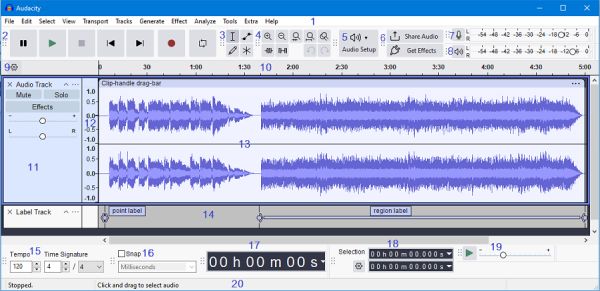
Audacity is a widely used open-source audio editor that allows users to convert MP3 to MIDI through plug-ins and additional processing steps. During the conversion process, you will find that the control and adjustment over the audio file is so detailed. The only problem is that the process entails some expert knowledge concerning audio files and parameters.
- Pros
- Free and open-source software
- Powerful audio editing and cleanup tools
- Support plug-ins for extended functionality
- Cons
- No direct option for MP3 to MIDI conversion
- Require extra plug-ins and manual setup
- Steeper learning curve for beginners
2. Bear Audio Online Tool
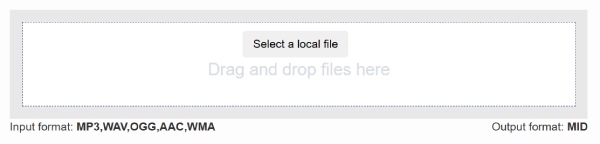
If you prefer a handier way to convert MP3 to MIDI, an online tool is just what you need. As a web-based converter, Bear Audio Online Tool allows users to upload files and perform quick conversions without installing software. And you don't need to be aware of all those complicated parameters, as the pre-settings are already prepared. The tool works best with clear, single-instrument audio, such as piano or melody lines.
- Pros
- No installation required
- Simple and intuitive web interface
- Compressing MP3 is supported
- Cons
- Limited accuracy with complex audio
- File size and usage limitations
- Internet connection required
3. WIDI Audio to MIDI Converter
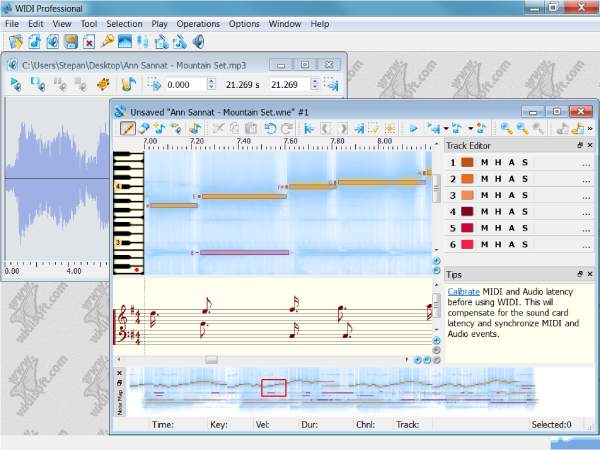
Whether you want to get an output file of MIDI from MP3 or whatever other formats, WIDI Audio to MIDI Converter can always help you. This tool specializes in audio-to-MIDI transcription. During the process, this MP3 to MIDI converter software analyzes pitch, tempo, and harmony to generate more accurate MIDI files.
- Pros
- High accuracy for melodic audio
- Equipped with a built-in MP3 louder
- Suitable for various audio formats
- Cons
- Many features are locked in the free version
- The guide and interface can be complex for beginners
- The output quality relies strongly on the source file
4. Melobytes Online Converter
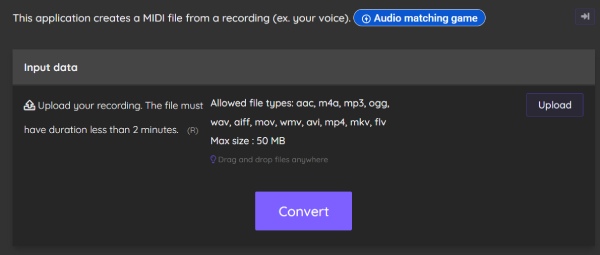
Melobytes is an experimental online MP3 to MIDI converter that focuses on creative music transformation rather than precision. It automatically analyzes uploaded audio and generates MIDI outputs along with other artistic variations. This tool is more suitable for inspiration and casual experimentation than for professional-level MIDI transcription.
- Pros
- Free and easy to use
- No software installation needed
- Fun and creative output options
- Cons
- Limited control over conversion accuracy
- Not suitable for professional production
- Output quality can be unpredictable
5. AmazingMIDI
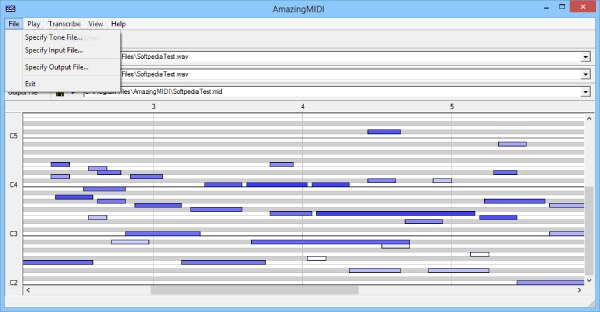
If you have the need for conversion from MP3 to MIDI from time to time, then a lightweight tool on your device can always be helpful. That's why many users choose AmazingMIDI as their work pal for converting MP3 to MIDI. This tool focuses on extracting pitch information from audio files. While its interface is minimal and somewhat dated, it remains a practical option for users who need basic MIDI conversion.
- Pros
- Lightweight and fast processing
- Adjustable pitch detection parameters
- Suitable for simple melodic audio
- Cons
- The interface may be a little bit outdated
- Can hardly deal with polyphonic or complex tracks
- Limited output customization options
[Bonus] How to Enhance Audio Quality After Conversion from MP3 to MIDI
MP3 to MIDI conversion is not always perfect, mainly when the original audio file deals with noisy audio or layered instruments. That's why the original file matters in the very first place. Once you have a somewhat crisp and clear audio file in the beginning, the converter will provide you with an output file of a higher quality. When it comes to enhancing the audio quality, AnyRec Video Converter stands out to help refine timing, correct pitch errors, and improve overall musical expression. Polishing before the process of conversion ensures smoother playback and makes it easier to integrate into professional music projects.

Enhance the audio quality before conversion from MP3 to MIDI.
Import large audio files in a batch without any limitations.
You can edit the MP3 file the way you want before exporting.
Support converting your MP3 files to many other formats.
Secure Download
Secure Download
Conclusion
This post has provided you with a bunch of reliable MP3 to MIDI converters, making sure you can turn static audio into editable musical data. While these tools can work well, the original audio file also matters concerning the final output quality. For enhancing the original audio file, you can use AnyRec Video Converter for optimizing audio, which can significantly improve your workflow.
Secure Download
Secure Download



