
A Dive to HD Video Resolution (and SD, Full HD, and 4K)

The clarity of what you want has never been more important than it is today. You don't want that cinematic scene to turn into pixelated masses because of low resolution. So, what does HD video resolution mean for your viewing experience? If you want the best seat at your home, navigate the world of high-definition video alongside SD, Full HD, and 4K here. Also, learn the best way to convert regular video to HD footage without losing any details.
Guide List
Introduction of SD, HD, Full HD, and 4K The Simplest Way to Convert Regular Video to HD Common Streaming Resolution Overview FAQs About HD Video ResolutionIntroduction of SD, HD, Full HD, and 4K
Ever wondered why some of your videos look so blurry while others feel sharp? The secret is in the video resolution, the invisible grid of pixels that puts every frame of your most-loved content to life. So, to get the jaw-dropping HD video resolution you want, take time to look at the four major players that define how digital worlds are displayed today.
- • Standard Definition (480p). The vintage resolution of the digital age. This was the standard for DVD players and old-school TVs, with a resolution of 720 x 480 pixels.
- • High Definition (720p). Starting at 1280 x 720 pixels, HD video resolution has a huge hump in clarity over the previous resolution, making it ideal for a modern viewing experience on social media platforms like YouTube.
- • Full HD (1080p). The reigning champion as of today, with 1980 x 1080 pixels (Full HD), is the standard for Blu-ray discs, streaming services, and mobile screens.
- • Ultra High Definition (4K - 2160p). This video resolution is a cinematic powerhouse, offering 3840 x 2160 pixels and delivering lifelike textures and vibrant colors.
The Simplest Way to Convert Regular Video to HD
Now, moving to the practical side of HD video resolution creation, you might still be stuck with a grainy video that needs a glow-up. Instead of staring at that low-resolution content, upgrade your video quality using AnyRec Video Converter. It is not just a simple converter, but also a complete tool that makes HD video resolution upscaling feel like a walk in the park. This software uses advanced algorithms to fill in the gaps, ensuring your content looks as sharp as your modern recordings. It also works quickly, is intuitive, and is perfectly designed for anyone who values quality but hates complicated settings.

Can upscale resolution to HD, optimize brightness, remove noise, and more.
Ultra-fast processing that ensures you aren't waiting hours for your HD export.
Thousands of formats are supported, like MP4, MOV, MKV, and more.
Convert multiple files to HD video resolution at once to save time.
Secure Download
Secure Download
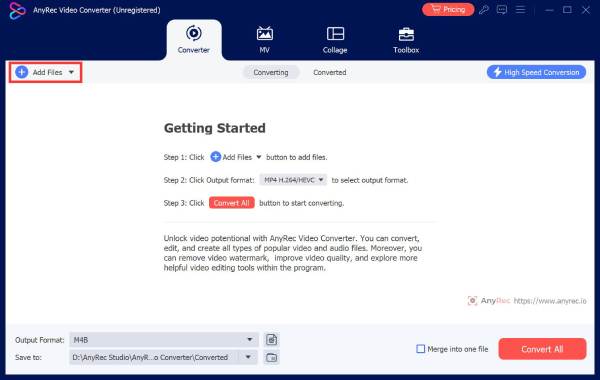
Step 1.Launch AnyRec Video Converter on your desktop. Once the interface is up, click the "Add Files" button to browse your folders and pick the video you want to upgrade. Or simply drag and drop it to the queue.
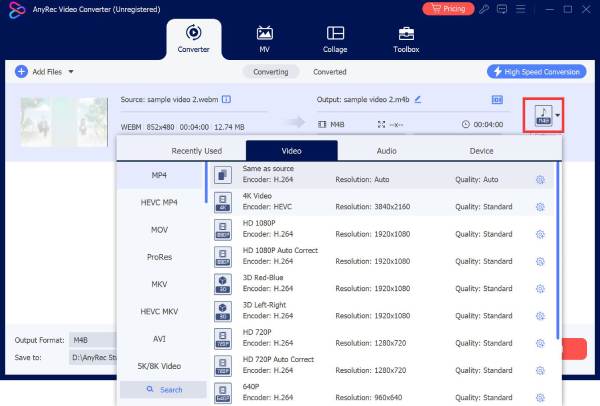
Step 2.Next, look for the "Format" menu. From the "Video" category, choose a versatile format like "MP4"; click the "Custom Profile" button for the one you choose to ensure you meet those HD standards.
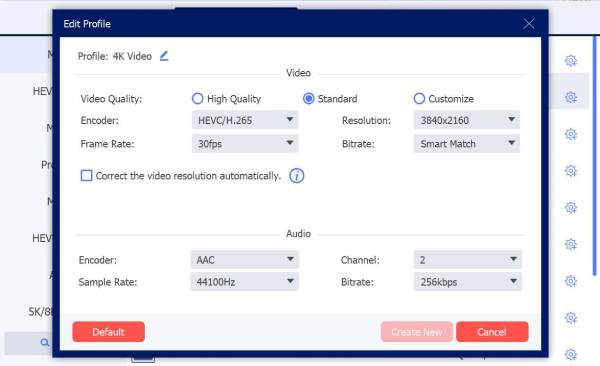
Set the resolution to 1080p and fine-tune the bitrate for maximum clarity.
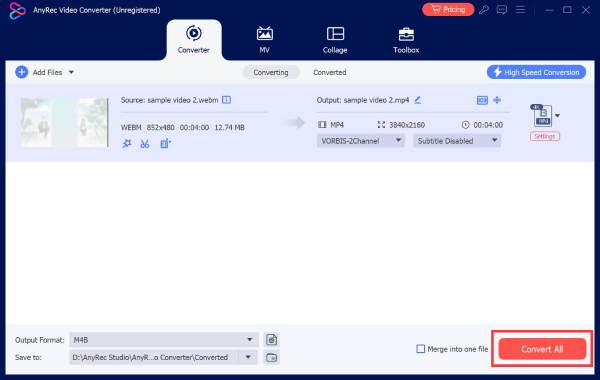
Step 3.With your settings set, head to the bottom to choose a destination folder for your new file and name it. When everything's done, click the "Convert All" button to begin converting your regular video to an HD file.
Common Streaming Resolution Overview
Once you know how to polish your files by converting to HD video resolution, it will be helpful to see how these major streaming giants today handle the same resolutions to keep your viewing experience smooth.
Here's a quick breakdown of how the common streaming resolution works once they hit the streaming services like Netflix and YouTube.
| Video Resolution | Frame Rate | Video Bitrate | Audio Bitrate | Recommended Internet Speed |
| 480p | 24-30 | 500-2,000 Kbps | 128 Kbps | 3 Mbps |
| 720p | 30-60 | 2,500-5,000 Kbps | 160 Kbps | 5 Mbps |
| 1080p | 30-60 | 5,000-10,000 Kbps | 192-256 Kbps | 15 Mbps |
| 2K | 30-60 | 10,000-20,000 Kbps | 256 Kbps | 20 Mbps |
| 4K | 30-60 | 20,000-50,000 Kbps | 320 Kbps | 25 Mbps |
With these in mind, you're better equipped to judge whether your current internet connection can handle HD video or other resolutions.
FAQs About HD Video Resolution
-
Why does my HD video sometimes look blurry on YouTube?
This is usually because of compression and your internet speed. Even if the video is uploaded in HD, sites will lower the quality if your connection dips to stop it from buffering.
-
Is there a noticeable difference between HD video resolution and 4K?
The answer depends on the size of your screen. On a standard mobile phone or laptop, HD looks sharp, and switching to 4K might go unnoticed. However, when you play it on a large monitor, 4K provides a huge boost in detail.
-
What resolution should I use for social media platforms?
If you're going to post on Instagram, TikTok, or Facebook, Full HD video resolution is best. Most social media apps compress 4K files when you upload, which results in lower quality than if you had chosen 1080p to begin with.
Conclusion
Whether you're binge-watching or trying to save that old clip, understanding each resolution helps to have a better digital watching experience. From SD and HD video resolution to 4K, finding the right balance can make your content more impactful. So, if you want to take your shaky clip to the high-definition video resolution world, AnyRec Video Converter will be your perfect companion. It gives you the power to upscale, enhance, and convert video files in just a few clicks, so your favorite memories won't stay in the past and get the HD glow they deserve.
Secure Download
Secure Download
Further Reading
About Our Author




