Hot

AnyRec Screen Recorder
Capture every moment. Record like a pro.
Secure Download
A Close Look at ShareX Review: Is It Worth It? (2026)

ShareX is more than just a screenshot tool; it is built for you who want to capture, record, edit, and share with ease. It has a lot to offer, but is it really the right choice? Like any other option, its extensive features may not suit every user. In this ShareX review, you're going to take a look at its features, advantages, drawbacks, best use cases, and what Mac users can use instead. Keep on reading to help you decide if it's worth trying.
Guide List
What Is ShareX ShareX Features Review ShareX Pros and Cons Who ShareX Is Best For Get ShareX for Mac Alternative FAQsWhat Is ShareX
ShareX is a free, open-source capture tool that makes screenshots and screen recordings more flexible. Instead of just basic capture options, it comes with a bunch of tools for capturing, editing, annotating, and sharing screen content. It is especially favored by Windows users who want customization without paying for extra features.
ShareX Features Review
As said, while screenshots and recordings are ShareX's main focus, it is packed with tools that make everyday capture much more convenient. Here's a closer look at the features that make it stand out and what each one is perfect for.
Screenshot Capture
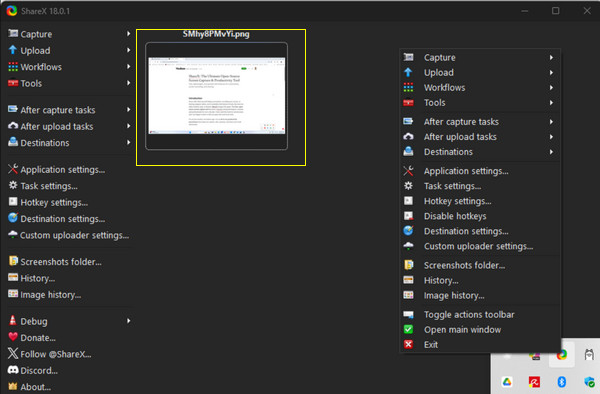
ShareX gives you many ways to capture a screen, whether you need the entire display, a specific window, or just a selected area. You can also use its scrolling capture and other easy options for capturing on-screen activities that do not fit on your screen at once.
Good for: Regularly taking screenshots for your work, tutorials, troubleshooting, or quickly saving what's on your screen.
Screen Recording
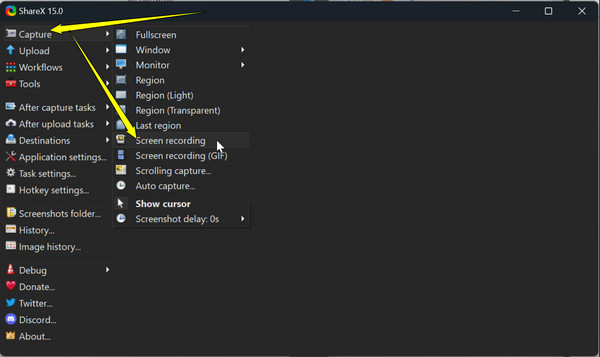
Need to show what's on your screen instead of just taking a screenshot? ShareX records your screen and even creates GIFs, making it ideal for your visual guides. Its recording tools are convenient for quickly showing a process without an extra app.
Good for: Creating tutorials, demonstrating features, or showing someone how to do a task.
Image Editing and Annotation
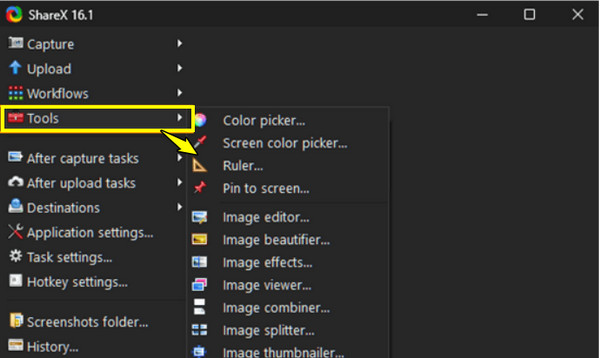
After taking a screenshot, ShareX won't require you to have another editor to edit. It includes editing tools for adding text, shapes, arrows, highlights, and other annotations. This makes it easy for you to point out crucial details or make screenshots much easier to understand.
Good for: Editing screenshots for presentations, feedback, and troubleshooting.
Upload and Sharing Features
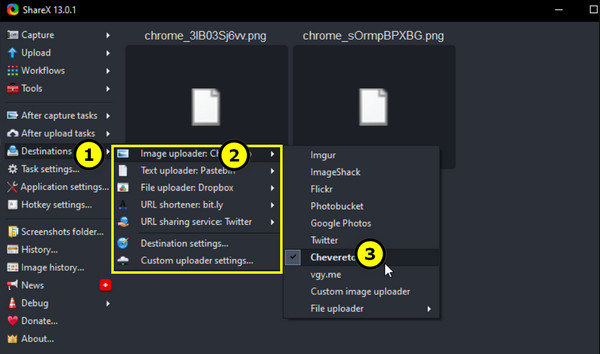
One of ShareX's biggest conveniences is how it can upload and share content quickly. You can select different destinations and even use automatic upload options, so sharing your recordings and screenshots takes just a few clicks.
Good for: Sending screenshots and recordings to friends or clients and avoiding the need to upload them manually each time.
ShareX Pros and Cons
While ShareX has a lot going for it, especially if you want a free tool with a bunch of features and customization options, having so many tools can also come with a few drawbacks. In this ShareX review, check out the main pros and cons to help you decide whether the software fits your needs.
Pros of ShareX:
- Free and open-source. Use ShareX without paying for a subscription or any premium plans.
- Highly customizable. Adjust shortcuts, capture settings, workflows, and other options to match your preferences.
- Packed with features. Screenshots, screen recordings, GIF recording, editing, annotations, and uploading in one app.
- Convenient sharing. Built upload and sharing will make it easy for you to send all your captured content.
- Multiple capture options. Capture a full screen, specific window, selected area, scrolling content, and more.
- No annoying ads. ShareX will not push any advertisements or unnecessary upsells.
Cons of ShareX:
- Windows only. ShareX is made for Windows users; Mac users must look for an alternative as Mac screen recorders.
- The interface looks dated. Compared with some screen recording apps, its screen may not feel as modern.
- Can overwhelm new users. Since it has many settings and tools, you may take some time to understand it.
- Not perfect for advanced recording. While ShareX can record the screen, you may look for more advanced recording and editing features that require another tool.
Who ShareX Is Best For
ShareX can be a great fit for anyone who wants screen capture tools without paying for them. However, its extensive features and settings may not be appealing to everyone. So, who can appreciate ShareX more?
It is best for Windows users who regularly take screenshots, record screens, or share visual content. It is a good choice for content creators, writers, students, and anyone who needs to quickly capture and explain something on their screen. It's also a practical option if you enjoy having the freedom to control how a tool works.
With ShareX's capture options, editing tools, customizable shortcuts, and upload settings, you can set it up to fit your workflow. But if you prefer a simple, modern tool, it might feel a bit overwhelming. And since it is Windows-only software, Mac users will need to look for another option.
Get ShareX for Mac Alternative
Since ShareX is not available on Mac, AnyRec Screen Recorder is a good alternative for users who want an easier recording experience. It covers the basics and more, including screen, audio, webcam, window, and area recording. You can also take screenshots and add notes while recording. With its built-in editing tools, you can quickly trim, compress, merge, and improve your recordings in one place.
Capture full screen, selected area, or window effortlessly.
Record audio and webcam footage separately or together.
Recording modes for screen, webcam, game, phone, and more.
Amidst frame rate, format, and other settings to match your workflow.
Secure Download
Secure Download
FAQs
-
Is ShareX free to use?
Yes. It is a free, open-source screen recorder and capture tool for Windows users. You can use its main features without paying for a subscription.
-
Does ShareX have a watermark?
No. ShareX does not embed a watermark in your recordings or screenshots, which makes it just perfect for your work, tutorials, and personal use.
-
Can I customize ShareX shortcuts?
Yes, definitely! It allows you to customize hotkeys for different actions, making the commonly used capture and recording functions easier to access.
Conclusion
ShareX is a feature-packed choice for Windows users to capture, record, edit, and share their screens freely and easily. In this ShareX review, you saw how impressive its wide range of tools is, although its limited support and learning curve may not work for everyone. If you're a Mac user or looking for a simpler recording experience, consider AnyRec Screen Recorder and download it to your computer. Enjoy customizable settings, screenshots, webcam and audio recording, and editing tools without making things difficult for you.
Secure Download
Secure Download
Related Articles:
About Our Author