Hot

AnyRec Video Repair
Repair drone, GoPro, and camera videos fast.
Secure Download
[Tutorial] Remove Mosaic from Video with 2 Hassle-Free Ways

Don't expect a miracle when removing a mosaic from a video. The hidden details are usually gone for good. Some tools can make the effect less noticeable, but success depends on the video itself. If you're more interested in improving the video's overall quality, AnyRec Video Converter gives you several simple editing and enhancement options.
Ask AI for a summary
Mosaic cannot always be removed completely, but damaged or pixelated videos can often be improved. AnyRec Video Repair helps fix corrupted videos and restore smoother playback with simple steps.
Secure Download
Secure Download
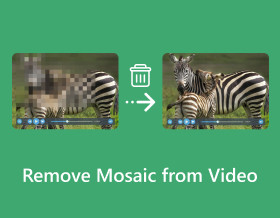
How to remove mosaic from videos? You may have accidentally added a mosaic effect to your video and deleted the raw one, or found a saved video with mosaic. This is very frustrating, especially if the effect ruins the video’s looks. Thankfully, there are two efficient ways that you can use to eliminate the mosaic effect! Continue reading this page, for learning the detailed steps to remove mosaic from video! So, without further delay, start exploring each of them now!
Guide List
Can You Really Remove Mosaic How to Remove Mosaic from Videos Quickly Use Premiere Pro to Remove Mosaic from Videos FAQsCan You Really Remove Mosaic
The short answer is: sometimes, but not always.
A mosaic effect hides original video details by replacing parts of the image with blocks or patterns. Once those pixels are removed, no software can perfectly recover the exact original content.
The video mosaic removal result depends on several factors:
| Video Condition | Expected Result |
| Slight pixelation or compression blocks | Easier to improve |
| Low-resolution videos | May become clearer after enhancement |
| Small mosaic areas | Better restoration results |
| Large hidden areas | Limited recovery |
| Fast-moving scenes | More difficult to process |
To get better results, you can use the highest-quality source video available. It is not suggested to repeatedly exporting the video. Because each compression process can remove more details.
How to Remove Mosaic from Videos Quickly
Suppose you want the easiest and quickest way to remove mosaic from a video; use AnyRec Video Repair on Windows/Mac! This tool can repair various videos, including those accidentally added or with mosaic effects. It supports the ability to automatically fix them after triggering a few clicks. Moreover, this video repairing software quickly fixes videos with mosaic (only in seconds), whatever their sizes are, without compromising their original quality. Although these are just a glimpse of this tool’s features, you can already tell this is the best mosaic removal tool you can utilize!

Capable of fixing videos with mosaic with high success rate and quality.
Support repairing videos with mosaic in HD, 4K, 8K, 12K, and 16K footage.
Able to fix videos with mosaic in seconds via its full-automatic repair technology.
Infused with a preview that displays the repaired video for checking.
Secure Download
Secure Download
Step 1.Install AnyRec Video Repair on your computer. Then, run the program and click the "Add" buttons from each side to import the video with mosaic and sample video.
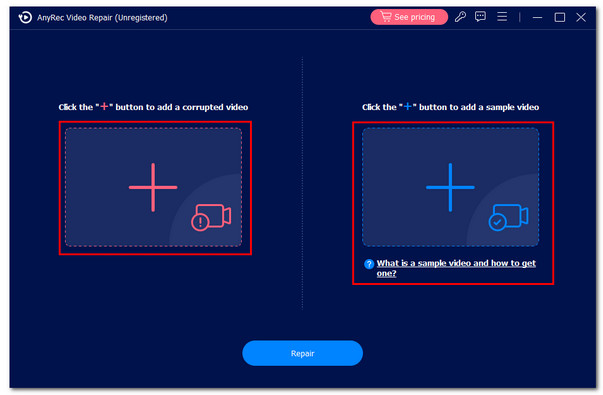
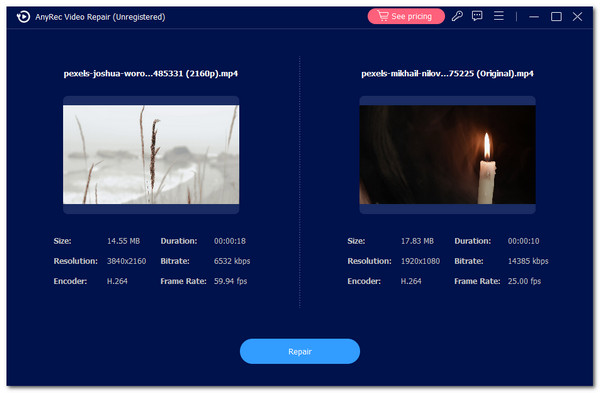
Step 2.After that, click the "Repair" button to initiate the automatic repair process. Then, you can check the output by clicking the "Preview" button to see whether the video is well-fixed.
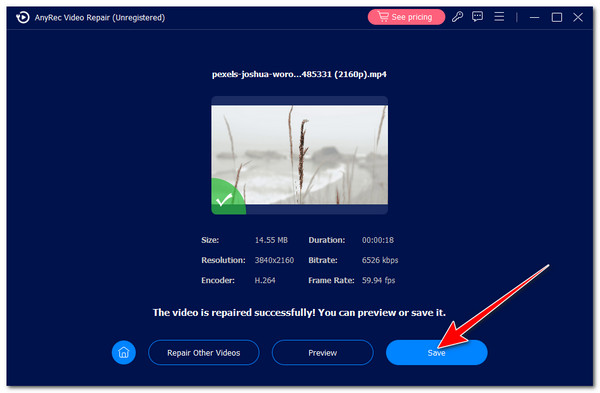
Step 3.If satisfied with the output, click the "Save" button to export the fixed video to the local storage. And that’s it! That’s how you use this tool as a mosaic removal tool.
Secure Download
Secure Download
Use Premiere Pro to Remove Mosaic from Videos
If you want a much more advanced tool to eliminate the mosaic blur effect, Premiere Pro is one of the best. Now, Adobe Premiere Pro cannot only efficiently remove the mosaic effect but also correct the pixelated censor image errors and stabilize your video to eliminate shakiness. Premiere Pro cannot recover missing information from a mosaic area. However, you can use sharpening, masking, and enhancement effects to make some footage look clearer.
Step 1.Run the Premiere Pro on your PC. Then, click the "File" tab at the upper right corner and select the "Import" option to import the video with the mosaic effect you wish to remove.
Step 2.After that, drag the imported video to the tool’s timeline. Then, click the "Effect" from the menu on the left pane and search for the "Unsharp mask" option using the search bar.
Step 3.Next, click the "Unsharp mask" option and drag it over the video. After that, double-click the video and select the "Effect control" option.
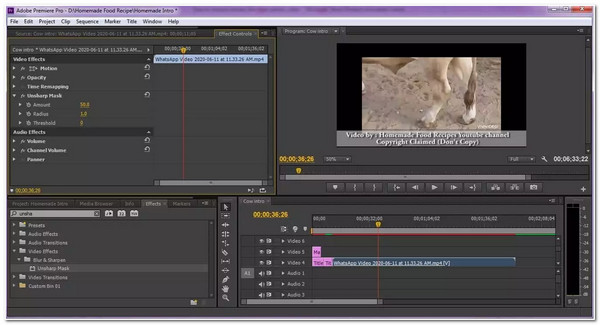
With the "Effect control" option, you can add keyframes, flip videos, and more.
Step 4.Then, increase/decrease the Radius, Amount, and Threshold density until the video’s part with mosaic is removed. Once you can tell that the mosaic removed, you can save it now.
FAQs
-
Can AI remove mosaic from a video?
Yes. AI can reduce or reconstruct visible mosaic effects in videos. But it cannot guarantee the exact original image.
-
How to remove Mosaic from videos online?
You can use online tools like Kapwing or Vmake to remove mosaics or blurred sections from videos using AI. However, for obscured content, the removal results may not be satisfactory.
-
Is it against the law to remove mosaics from video?
If you are talking with videos from other people, it depends on what you will do after removing the mosaic. If you are only going to keep the video to yourself, that's okay. The only time you will linked to the law is when you share it with the public online without having any consent.
-
Are there any free tools available on the market that I can use to remove mosaic from video?
Yes. Free tools on the market let you remove mosaics from video. Sadly, free tools’ features and quality might be too limited compared to paid tools and offer near-unsatisfying results. So, it is still suggested that paid tools be used to acquire the best mosaic removal service.
-
Does removing the mosaic from the video affect its original quality?
Yes. Removing mosaics from a video can affect its quality, mainly if the mosaic effect covers a large portion of the video. While removing the mosaic, there’s a great chance that the footage might lose details. In that case, you can use an enhancer tool to improve the video’s quality.
Conclusion
That’s it! Those are the two workable ways to remove mosaics from video. You can eliminate the mosaic effect on your video that ruins its overall look through these two ways! If you want a quick yet efficient way to remove the mosaic effect from your video, use AnyRec Video Repair! It supports a full-automatic repair technology that can fix and remove mosaics from video in seconds, with a high success rate and output quality. Free download this program and start your free trial now!
Secure Download
Secure Download
Related Articles
About Our Author