
How to Remove Alight Motion Watermark without Premium

Removing Alight Motion watermark is essential for those who use Alight Motion, only to find its watermark after exporting the videos. Whether you're sharing your video on social media, presenting it for business purposes, or simply keeping a clean copy for personal use, removing its watermark is essential. Fortunately, by 2025, several effective solutions will be available. This guide will show you the most reliable methods to use Alight Motion without a watermark.
Guide List
Why Consider Removing Alight Motion Watermark in 2025 Basic Information about Removal of Alight Motion Watermark The Most Powerful Tool to Remove Alight Motion Watermark An Online Method of Removing Alight Motion WatermarkWhy Consider Removing Alight Motion Watermark in 2025
Why are so many people considering removing the Alight Motion watermark? This is related to the issue of video professionalism. By 2025, when everyone is eager to share videos, knowing how to make your video stand out becomes an essential ability. And the watermark present on the video not only spoils the visual effect of your video, but also makes viewers subconsciously think that the producer is not professional. Therefore, for creators committed to building their personal brand, promoting their business, or sharing creative works, removing the watermark from Alight Motion can provide a clean video and convey a stronger, more trustworthy image.
Audience engagement is another reason to consider removing the watermark. Viewers prefer to focus on the message and creativity of your video if there are no distracting marks on the screen. A watermark can unintentionally signal that the video was made with limited tools, which may reduce credibility.

Finally, removing the Alight Motion watermark helps ensure your video stands out from others. In a competitive digital environment, polished and watermark-free videos reflect attention to detail, making them more suitable for professional use, social media growth, and even client presentations.
Basic Information about Removal of Alight Motion Watermark
Alight Motion is a popular mobile video editing app that gives creators access to professional-level tools directly on their phones. However, for the free version of Alight Motion, when you export each video, the system will automatically add an "Alight Motion" transparent watermark to it. Although you won't see the watermark during the editing process, and it won't directly cover the content in your video, its blurry color might make a specific part of your video appear unclear.

If you use Alight Motion frequently, then subscribing to its premium version (with a monthly price of $6.99 or an annual cost of $28.99) is a worthy option to consider. Through the subscription, you can directly export content without Alight Motion watermarks. Additionally, more advanced editing features will also be unlocked. If you are serious about video editing or plan to share your work online, investing in the subscription is the most straightforward and reliable method to ensure your projects remain clean and watermark-free.
The Most Powerful Tool to Remove Alight Motion Watermark
However, considering the high price of an Alight Motion subscription, if you are not a professional user or have frequent usage needs, it might not be worth it. So, how can free users remove the Alight Motion watermark? In fact, some simple yet powerful tools can also help you solve this problem. AnyRec Video Converter has emerged as a perfect alternative solution.
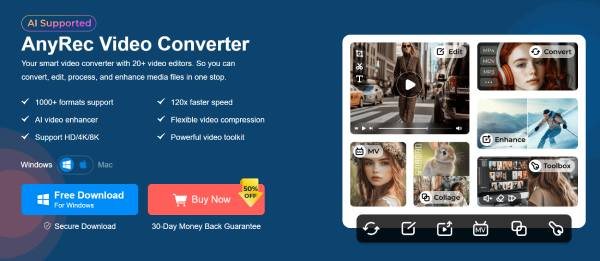
Beyond its basic video converter functionality, it also features powerful watermark removal capabilities, cleanly removing unwanted logos, text, or watermarks from your exported Alight Motion projects. You can erase the selected watermark area precisely and remove it without blurring or distorting the remaining footage by using this video watermark remover.
Remove the Alight Motion watermark without sacrificing quality.
The removal is almost virtually invisible on the exported video.
Export clean videos in multiple formats, like MP4, MKV, and more.
Adjust the details on your video file like color, contrast, etc.
Secure Download
Secure Download
Step 1.Launch AnyRec Video Converter and click the "Video Watermark Remover" button under the "Toolbox" tab.

Step 2.In the pop-up window, click the "Add Files" button to import the video file with Alight Motion watermark
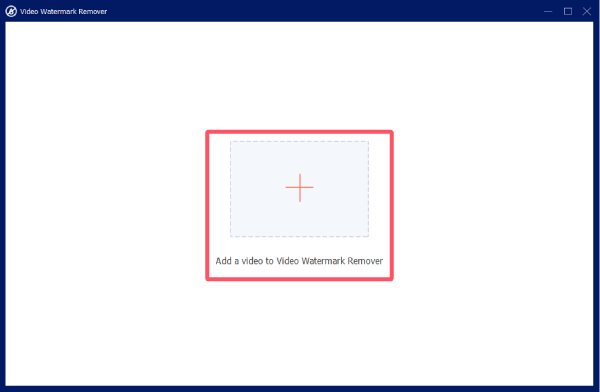
Step 3.Click the "Add watermark removing area" button to remove Alight Motion watermark. Finally, click the "Export" button.

An Online Method of Removing Alight Motion Watermark
Of course, you only use Alight Motion occasionally and only need to process videos of a tiny size. In that case, online tools can be an effective solution to remove Alight Motion watermark without premium. 123 Watermark Remover is the perfect option for Alight Motion watermark removal. This online video editor with no watermark operates based on a browser service and features basic video processing capabilities, enabling you to remove text or logos quickly.

Even so, using 123 Watermark Remover also has its drawbacks. As a free tool, it lacks sufficient video processing capabilities. This means it is only suitable for basic editing of low-quality videos. For larger or high-definition files, the quality suffers to some extent after the process is completed. Moreover, since it is an online tool, you have to rely on your internet speed for uploading and processing.
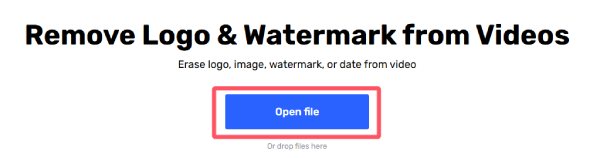
Step 1.Open the 123 Watermark Remover website. Click the "Open file" button. Then upload your video file.
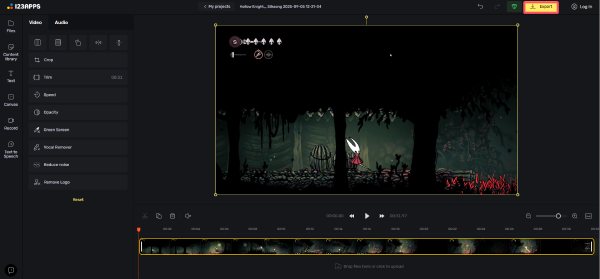
Step 2.Click to select the area where Alight Motion watermark is for the removal.

Step 3.At last, click the "Export" button to save your clean video file without Alight Motion watermark.
Conclusion
Removing the Alight Motion watermark doesn't have to be complicated. There are plenty of workable options. The best method depends on your editing needs and whether you value speed, precision, or convenience. Among them, AnyRec Video Converter can help you polish your projects without distracting marks and present videos that look clean and professional, making your creative work stand out with greater impact. If you need, download it now!
Secure Download
Secure Download



