
[Quick Comparison] 4K vs 1080p: Which One is Right for You

Trying to figure out which one suits your needs between 4K vs 1080p? Identifying which of these resolutions or qualities best fits your needs is a common dilemma for many people. Whether gamers or TV buyers are determining which one provides better playback, or content creators are figuring out how these options affect their workflow, this post can help. It features a comprehensive comparison of 4K vs 1080p resolution. Dive in now and explore this post 1080p vs 4K!
Guide List
Understand 4K and 1080p 4K vs 1080p: Which One to Choose 4K vs 1080p: Full Comparison How to Upscale Video from 1080p to 4K (Or Vice Versa)Understand 4K and 1080p
Before exploring this post's comparison of 4K resolution vs 1080p, it is helpful first to understand what these two are about.
What Is 4K (Ultra HD)
So, what is 4K, or Ultra HD? This resolution packs four times the pixels (3840 × 2160) into the same space as 1080p, making images look incredibly sharp and lifelike. It is ideal for large TVs or for sitting close to a monitor, where you can actually see the fine details. A major "pro tip" from enthusiasts is that 4K video can look better even on 1080p screens; the extra data results in cleaner colors and fewer fuzzy edges, giving you a much more stable and solid picture.
What Is 1080p (Full HD)
On the other hand, what is 1080p? This resolution is also often called Full HD, 1080p (1920 × 1080), and has long been the standard for most screens. It remains popular mainly because it provides a smooth playback without spending a lot, since it doesn't demand too much in terms of internet and hardware. Many people also point out that on smaller screens or when you are sitting farther away from a TV, 1080p still looks excellent.
4K vs 1080p: Which One to Choose
After reading the first section, you can already see a glimpse of the difference between 1080p and 4K. To further clarify their differences and make them easy to spot, here is a simple comparison chart of both resolutions.
| Aspect to Compare | 4K (Ultra HD) | 1080p (Full HD) |
| Resolution or Quality | 3840 x 2160 pixels | 1920 x 1080 pixels |
| Pixel Count | 8.3 million pixels (4 x more) | 2.1 million pixels |
| Optimal Display Size | Best on 40-inch screens or bigger | Most effective on displays under 32″ |
| File Size | Much larger; requires significant disk space | Smaller; simple to save and distribute |
| Availability | Common on modern TVs and streaming platforms | Found on almost all current hardware |
Now that you understand the difference between 4K and 1080p resolution, here is a helpful guide showing when to choose 4K over 1080p and vice versa.
When Is 4K Better Than 1080p
When does 4K win in the 4K vs 1080p clash? 4K is the better choice when you sit close to a large screen, like a 27-inch monitor or a 55-inch TV, because the higher pixel density keeps the image from looking soft. It is especially great for high-end gaming and movies, as it shows fine details, such as distant landscapes or textured fabrics, that 1080p tends to blur. Interestingly, many people say 4K can look better on a 1080p screen. Since the original 4K file contains much more data, downscaling it produces a cleaner, sharper image with richer colors than a regular 1080p file.
When Is 1080p Better Than 4K
Well, 1080p resolution shines in gaming and budget setups where performance is more important than visual detail. Because there are fewer pixels to render, in that case, systems can push higher frame rates, which results in smoother gameplay. Aside from that, it is also a great option to choose for slower internet connections or limited data plans. This is because 1080p streams more reliably with less buffering.
4K vs 1080p: Full Comparison
To give you a more detailed comparison of 4K vs 1080p, here are some scenarios to help you choose the best resolution or quality for your needs and preferences.
4K vs 1080p in Gaming
4K vs 1080p in gaming? Well, 4K provides sharper visuals, especially on large monitors or TVs. Many players, maybe like you, do not see much difference on smaller screens or when sitting at a normal distance. Because of this, smooth frame rates and quick response times matter more than higher resolution in fast-paced games. Since 1080p needs less processing power, it often runs more smoothly.
4K vs 1080p in Video Editing
In terms of 1080p vs 4K in video processing, 4K, of course, offers more pixels, which gives video editors extra detail. When you downscale 4K footage to 1080p, it can create cleaner, sharper results than 1080p files. It also allows for better color and texture preservation during the process of making the video.
4K vs 1080p in Streaming & Media Support
With regards to 1080p vs 4K in streaming content and media support, streaming 4K content can look better, but many platforms compress the video heavily. In that case, the difference between 4K and 1080p is subtle in everyday viewing. Most people cannot see the improvement from a distance, like couch distance. 1080p offers a smooth streaming experience even though you have a slow internet connection.
4K vs 1080p in Hardware & Compatibility
In 1080p vs 4K in hardware and compatibility, not all devices handle 4K properly. Most of the older monitors or TVs often upscale content, which can sometimes make 1080p look sharper than 4K. Smooth playback also depends on your device's graphics card and overall processing power. Because of this, the better choice between the two resolutions comes down to your hardware and the type of content you watch.
4K vs 1080p in Cost & Accessibility
Lastly, 4K vs 1080p in cost and accessibility. 4K hardware and content are generally more expensive than 1080p. 4K requires a faster internet speed and stronger graphics performance for smooth video playback or gaming. Meanwhile, 1080p is widely supported by most devices. 1080p is cheaper and easier than 4K on hardware. As for smaller screens or casual use, 4K and 1080p resolutions are similar.
How to Upscale Video from 1080p to 4K (Or Vice Versa)
Now that you have explored the comprehensive comparison of 1080p vs 4K, which one do you think suits your needs or preferences? In case you have a video and wish to upscale it (1080p to 4K) or downscale it (4K to 1080p), you can use a professional AnyRec Video Converter tool! This desktop-based tool enables you to upscale or downscale your video from 1080p to 4K or vice versa. Thanks to its built-in video editor, it provides options to tweak the quality and appearance of your video, including changing the resolution based on your preferences. The option of upscaling or downscaling video quality/resolution is easy to use, which makes the whole process quick yet offers excellent output.

Offers various resolution options to upscale or downscale your video's resolution.
Lets you tweak your video quality, bitrate, frame rate, and encoder for enhancement.
Allows you to enhance the video's audio by tweaking its bitrate, sample rate, and more.
Supports a video enhancer feature that automatically upscales video resolution.
Secure Download
Secure Download
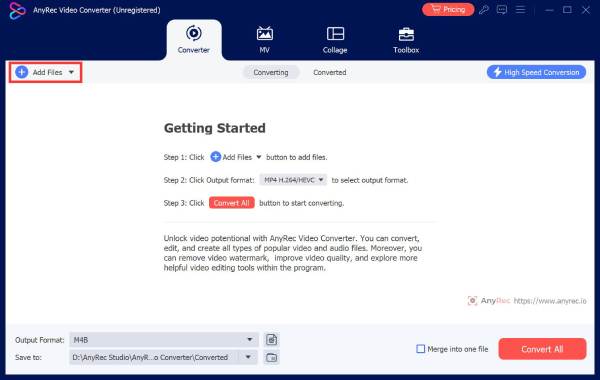
Step 1. Install AnyRec Video Converter on your computer. After that, launch the tool, click the "Add Files" button at the right to import the video you wish to downscale or upscale.
Step 2. Next, click "Settings" on the right under your video's format. In the "Edit Profile" section, click the "Resolution" dropdown button, and choose "1920 x 1080" or "3840 x 2160".
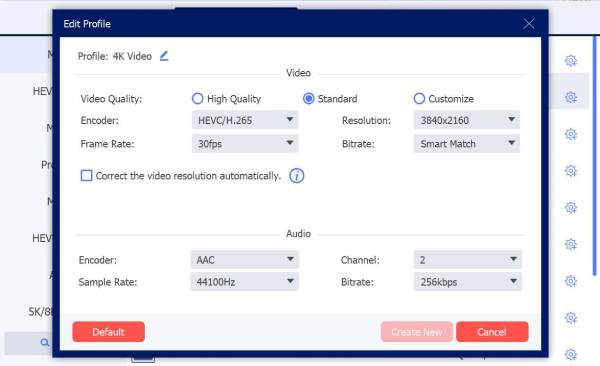
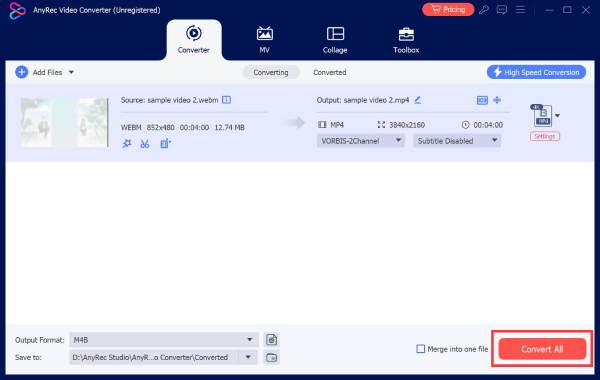
Step 3. After that, click "Create New" to save the changes you made. Then, click the "Convert All" button in the lower right corner to start processing the video.
Conclusion
There you go! That's the comprehensive comparison of 4K and 1080p. Through that comparison guide, you can now easily identify the difference between 1080p and 4K. You are also now fully aware which of them suits specific use cases or scenarios. Now, in case you have a video that you wish to upscale from 1080p to 4K or downscale from 4K to 1080p, you can use professional AnyRec Video Converter!
Secure Download
Secure Download



