Add Colors to Your Video with Top 5 Offline and Online Tools

With the help of a video colorizer, you can easily add vibrant colors to black-and-white or grayscale videos. Through them, you can restore old family videos and historical footage, improve engagement with vintage content on social media, enhance documentaries, and more. Now, here's the catch: with so many options available, only a few offer great video colorization, and you'll find five of them here! So, jump in and see which video colorization tool is for you.
Guide List
What to Look for in Video Colorizer Top 5 Video Colorizers [Online & Offline] How to Colorize Black and White Videos FAQs About Video ColorizerWhat to Look for in Video Colorizer
Before choosing one of the five best video colorizer tools, it's important to know what features to look for. This can help you find a tool that meets your needs and delivers the output you want.
- 1. Natural Color Results - Ensure that the video colorizer can add natural-looking colors. The colors should match the original scene without making the video look too artificial.
- 2. Video Quality Improvement - The video colorizer should keep the original quality or improve the video into HD or 4K output, and help keep it clear after the video colorization.
- 3. Processing Options - Check what processing options the tool offers. Some tools may let you adjust the color, improve video resolution, or other settings to get the results you want.
- 4. Ease of Use - A tool with a simple interface makes the process easier, especially if you are new to video editing. Look for a tool that only offers a few steps.
- 5. Supported Video Formats - Make sure the tool supports the video format you want to use, such as MP4, MOV, or AVI. This can save you from converting your video before colorizing it.
Top 5 Video Colorizers [Online & Offline]
Now that you know what features to look for in a video color correction tool, it's time to check whether this post's five colorizers have them. Explore each of them now.
1. AnyRec Video Enhancer - Best for Enhancing and Improving Old Videos and Colors
If you are looking for a desktop video colorizer software that also improves video quality, try AnyRec Video Enhancer. This tool includes an AI-powered video enhancer that automatically improves your video's overall quality. It makes colors more visible and adds detail to old or black-and-white videos. You can also improve video quality by upscaling to 4K, reducing noise, and removing video shake. Additionally, with its simple interface, you can easily and quickly colorize videos!
Upscale Resolution feature that adds details and enhances colors for your blurry video.
Capable of keeping original video quality and improving it to HD or 4K output.
Infused with options to optimize brightness and contrast, and remove video noise.
Lets you adjust saturation and hue to fine-tune video colors.
Secure Download
Secure Download
Limitation: Requires a subscription for the full experience.
2. UniFab AI Video Colorizer - Best for Colorizing and Restoring Old and Archival Videos
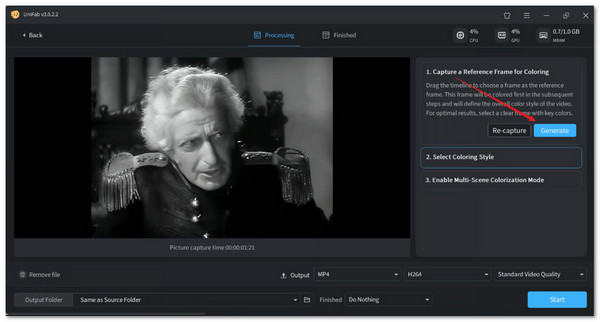
Another desktop tool you can use to colorize black and white video files is UniFab AI Video Colorizer. The same goes with the first one; this tool also utilizes AI to add realistic colors to people, objects, and scenes while preserving the video's original quality. It also supports multi-scene colorization, which adjusts colors as scenes change, and offers styles like vivid cinema, muted documentary, and warm nostalgia for 8mm, 16mm, and archival footage.
Limitation: The free trial has a limited number of output credits.
3. HitPaw VikPea AI Video Colorizer - Best for Batch Video Colorization
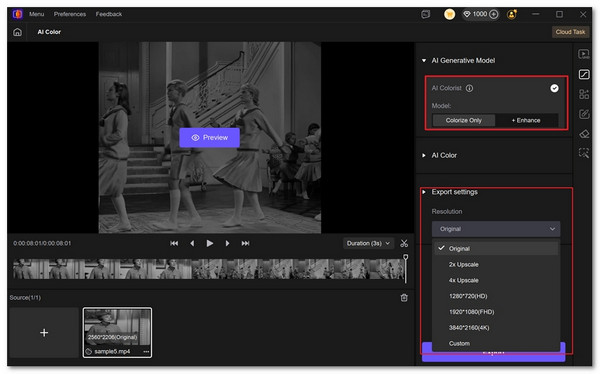
Apart from those tools, HitPaw VikPea is another desktop AI video colorizer for Mac and Windows that can colorize black-and-white videos. It also uses AI to automatically colorize videos while keeping the video's subjects' skin tones, scenery, and other details so they look natural. Aside from that, it offers color enhancement, denoising, and low-light enhancement to improve video quality. Additionally, it supports processing multiple old videos and archival footage at once.
Limitation: Output export requires a subscription and occasionally produces output with incorrect colors.
4. Neutral.love - Best for AI Colorization Models
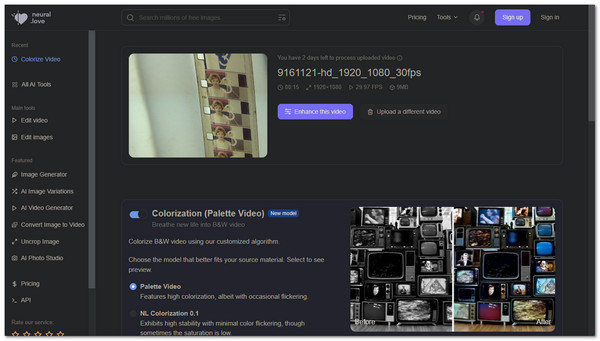
Aside from those desktop-based tools, there are also web-based tools you can use to colorize video online for free, and one of the best options you can have is Neural.love AI Video Colorizer. Like the desktop tools above, it uses AI to enhance and restore digital media from various sources. It supports different models for different footage. Palette Video offers brighter colors but may flicker, while NL Colorization 0.1 provides more stable but less saturated colors.
Limitation: It offers fewer controls than the other tools.
5. Kolorize - Best for Straightforward Video Colorization Online
Another web-based tool you should also try is Kolorize. This online video colorizer can also automatically add color to black-and-white videos with AI. It analyzes each frame to create consistent colors for people, objects, and backgrounds while keeping the video's original look. You can use this to colorize historical footage, classic films, family videos, and cultural heritage content. What makes this tool a great option to try is its straightforward nature.
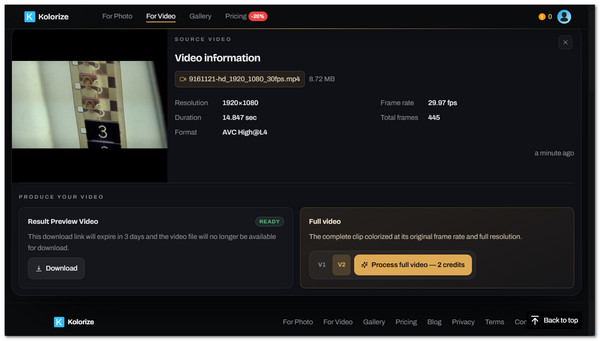
Limitation: Video colorization takes time, even for short clips, and it isn't completely free.
How to Colorize Black and White Videos
To give you a sample guide to colorize black and white video files, here are simple steps you can follow using AnyRec Video Enhancer.
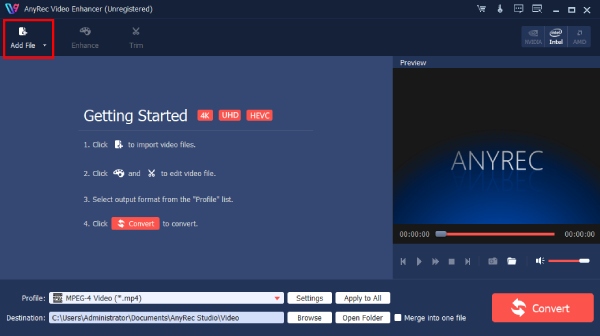
Step 1.Install and download the AnyRec Video Enhancer tool, then launch it. Next, import the black-and-white video you wish to colorize by clicking "Add File".
Step 2.After that, under the "Enhance" section, tick the checkboxes for each option in the list: Upscale resolution, Optimize brightness and contrast, Remove video noise, and Reduce video shaking. Once finished, click "Apply".
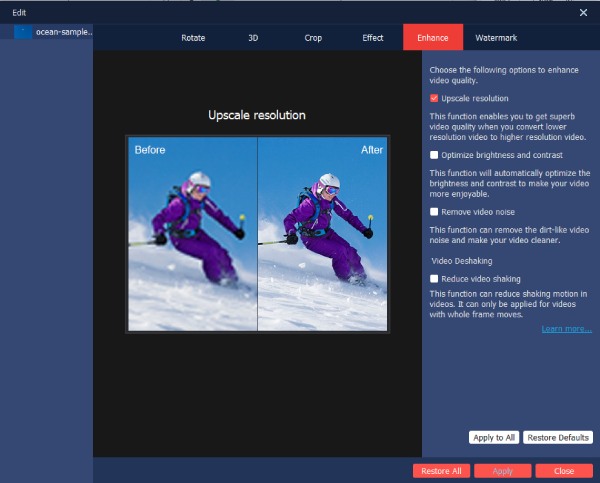
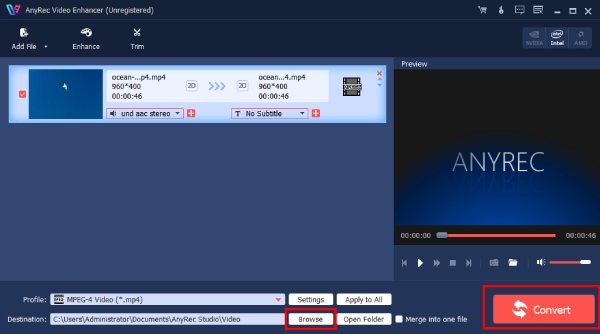
Step 3.Once done, you'll see the enhanced version of the video in the preview. If satisfied, click the "Close" button. In the main interface, click the "Convert" button to start saving the colorized and enhanced version of your video.
FAQs About Video Colorizer
-
Which of the video colorizer tools are free?
Among those video colorizer tools, AnyRec Video Enhancer, HitPaw VikPea AI Video Colorizer, and UniFab AI Video Colorizer offer a free trial with no watermark on your output, while Kolorize and Neutral.Love requires payment for the full colorization process.
-
What is the best AI video colorizer for old videos?
If you want to restore old family videos or archival footage, you need a tool that can help you preserve their quality and produce natural colors. HD or 4K enhancement can also improve the final result.
-
Is video colorization with AI historically accurate?
No. Video colorization with AI is not always accurate. It predicts colors based on the details in the footage. In that case, although the output looks realistic, it doesn't match the original colors.
Conclusion
So if you have old family videos, historical footage, black-and-white videos, etc., you can always count on those five best video colorization tools! Through them, you can not only bring vibrant, natural colors but also enhance their overall quality. Now, it's up to you whether to use a desktop or an online, web-based tool that fits your preferences, as they all have what it takes to colorize and enhance videos. However, if you're looking for a tool that not only brings out colors in your videos but also improves their quality, AnyRec Video Enhancer is for you! Try it today.
Secure Download
Secure Download
Related Articles
About Our Author