Change Video Speed Easily: Top 5 Online Speed Controllers

When you're making Reels, TikTok clips, or short YouTube videos, upgrading your content rhythm is necessary. Fast forwarding redundant parts keeps audiences engaged, while slow motion highlights your best shots. In this guide, we cover the best online tools to help you speed up your videos online freely.
Guide List
Why You Need to Change Video Speed Top 5 Tools to Speed Up Videos Online 1. EZGIF 2. Kapwing 3. Clideo 4. FlexClip 5. Clipchamp Best Video Speed Changer to Speed Up or Slow Down Videos How to Choose the Right Video Speed ControllerWhy You Need to Change Video Speed
Changing video speed is a simple way to make your videos more engaging, efficient, and suitable for different situations.
- Save time when watching long videos. Speeding up videos is useful for tutorials, lectures, and long meetings. You can quickly review content without missing important information.
- Create more engaging content. Adjusting video speed can add creative effects and make clips popular on social media like YouTube, TikTok, or Instagram.
- Highlight important details. Slow motion helps viewers focus on fast motion, highlights, tutorials, or specific actions that are difficult to see at normal speed.
- Make video pacing better. Sometimes a video may feel too boring or rushed. Changing the speed can improve the overall flow and make the viewing experience more comfortable.
Top 5 Tools to Speed Up Videos Online
Looking for a simple way to speed up your video? These 5 best online video changers can help you speed up or slow down videos directly from your browser.
1. EZGIF
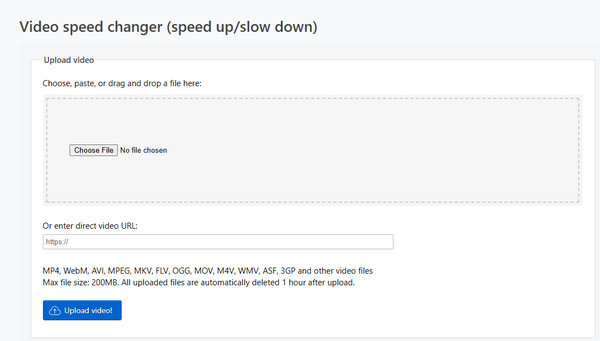
EZGIF is a lightweight online video and image editor. It not only speeds up video files from 0.5x to higher online, but also changes the speed of animated GIF, WebP, APNG, MNG, AVIF. It supports multiple video formats, including animated GIF, WebP, APNG, MNG and more. You can upload your video or type the URL directly, convert videos to GIFs, and edit your videos like resizing, trimming, cropping, merging, or reversing.
Limitations:
- It has a maximum video file size of 200 MB.
- This uploading time is relatively slow, and the website may take a few seconds to respond.
2. Kapwing
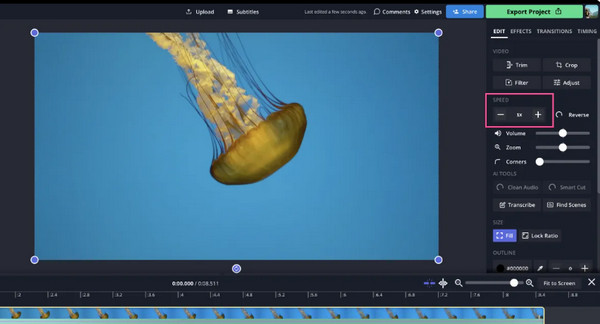
Kapwing is a versatile online video editor favored by social media creators. This video speed controller supports popular video file formats, including AVI, MP4, MOV, and 3PG. It allows you to accelerate video online up to 4x or slow down the speed to 0.25x. Kapwing packs thousands of built-in assets, including subtitles, clean audio, overlays, templates and editing tools, letting you polish your clips easily.
Limitations:
- You need to create an account before using.
- 1080P/4K exports and advanced features need a paid version.
3. Clideo
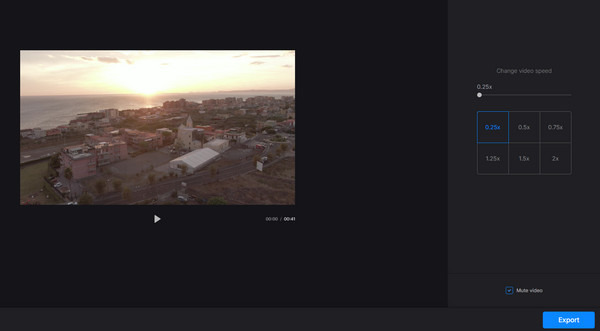
Clideo Video Speed Controller is suitable for users who want a clean and straightforward tool. You can upload videos from devices, Google Drive, or Dropbox and change the speed from 0.25x to 4x. It also provides 6 preset speed options (0.25x, 0.5x, 0.75x, 1,25x, 1,75x, 2x) for you to set speed quickly. The interface is very precise and the operation is easy. You can choose to keep the sound in the video, mute it or change its output format to export it.
Limitations:
- Speed adjustment options are limited.
- Fewer editing features compared with Kapwing and FlexClip.
4. FlexClip
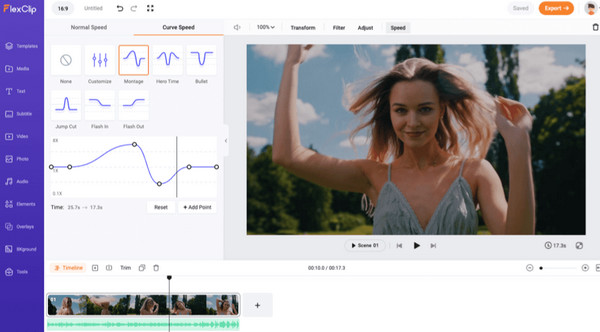
FlexClip is an AI-powered video editor that allows you to easily increase video speed or slow down video online. After uploading videos from local files, phones, OneDrive or Google Drive, you can set the speed from 0.2x to 8x. Or just type your desired video duration, and FlexClip will automatically adjust the playback speed accordingly. FlexClip also involves a speed curve feature, which helps you create dynamic speed changes throughout a video. FlexClip provides many handy tools, and you can easily merge, trim, split, reverse, reduce file size, and explore effects to create stunning videos.
Limitations:
- Advanced features require a paid subscription.
- This tool may feel excessive for users who only want to speed up videos online.
5. Clipchamp
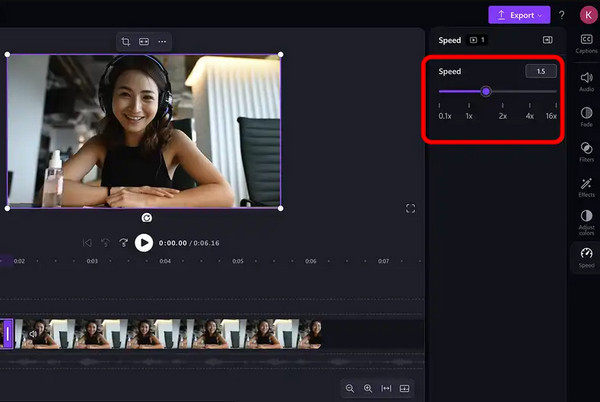
Clipchamp is Microsoft's online video editor designed for Windows users. It can fast-forward video speed up to 16X or slow it down to 0.1x. The speed range is wider than other online video speed changers. You can also enter the desired speed directly. It also provides various editing tools, so you can add text, music, stickers, transitions, templates, and more creative content to personalize your clips.
Limitations:
- Requires a Microsoft account to use.
- Primarily optimized for Windows users.
Best Video Speed Changer to Speed Up or Slow Down Videos
If you often edit long videos or have a high demand for video quality, you may need a desktop video speed controller. Available for Windows PC and Mac, AnyRec Video Converter is a professional video speed changer that can increase speed of video up to 8x and make smooth slow-motion to 0.125x. It also offers a complete set of editing tools, allowing you to trim, crop, rotate videos, apply filters, adjust audio, add subtitles, and convert videos between different formats.
Speed up or slow down videos from 0.125x to 8x.
Support 1000+ video output and input formats.
Preserve original quality and export with high resolution.
Include 20+ built-in tools for convenient editing.
Secure Download
Secure Download
How to Make a Video Slower with AnyRec:
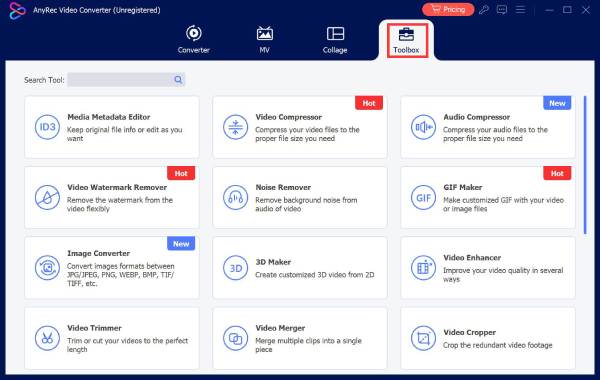
Step 1.Launch the software and click "Toolbox" from the top menu. Then, scroll down and select "Video Speed Controller".
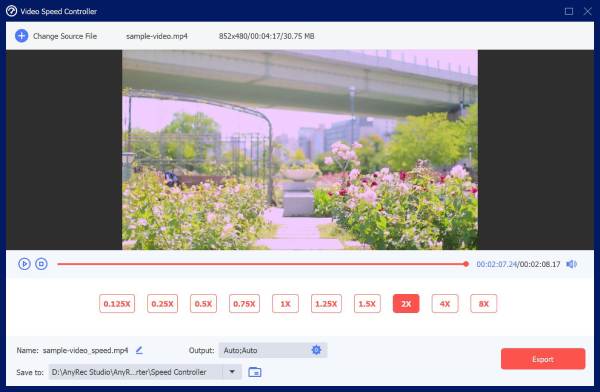
Step 2.Click the "Add" button to upload your video, or drag and drop your video into the program. Now, you can set the speed from 0.125X to 8X.
Step 3.Optionally, you can click the "Output" button to customize the video format, encoder, resolution, and frame rate.
Step 4.Choose a save path and click "Export" to save the changes.
How to Choose the Right Video Speed Controller
The following table gives a quick overview of the six recommended tools:
| Tool | Platform | Speed Adjustment Range | Best For |
| EZGIF | Online | 0.5x to faster | Quick speed changes for short videos and GIFs |
| Kapwing | Online | 0.25x to 4x | Speed adjustment with editing tools |
| Clideo | Online | 0.25x to 4x | Simple speed adjustments |
| FlexClip | Online | 0.2x to 8x | Creative social media videos |
| Clipchamp | Online Windows | 0.1x to 16x | Powerful speed controls on Windows |
| AnyRec Video Converter | Desktop (Windows, Mac) | 0.125x to 8x | High-quality speed adjustment |
Conclusion
With the online tools we mentioned above, you can easily change video speed and refine your videos in just a few clicks. If you want to level up your video quality without limitations, try a professional desktop speed changer like AnyRec Video Converter - it may bring you a pleasant surprise!
Related Articles
About Our Author