



Create transparent PNGs, white product photos, profile pictures, and social media images immediately.

You can remove background from an image on your browser in seconds. It is also supported to change a new background online. Just read and follow.
Add Photo

Remove and Change Background

Download Now










The AI background remover automatically detects the person in your portrait or selfie within seconds. Then use the brush to refine hair strands, edges, and other fine details. If you’d rather not use Photoshop or other paid software, AnyRec Free Background Remover Online is a quick alternative.
Clean backgrounds make product photos look professional. As you know, Amazon requires a pure white background for main images, and many other marketplaces recommend one. Upload your photo, remove the background, and replace it with white, or download a transparent PNG. You can use the AI photo background remover to separate products from low-contrast backgrounds.
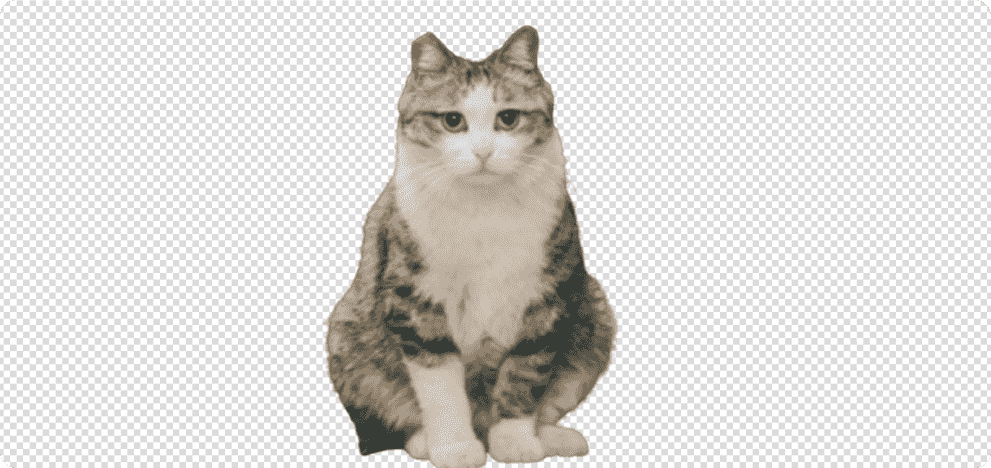
Trace around your pet with the brush to cut it out cleanly. Then add a solid background color, such as red, blue, or yellow. You can also upload your own photo as the new background. The entire background removal process is simple. You can create a standout image for Instagram or a presentation, with no design skills needed.
A clean background gives property photos a more polished, professional look. Remove the original background and replace it with a transparent, solid-color, or custom-image background. The same free image background remover works for other subjects, such as cars and jewelry.
Remove a solid or distracting background from logos, signatures, illustrations, and other graphics. A transparent PNG can be useful when placing an image over a document, presentation, or colored design. Inspect small text, thin lines, and fine edges before downloading to make sure important details remain intact.
Remove BackgroundCreate Transparent PNG Images
Make your images easier to reuse by removing backgrounds and keeping the subjects ready for any design.
Try it now
Create Product Photos for Amazon, Etsy
Replace messy backgrounds with pure white or a clean solid color to help your products look polished and consistent.

Replace Unwanted Photo Backgrounds
Hide messy rooms, crowded streets, and unwanted objects by swapping the entire background in just a few clicks.

Design Social Media Images
Create eye-catching images for Instagram, Facebook, Pinterest, and more by removing backgrounds and placing your subjects on bold colors.
Try it now


For work and personal use
Use it for everyday photos, online store listings, collages, presentations, and more. Create transparent or colored backgrounds for personal and commercial projects.

100% free to use
Anyone can use AnyRec Online Background Remover for free, with no Photoshop, paid software, or green screen needed.

Change new background
After removing the original background, add a solid color or upload your own image. Resize and crop it to fit any purpose.
How to make background transparent?
Click the Add Photo button. The first time you use AnyRec Free Background Remover Online, you can install a launcher quickly. Later, upload your picture. Adjust the brush size first. Later, you can drag with your left-click mouse to keep which area you want to keep. Also, you can click the Erase button to delete unwanted part. The real-time Preview window can show you all details. At last, click the Download button to save your picture with transparent background.
How to change the background color?
After removing image background and do edge refine, you can be in the Edit section. Here you can add any solid color in RGB, including blue, red, pink, green, black, etc. Adjust the image size and position based on your need.
How to add a new background?
Click the Add Photo button. Browse and open a picture. Remove unwanted background in the Edge Refine section if needed. Later, click the Edit button in the left panel. You can change photo background to blue, red, white, green, and other colors. Or you can click the Image button to upload a new image background. Resize and crop the picture based on your need. After all customizations, click Download to save and add a background to a photo successfully.
Will my images be stored?
No. All your images will be deleted from our servers after processing automatically.
Photoshop vs. AnyRec Free Background Remover Online, which is better?
If you want to quickly delete and change background, it is highly suggested to use AnyRec online image background removal tool. Photoshop is not friendly to beginners. But if you need to apply other photo effects after background removal, you can take a look at Adobe Photoshop.
Corey


 I use the online background remover to erase the product photo background to transparent for Amazon. It is easy and fast to use. I’ll recommend this tool to other online sellers.
Nellie
It is the best free online background remover I ever had! No ads. No watermark. No signup. The entire background removal process is great! Love it!
Anthony
I have tried many online background removers, such as removebg, adobe express, photoscissors, experte, etc. They are good but not suitable for me. Only your online tool does a great job in erasing the photo background.


Best free image background remover to remove BG from any images for free
Served Users Worldwide
Remove Background Free Image Converter Online
 Batch convert up to 40 images to JPG, PNG, and GIF online without watermark. 5MB maximum each.
Try Now AI Image Upscaler Online
 Make your image larger by 2x, 4x, 6x, and 8x without losing quality online.
Try Now Free Online Watermark Remover
 Remove text/image watermark from your picture online with AI algorithm.
Try Now follow us on Facebook
 follow us on X (Twitter)
 follow us on YouTube
Copyright © 2026 AnyRec Studio. All Rights Reserved.

 Free Background Remover