
A Comprehensive List of the 7 Best Metadata Editors for 2026

File metadata editors can help you prevent the potential. risk from the exposure of sensitive information. This is because metadata is embedded in almost every digital file, quietly storing information such as creation date, device details, location data, and editing history. For users who frequently handle media files, managing metadata becomes an important step in maintaining privacy and control. This guide introduces the fundamentals of metadata and explores reliable tools for efficiently editing, removing, or managing file information.
Guide List
Things You Need to Know About Metadata What is a File Metadata Editor Used for Reliable Metadata Editors for SafetyThings You Need to Know About Metadata
Before stepping into metadata editors, you should understand what metadata is. Simply put, metadata is structured information attached to a file that describes its properties and origin. Generally speaking, no matter what type of media files you are dealing with - photos, videos, audio, or others - they all come with their own specific details. These details represent all the evidence indicating that you and others have dealt with this media file before. Metadata is usually not added manually by operators; the system automatically updates it after it recognizes that you have completed editing the media file.
When you examine the metadata of a media file, you will find that it is very easy for you to obtain the relevant information attached to it, including but not limited to creation time, modification time, etc. Sometimes, it may even include more private information. Although this facilitates querying file changes, it also increases the risk of information exposure. They may be inadvertently accessed by other users who view the media files, including their metadata.
What is a File Metadata Editor Used for
What is a file metadata editor used for? In short, with its help, you can access the relevant information in a media file to the greatest extent, whether it is displayed directly or hidden by the system. On the one hand, you can use it to correct some incorrect information so that similar errors won't occur later. On the other hand, you can use it to modify private information, such as location tags, to prevent its leakage. For example, when you use an MP3 recorder, the time and location of the recording may be recorded. Using the file metadata editor can help you correct or hide this information.
Reliable Metadata Editors for Safety
Choosing the right metadata editor can significantly improve both privacy protection and file management efficiency. With a variety of tools available, each offering different features and levels of control, selecting a suitable option depends on specific needs such as batch editing, format support, or ease of use. The following section highlights several reliable metadata editors designed to help manage file information safely and effectively.
| Tool Name | Ease of Use | Supported File Types | Batch Editing | Platform |
| AnyRec Video Converter | Very Easy | Video, Audio, Image | Yes | Windows / Mac |
| MP3Tag | Easy | Mainly Audio, Some Video | Yes | Windows / Mac |
| ExifTool | Difficult | Image, Video, Document | Yes | Cross-platform |
| Adobe Bridge | Moderate | Image, Video, Creative Files | Yes | Windows / Mac |
| TigoTago | Easy | Audio, Some Video | Yes | Windows |
| Metadata++ | Easy | Image, Document, Some Media | Yes | Windows |
| A Better Finder Attributes | Very Easy | File Attributes (General) | Yes | Mac |
1. AnyRec Video Converter
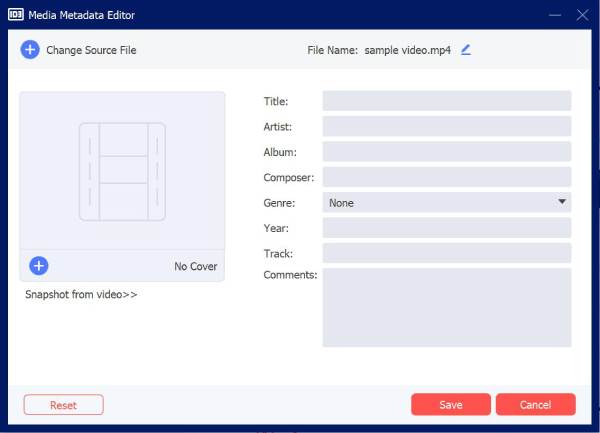
AnyRec Video Converter is a versatile media tool that includes a built-in metadata editor for video, audio, and image files. It allows users to modify details such as title, artist, album, and cover image while maintaining high-quality output. The software features a clean interface, making it accessible to beginners while still offering precise control. In addition to metadata editing, it supports format conversion and basic editing, making it a comprehensive solution for media management.
Compress video smaller than 25MB for Gmail, Dropbox, and other email services.
Send a long video and reduce the file size to 16MB for WhatsApp sharing.
Compress video online for Discord, TikTok, Facebook, and other social media.
Compress video by percentage from 10% to 99% to shrink file size flexibly.
Secure Download
Secure Download
- Pros
- Easy-to-use interface with clear layout
- Supports multiple file formats and metadata fields
- Includes additional video editing and conversion tools
- Cons
- Not specialized only for metadata editing
2. MP3Tag
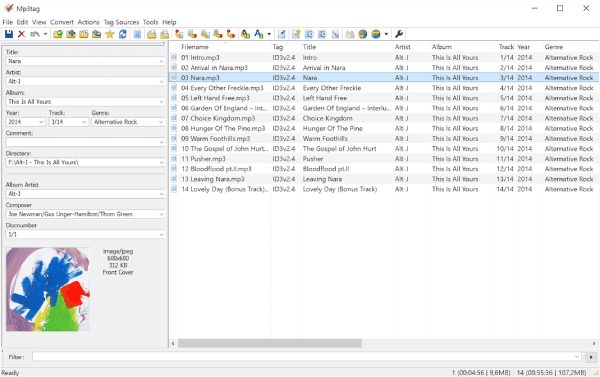
For a user who is looking for an MP3 metadata editor, MP3Tag is a very good choice. This tool is specifically designed to handle metadata attached to audio files, allowing you to modify detailed information such as artist, album, genre, etc. By modifying this information, you can efficiently classify and organize audio files.
- Pros
- Powerful batch editing capability
- Supports multiple tag formats
- Lightweight and fast performance
- Cons
- Interface feels outdated and lacks efficiency
- Limited support for video metadata
- Require learning for advanced features
3. ExifTool
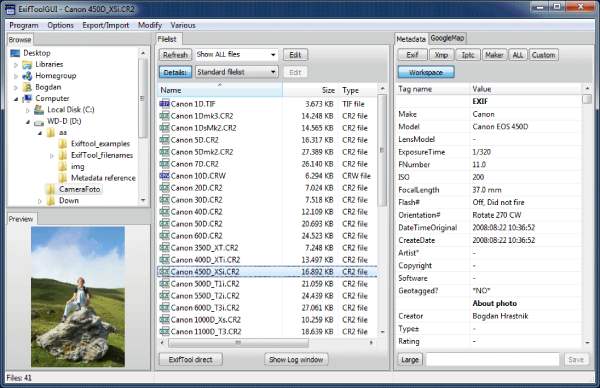
As a powerful command-line-based tool, ExifTool is a reliable file metadata editor that supports a wide range of file types. It provides deep access to images, videos, and other media, allowing users to read, write, and delete detailed information. However, its command-line nature makes it less accessible for beginners. If you are looking for a free metadata editor, you can also try this one.
- Pros
- Extremely powerful and flexible
- Support a wide range of file types
- Allow deep metadata editing
- Cons
- Require command-line knowledge
- No graphical interface to view
- Steep learning curve for beginners
4. Adobe Bridge
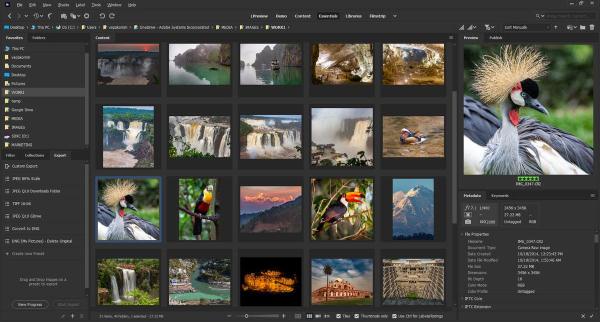
You may already be familiar with many Adobe tools, such as Photoshop, Premiere Pro, Audition, and more. They are all professional-grade options specifically designed for handling certain types of media files. When it comes to handling metadata for these files, Adobe Bridge is a natural choice. Integrated with Adobe Creative Cloud, this metadata editor is free and particularly useful for creative professionals handling large projects.
- Pros
- Professional-grade metadata management
- Batch editing and organization features
- Integration with the Adobe ecosystem
- Cons
- Require an Adobe account
- Resource-intensive software
- An Adobe alternative required for other editing tasks
5. TigoTago
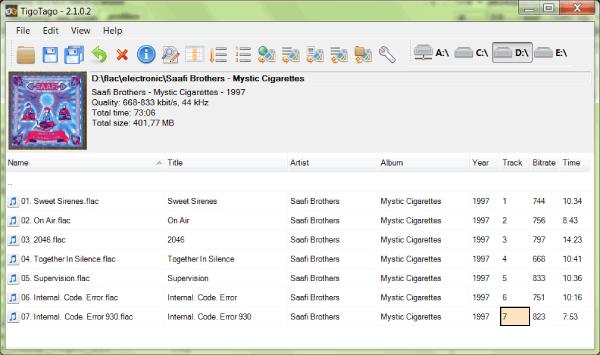
If you are looking for an MKV metadata editor, TigoTago can help you efficiently manage audio and video metadata without any hindrance. With an intuitive interface and clear instructions, you can quickly access media file metadata and make simple modifications. The only potential issue might be that it only supports the most basic metadata editing and cannot modify information hidden by the system.
- Pros
- Spreadsheet-style batch editing
- Support multiple file formats
- Simple and efficient workflow
- Cons
- Outdated interface design
- Limited advanced features
- Primarily focused on audio files
6. Metadata++
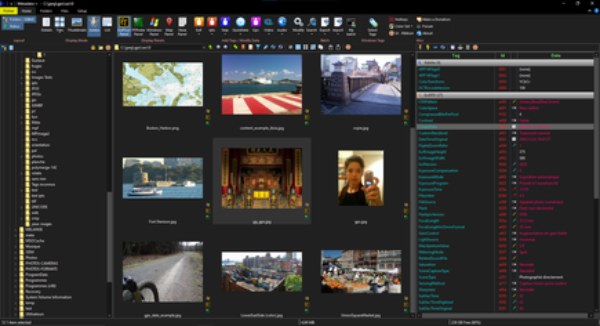
Metadata++ is a Windows-based metadata editor that enables users to view and edit metadata in some uncommon file formats, such as EXIF, IPTC, and XMP. If you have specific requirements for these file formats, Metadata++ can ensure your workflow is not affected. Of course, since it is only available for Windows systems, many Mac users will not be able to use this convenient tool.
- Pros
- Support multiple metadata standards
- Simple and clean interface
- Wide file type compatibility
- Cons
- Windows-only software
- Limited advanced editing tools
- Less frequent updates
7. A Better Finder Attributes
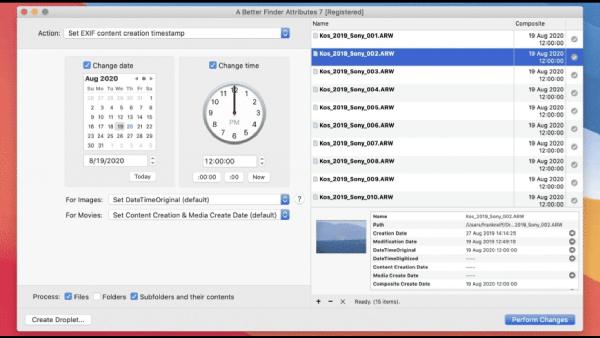
For users constrained by system limitations, metadata editors for Mac are rather uncommon. In fact, macOS itself offers an effective utility called "A Better Finder Attributes". This reliable option enables users to manage file organization and correct metadata inconsistencies, thus facilitating better management of numerous files on the Mac. However, it focuses more on file attributes than detailed media metadata editing. For additional polishing requirements, you may need a Mac video editor.
- Pros
- Optimized for the macOS environment
- Easy file attribute management
- Quick batch processing
- Cons
- Mac-only application
- Limited media metadata editing
- Fewer advanced customization options
Conclusion
A metadata editor not only enables you to edit the metadata of media files to facilitate better management and organization, but also provides a stronger safeguard for privacy-related information. By using AnyRec Video Converter, it becomes easier to handle file information responsibly, ensuring that only intended data is preserved when files are distributed or stored.
Secure Download
Secure Download
About Our Author




