
Hot

AnyRec Screen Recorder
Capture every moment. Record like a pro.
Secure Download
Honest Vocaroo Review after Testing & Best Alternative

Since Vocaroo's debut, it has served as a tool for recording voice and sharing it instantly. No accounts needed and no learning curve experiences. But does this tool still hold up? What does it offer in 2026? In this Vocaroo review, you'll see a breakdown of how it works, where it shines, and where it falls short. Also, you'll know which alternative you should consider to record easily, especially if you need a bit more features for your audio production.
Guide List
What is Vocaroo? Features, Pros, and Cons of Vocaroo How to Use Vocaroo to Record The Best Alternative to Vocaroo to Record EasilyWhat is Vocaroo?
Vocaroo is a long-standing, web-based tool specifically made for quick audio recording and sharing. It allows you to record voice notes without an account, pay for a subscription, or download anything. Basically, it functions as your digital tape recorder that works entirely in your browser, giving you a permanent link for others to hear your audio message.
Features, Pros, and Cons of Vocaroo
While Vocaroo voice recorder is well-known for its simplicity, there are still things you must consider. The following part of the Vocaroo review is to understand its specific capabilities and limitations before applying it to your workflow. By weighing these specifics, you can determine whether the recording tool fits your needs, or you may need to look for an alternative.
Vocaroo Overview:
- One-Click Recording. Start and stop recording quickly with a single button.
- Flexible Sharing. Let you share recordings through direct links, codes for websites, and social media.
- QR Code Generation. Quickly transform any recording into a scannable QR code.
- Audio Upload. Allow you to upload pre-existing audio files up to 250MB to share them via links.
- Background Noise Removal. Help you clarify voice recordings with the basic toggle.
What I like about Vocaroo?
- Can start recording with no data shared.
- Works completely free, no hidden fees.
- Very easy for non-tech-savvy users.
- It is cross-platform, working on any device with a browser.
What I don't like about Vocaroo?
- Files expire after a few months if not downloaded.
- Lacks editing tools; no audio trimmer or combiner.
- Needs a stable connection to save recordings.
How to Use Vocaroo to Record
Moving from the above Vocaroo audio recorder review, using this tool is among the most straightforward ways to record audio. The following guide provides a three-step path to record your audio successfully on your browser tab.
Step 1. Visit Vocaroo.com on any web browser. There, click the large, red "Microphone" button; if prompted, click the "Allow" button to let the site access your microphone.
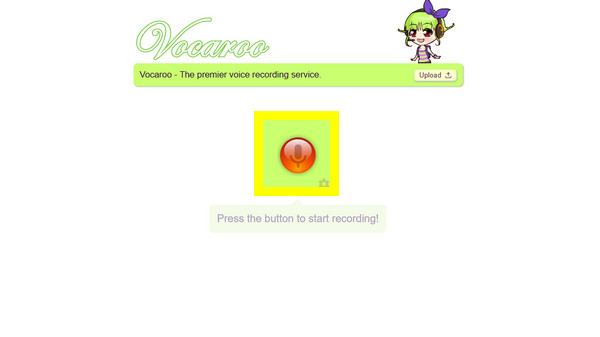
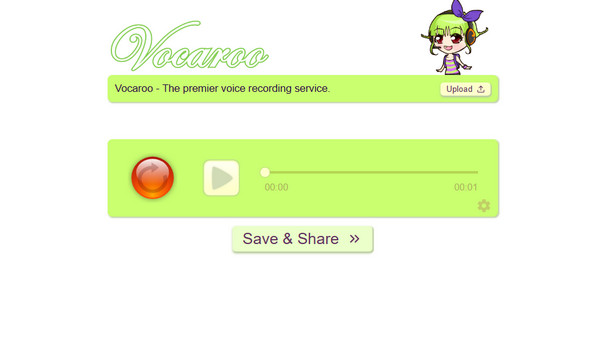
Step 2. Later, once the recording ends, click the "Stop" button. You can then click the "Play" button to listen to your voice recording.
Step 3. Next, click the "Save & Share" button, generating a unique URL, a QR code, and options to save the file as an MP3.
The Best Alternative to Vocaroo to Record Easily
As you have seen in the Vocaroo review, the audio recorder is perfect for quick notes. However, you may find yourself looking for more stability and higher quality when recording audio. For this, here comes AnyRec Screen Recorder, a professional-grade alternative that lets you record microphone and system audio. Unlike Vocaroo, the software provides advanced controls such as noise cancellation and mic enhancements, so the audio recording results will be exceptional. Also, it lets you save files in multiple formats like WAV or FLAC, with customizable output settings. This Vocaroo alternative manages to offer anyone powerful yet without the steep learning curve to record audio.
Can capture system sound and microphone voice at once or separately.
A built-in editor to cut out all unnecessary noise or silence at the start and end.
Let you set specific times for the recorder to start and stop automatically.
Adjust the sample rate, format, volume, and other settings for desired results.
Secure Download
Secure Download
Step 1. Launch AnyRec Screen Recorder and head straight for the "Audio Recorder" option on the primary dashboard. A dedicated control panel will be opened, giving you much more to record audio.
Step 2. Toggle "System Sound" to ON to capture computer audio, and make sure the "Microphone" is toggled ON, too, for your narration.
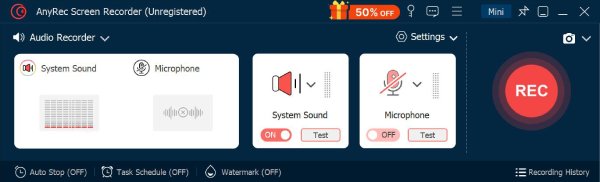
Pop into the "Settings" menu, look for the "Sound" tab, and check the noise cancellation and enhancements features to filter out background noises, ensuring your recording sounds crisp.
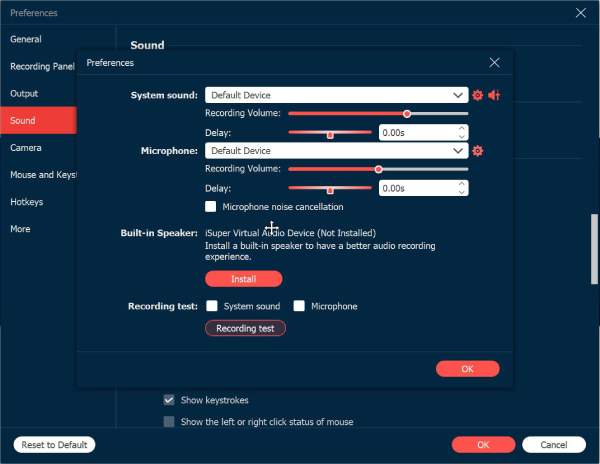
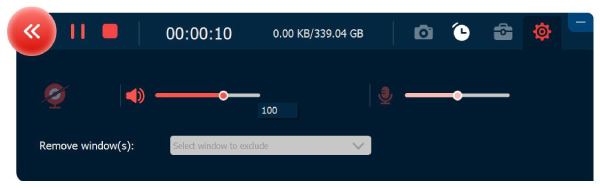
Step 3. Once everything looks good, click the big "REC" button to start. A handy floating toolbar will stay on your screen, letting you adjust the volume in real-time if you're speaking a bit too softly or loudly.
Step 4. When you finally say your piece, click the "Stop" button to bring up the preview window. At this point, you can easily cut out any dead air or noise at the start or end. Click the "Save" button to ready your audio recording.
Conclusion
If you need a quick voice note to send a message, Vocaroo online audio recorder is unbeatable. In this Vocaroo audio recorder review, you have realized the tool is a standout choice for anyone who needs to record and share audio right away with no login required, and just instantly like a QR code generation. In contrast, if you need high-quality audio that you can keep forever, you'll want something like AnyRec Screen Recorder. This Vocaroo audio recording alternative offers features like AI noise cancellation, a built-in editor, and multi-format exports, giving everyone reliability and control that a simple web tool cannot match when recording audio.
Secure Download
Secure Download
Related Articles:
About Our Author




