TensorPix Review: In-depth Feature Review & Best Alternative

Are you looking for a TensorPix review to assess whether it's a great option for your video enhancement needs? Well, with a 4.2/5 Trustpilot rating from 121 reviewers, this tool might already offer great service. However, being great is subjective and largely depends on how satisfied people are with the service. Now, to help you review TensorPix, continue reading this post, which features a comprehensive TensorPix AI review and the best alternative. Dive in now.
Guide List
What Is TensorPix TensorPix Features TensorPix Pros and Cons Is TensorPix Safe to Use TensorPix Pricing Best TensorPix Alternative: AnyRec Video EnhancerWhat Is TensorPix
Before you completely start your journey of assessing whether TensorPix is worth trying, you can first explore what this tool really is. So, TensorPix is an AI-powered browser-based video enhancer that can help you improve low-quality, blurry, noisy, or old videos. It can upscale video resolution, reduce noise, sharpen details, and smooth videos. All doesn’t require your advanced editing skills.
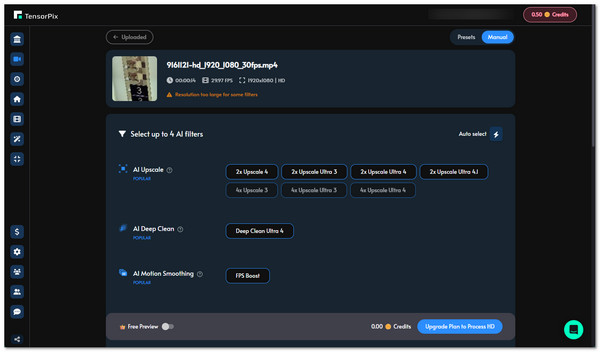
Now, who is TensorPix for, and who is suitable for? Well, this tool is:
- • Beginners who want an easy video enhancement tool
- • Content creators are improving videos for social media
- • Users restoring old or low-quality footage
- • Anyone looking for a simple alternative to a complex video editor tool
TensorPix Features
Now that you know what TensorPix AI video enhancer is, you can start assessing whether it offers a great service for you. You can start by taking a closer look at its main features. As mentioned earlier, this tool is designed to help users improve video quality with less manual editing.
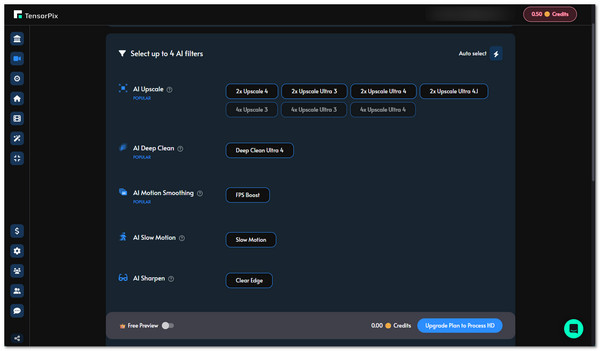
- AI Video Upscaling - This tool uses AI to analyze your video and enhance its detail and sharpness. It also upscales videos to 4K or higher resolutions, including 1080p, 2K, and 4K.
- Video Restoration and Enhancement - It also supports improving old or low-quality footage. It can help you reduce noise, fix blurry details, stabilize shaky footage, and restore your old videos.
- Browser-Based Processing - Aside from that, TensorPix works directly in your browser, so you do not need to install desktop software.
- AI Enhancement Results - It also uses AI filters to address various video quality issues. After uploading a video or footage, you can select the filters you need and let it process the footage automatically.
- Frame Rate Enhancement - It can also increase a video's frame rate, making the video’s motion smoother. It supports boosting the frame rate up to 8X, depending on the source video.
- Video Stabilization - Lastly, it also supports stabilizing shaky footage through its AI stabilization feature. It automatically analyzes the video and reduces unwanted camera movement.
TensorPix Pros and Cons
As you can see in the earlier section, TensorPix AI video enhancer offers a great set of features, most of which are AI-powered and easy to use. Now, this section will help you weigh the pros and cons of this tool. You can use this as a basis for deciding whether to use it or an alternative.
- Pros
- Supports an easy-to-use interface that makes it a great option for beginners.
- Doesn’t require software installation because it runs directly in a browser.
- Offers AI-powered tools for upscaling, noise reduction, restoration, and more.
- Works well with improving old or low-quality footage.
- Can process short videos quickly.
- Effective for landscape and daytime video upscaling.
- Cons
- Longer videos may be difficult to upload or process.
- Extremely low-quality footage may not always produce the expected results.
- Offers less customization than other video enhancement tools.
- The free option comes with limited credits.
- Available payment methods may be limited for some users.
Is TensorPix Safe to Use
So, how are the pros and cons of TensorPix? Did you find them not too bothersome, or were they enough to make you hesitant about using it? If not, and you are much into knowing whether it is safe to use, well, TensorPix is generally safe to use. It uses security measures to protect your uploaded videos and personal information.
This tool also states that it does not use your uploaded videos or images to train its AI models. You can also delete your files and account when you no longer need them. However, it is still best to avoid uploading highly sensitive or private videos to any online service.
TensorPix Pricing
The final section of this TensorPix review covers its pricing. So, how expensive is Tensor Pix? Well, TensorPix offers a free plan along with paid subscription plans. It also uses a credit system in which 1 credit equals 2 minutes of enhanced video.
- • Free: $0 with weekly credits, up to 720p video enhancement, and 1 GB of storage.
- • Standard: $5.5/month when billed annually, with 10 credits per month and up to 4K video enhancement.
- • Premium: $12.42/month when billed annually, with 35 credits per month and up to 4K video enhancement.
- • Elite: $30.25/month when billed annually, with 110 credits per month and up to 4K video enhancement.
So, that’s how expensive TensorPix is.
Best TensorPix Alternative: AnyRec Video Enhancer
That’s it! That’s the TensorPix review. Now, if you think those not-so-good side of this tool makes you consider looking for an alternative, then you might want to check AnyRec Video Enhancer. Just like TensorPix, this tool also uses AI to enhance your video automatically and as naturally as possible. It can upscale your video to 4K, optimize its brightness and contrast, remove noise, and reduce its video shaking. Now, what makes this a great alternative is that it offers many beginner-friendly options for customizing videos and can process lengthy videos with excellent performance in batches.
Support options to manually adjust the video’s volume, brightness, contrast, etc.
Offers 3D settings that let you choose an anaglyph, use split screen, and more.
Infused with a trimmer that you can use to eradicate unwanted parts of your video.
Options to tweak the video’s format, resolution, frame rate, etc., to make it high-quality.
Secure Download
Secure Download
TensorPix vs. AnyRec Video Enhancer Comparison Table
| Features | AnyRec Video Enhancer | TensorPix |
| Supported Platform | Windows and Mac | Web only |
| Video Processing Speed | Hardware accelerated | Cloud-based |
| Editing Tools | Advanced | Basic |
| Max Resolution | 4K | 4K |
| Batch Processing | Yes | No (paid only) |
| Free Plan | Free trial | Free trial |
Conclusion
There you have it! That’s the TensorPix review. Through this post’s comprehensive review of the tool, you can easily weigh everything and help you build your decision on whether the tool suits your video-enhancing needs. As you can see, TensorPix AI offers great features that are easy to use and accessible to beginners. Aside from that, it also offers great AI-enhanced video performance. However, given those not-so-good features, you might consider an alternative, and AnyRec Video Enhancer is one of your best options! Try it today and see how it works.
Secure Download
Secure Download
About Our Author