
Can You Screenshot OnlyFans Without Notification? Answer Today

Whether you want to save a favorite moment for offline viewing or a creator worried about your content, the screenshot OnlyFans question is one of the most debated topics. With the platform's service evolving, you are left wondering: Does OnlyFans notify screenshot activity? In today's guide, you will dive deeper into OnlyFans screenshot capabilities and share the most reliable tool for high-quality captures. Here's everything you need to know about it.
Guide List
Will OnlyFans Send Notifications When Taking Screenshots? Does OnlyFans Detect Screenshot Activity? A Professional High-Definition Tool for Screenshot on OnlyFansWill OnlyFans Send Notifications When Taking Screenshots?
Want to take a screenshot of OnlyFans content, but afraid it will notify the creator? Does OnlyFans notify screenshots?

Well, the short answer for this is no, an OnlyFans screenshot will not send any notification to a creator. Unlike Snapchat, whether it is a screenshot of a post, stories, or chats, OnlyFans is a web-based platform and does not have access to your device's operating system.
Therefore, you can capture any images for personal use without worrying about an awkward notification showing up on the creator's end. So, more and more OnlyFans leaks show on the Internet. However, you might still wonder if the platform is silently monitoring OnlyFans screenshot activity behind the scenes.
Does OnlyFans Detect Screenshot Activity?
While you've seen that OnlyFans screenshot does not notify creators, it does have a specific Digital Rights Management or DRM technology that protects its content. In many scenarios, if you use a screen recorder or a screenshot tool on protected content, the result will be a blank or black screen rather than the visuals. It may not detect you in a way that results in an automatic ban, but the protection is designed to make it difficult.
For this reason, you may still want to try to hit the screenshot button to capture OnlyFans content. As long as you're using any bots that violate the platform's protocols, you can capture any content. But, to ensure no black screen and screenshot failure will happen, proceed to the next part to take OnlyFans screenshots using the most effective workaround.
A Professional High-Definition Tool for Screenshot on OnlyFans
If you encounter black screens while taking screenshots on OnlyFans, using AnyRec Screen Recorder is a premier choice! Here, you can capture any areas of your screen, ensuring you only take an OnlyFans screenshot and not the entire UI. In addition to that, it supports a wide range of output formats, such as JPG, PNG, GIF, and more, making it easy for you to view all your OnlyFans captures on any device. With its lightweight architecture and powerful capabilities, it is a great option to save OnlyFans content with crystal-clear precision.
Select full-screen, a specific window, or a custom region to capture.
Take OnlyFans screenshots and videos in 4K or 1080p without quality loss.
Use hotkeys to take screenshots for a quick result, even while recording.
Add arrows, text, annotations, etc., immediately after capturing.
Secure Download
Secure Download
Step 1. Launch AnyRec Screen Recorder and locate the "Snapshot" icon (Camera) within the main interface. Once clicked, your cursor will transform into a crosshair, letting you click and drag to frame the OnlyFans content you wish to save.
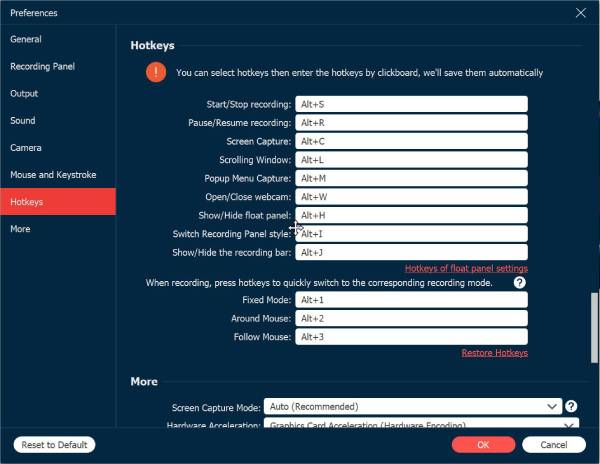
To make the process even easier, bypass the main menu by using the customized keyboard shortcuts to trigger the capture. You can see it in "Settings", then the "Hotkeys" section.
Step 2. The moment you release the mouse over the area, the screenshot will be taken and open the editor. At this point, you can add quick notes, drawings, arrows, and more to highlight specific details.
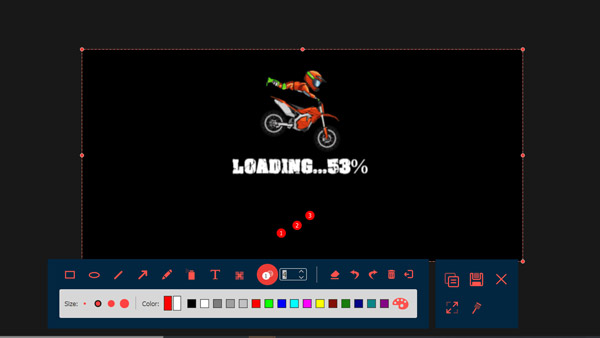
Step 3. After you have finished editing your capture, click the "Save" button (Floppy Disk). You can then select your desired destination folder and choose a high-quality file format, like PNG or JPEG. That's how simple it is to achieve your favorite OnlyFans content!
Secure Download
Secure Download
Conclusion
In summary, navigating the rules of taking screenshots on OnlyFans is simpler, though it needs a degree of caution. As you explored, OnlyFans does not notify creators, nor does it have anything to detect the capture performed. However, if you want to ensure you get the highest quality results without the chance of black screens, using AnyRec Screen Recorder is best! Enjoy its customizable hotkeys, friendly interface, and high-definition results to capture exactly what you need in OnlyFans and other screen activities with zero hassle.
Secure Download
Secure Download



