
Best Way to Convert Any REC File to MP4 [No Quality Loss]

REC files won't open in common players or editors. That's why you need to convert REC to MP4 format. But it is not easy to find a proper REC converter. Many users report problems while converting .rec files into .mp4 using VLC, HandBrake, and those popular converters. What happens? Is there any way to export .rec to .mp4 successfully? Read this article and get your almighty way to watch replays in MP4 format.
Guide List
What Is a REC File Best Way to Convert REC to MP4 [100% Working] Troubleshoot Other REC to MP4 Converters Not WorkingWhat Is a REC File
A .rec file is a recording file format that is used to store captured audio (voice or system sound), video (screen capture, gameplay, CCTV footage), or screen recordings. REC files are created by older screen recorders, CCTV/DVR/NVR (Hikvision, Dahua, Swann, Lorex, etc.), gaming or streaming software, and more. For easier sharing, editing, and playback, many people convert a CamRec file to MP4.
Best Way to Convert REC to MP4 [100% Working]
CCTV, DVR, and NVR REC files are encrypted or proprietary. You can identify the source of your REC file to see if it is encrypted or not. That's why you fail to convert .rec to .mp4 with VLC in some cases. During this time, you can use AnyRec Screen Recorder to make a copy without restrictions. Record on-screen videos with its Video Recorder. Once you can watch REC files, you can convert any REC file to MP4 here.
Record REC video and export to MP4.
Convert videos in rare formats by capturing.
Add webcam, annotation, and voiceover to your REC replays.
Trim, convert, compress, and edit metadata after recording.
Secure Download
Secure Download
Step 1.Open AnyRec Screen Recorder. You will be in the default "Video Recorder" mode. Set the screen capture area. Turn on the toggle button before "System Sound" to record the REC video with the original audio.
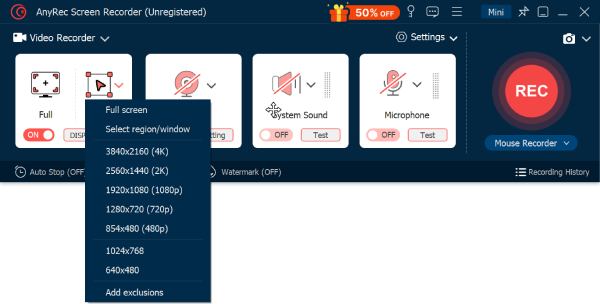
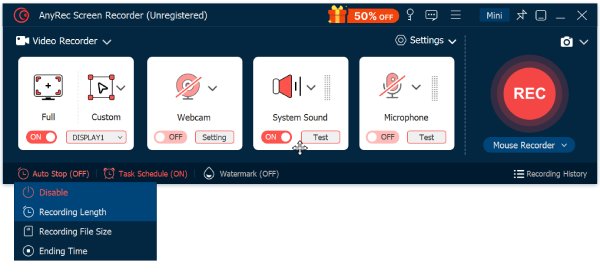
Step 2.You can click the "Auto Stop" button to set a custom recording length based on your needs. Play your .rec video file. Click the "REC" button to start recording after a 3-second countdown.
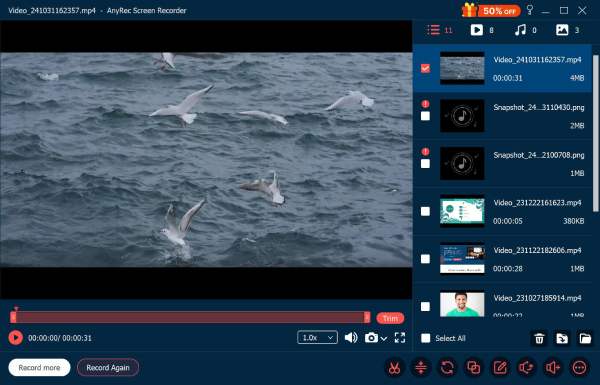
Step 3.Click the "Stop" button to finish the REC recording manually. In the Preview window, you can edit your REC video recording. Or you can find the recorded MP4 video quickly.
Secure Download
Secure Download
Troubleshoot Other REC to MP4 Converters Not Working
1. REC files play but won't convert to MP4.
Some CCTV REC files are not standard video containers. They are encrypted or wrapped in proprietary codecs. You can use the original DVR export function to export REC files instead of using third-party converter software. Or you can record REC video files with AnyRec Screen Recorder as an alternative solution.
2. Have a black screen after the REC to MP4 conversion.
You can re-export from the original DVR software using H.264 instead of H.265. But don't use those online REC video converters. They often cannot decode CCTV formats.
3. There is no audio in MP4 after converting from REC files.
That's because REC files may use PCM, G.711, and other uncommon audio codecs. Or the converter ignores secondary audio streams. So you can select the correct audio track or specify the audio codec (on FFmpeg). (Also see solutions to fix MOV file no audio.)
4. The converted REC to MP4 video is choppy or out of sync.
If the playback is stuttery, you can re-export REC files using constant frame rate (CFR). You can convert short REC clips instead of full-day recordings.
5. Timestamps and watermarks are missing after converting REC to MP4.
Third-party converters strip overlays. You can enable "Burn-in timestamp" while exporting REC from the DVR software. Or you can use AnyRec Screen Recorder to record everything in a 1:1 copy.
6. The converted REC to MP4 video is not accepted as legal evidence.
Use the official DVR software to export REC files. If you want to keep metadata and a timestamp, you can record a REC video to MP4 using AnyRec Screen Recorder.
Conclusion
It would be great if you could export REC video files with the original software. Many online and offline REC to MP4 converters cannot handle encrypted replays. To convert Topfield REC files to MP4 in all scenarios, free download AnyRec Screen Recorder and capture all visible content on your computer. There is no need to consider format limits or quality loss. If this article helps, please share it to help more people.
Secure Download
Secure Download



