
A Complete MP3 vs. MP4 Comparison [with Top 5 Converters]

When it comes to digital media, MP3 and MP4 are the two famous and widely used file formats. They may look similar, but they serve very different purposes. One centers on audio compression, and the other focuses on multimedia content. To make things easier for you, this guide breaks down an MP3 vs. MP4 comparison, helping you learn which format is better for your needs. Also, you'll learn how to seamlessly switch between the two without losing quality.
Guide List
Quick Comparison Table: MP3 vs MP4 What Is MP4 What Is MP3 MP4 vs. MP3, Which Is Better How to Convert MP4 to MP3Quick Comparison Table: MP3 vs MP4
As said, MP3 and MP4 play different roles in the world of audio and video files. Understanding how each format works will help you choose wisely for your videos, music, and data storage. See below the first part of the MP3 vs. MP4 battle, a comparison table of their strengths, limitations, and best uses.
| Feature | MP3 | MP4 |
| Type/Format | Audio codec/format | Multimedia container |
| File Size | Smaller for audio | Larger if it contains multiple videos or streams |
| Compression | Lossy audio compression | Lossy compression for video/audio, depending on the codec used |
| Extension | .mp3 | .mp4, .m4v, .m4a |
| Compatibility | Widely compatible with almost all players and devices | Widely compatible with modern devices |
| Use Case | Music, audiobooks, podcasts, and any audio-only content | Videos, interactive content, multimedia files, streaming with subtitles, and more |
What Is MP4
After diving into the differences of MP3 vs. MP4, it's nice to understand what MP4 really is. It is known as the most widely used multimedia format today. MP4 can store audio, videos, text, subtitles, and even images, making it a preferred format across devices and many streaming platforms.
Stand for: MPEG-4 Part 14
Purpose: To store and play multimedia content, such as videos, audio, and subtitles, in one file.
Best for: Video playback, online streaming, and sharing media files with high quality.
Why MP4 is popular: It balances high-quality playback with efficient compression so you can enjoy crisp video and audio while maintaining manageable file sizes.
What Is MP3
While MP4 handles multimedia, the MP3 format focuses primarily on sound. It is the world's famous audio format due to its compressed sound file without dramatically reducing quality. Designed to make audio accessible and portable, this format allows you to store songs without eating up too much space.
Stand for: MPEG-1 Audio Layer III
Purpose: To compress audio data and lessen file size while keeping good sound quality.
Best for: Playing and storing music, podcasts, audiobooks, and any audio-only content.
Why MP4 is popular: It is lightweight and compatible with all music players and software. It has universal support, which has made it popular in digital music sharing and streaming.
MP4 vs. MP3, Which Is Better
Choosing between MP4 and MP3 relies on what you want to do, like stream, upload, or listen offline. To help you, below is a table that contains some everyday situations and which format usually works perfectly in each case. After that, you will find detailed comparisons in areas like quality, compression, and more, helping you choose which is better: MP3 or MP4.
| Situation | Best Format |
| Watch video content online | MP4 |
| Upload video to YouTube | MP4 |
| Listen to music offline | MP3 |
| Streaming music with visuals | MP4 |
| Share a song only | MP3 |
| Embedding audio and visuals in a webpage | MP4 |
MP3 vs. MP4: Quality
Both MP3 and MP4 deliver very similar sound if encoded at the same bitrate. However, MP4 is more flexible; it holds audio streams with higher quality codecs like AAC. For a clean audio playback with minimal fuss, MP3 works well enough, but if you wish for a more advanced format, MP4 is more capable.
MP3 vs. MP4: Compression & File Size
Since MP3 is designed for audio only, it is smaller than MP4 files and also uses lossy compression. MP4, on the other hand, is a container that includes various combinations, so its size is larger. You can extract MP3 audio from this MP4 video to make the file size smaller than before.
MP3 vs. MP4: Use Cases
MP3 is proper for audio, particularly music podcasts and audiobooks. It is a simple choice whenever you just need sound. Meanwhile, MP4 is much more flexible; it is a multimedia container that holds video, sound, text, images, and more, making it a go-to for video streaming.
MP3 vs. MP4: Compatibility
When it comes to compatibility, MP3 is supported by every audio player, software, device, and browser. And it goes the same with MP4, especially for modern media players, devices, and websites.
MP3 vs. MP4: Metadata
MP3 supports ID3 tags, such as title, album, artist, cover art, etc. MP4 is a container that allows more advanced metadata like chapters in video, subtitles, multiple tracks, text, images, and more.
How to Convert MP4 to MP3
If you wish to enjoy your favorite videos as pure audio tracks, converting MP4 to MP3 is the answer! Doing so can help you save storage space and allow you to play the content on any audio player or device. Ending this MP3 vs. MP4, see below the five trusted tools for converting MP4 to MP3.
1. AnyRec Video Converter
AnyRec Video Converter converts MP4 to MP3, and other 1000+ formats, such as MOV, AVI, AAC, FLAC, OGG, etc., without losing quality. This video converting software supports batch conversion and holds editing tools like trimming, merging, and audio editing. It works fast and is user-friendly, making it ideal for beginners and professionals alike.
Supports over 1000 formats, including MP4, MKV, AVI, MOV, and more.
Works with GPU acceleration, offering high-speed processing.
Let you adjust bitrate, sample rate, channels, and more before converting.
Batch conversion to turn multiple MP4 files into MP3s at once.
Secure Download
Secure Download
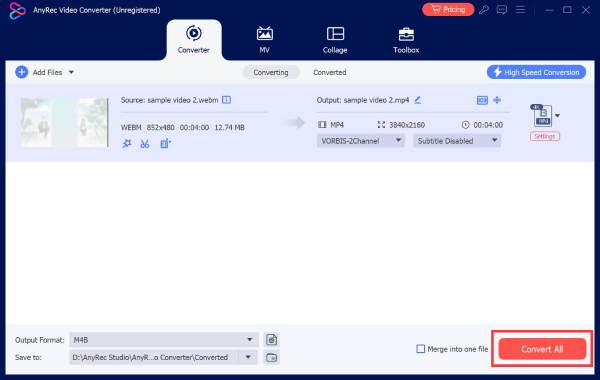
Step 1.Open AnyRec Video Converter on your computer. From the main screen, click the "Add Files" button to add one or more MP4 videos you wish to convert.
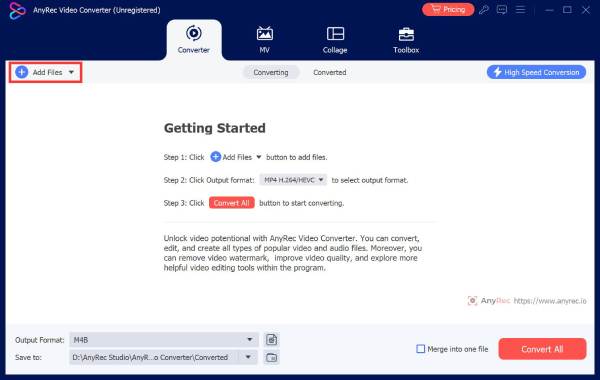
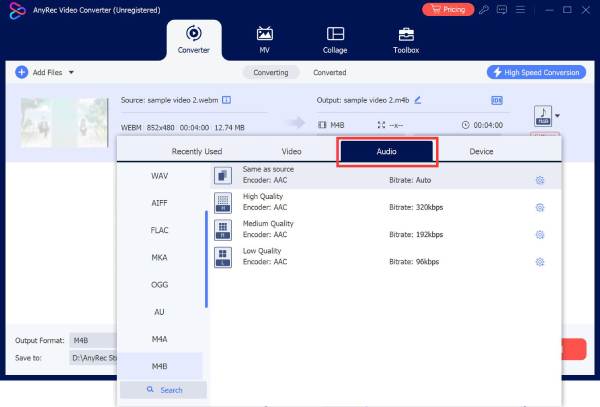
Step 2.Next, click the "Format" dropdown menu and then head to the "Audio" tab and choose "MP3" as your desired output format.
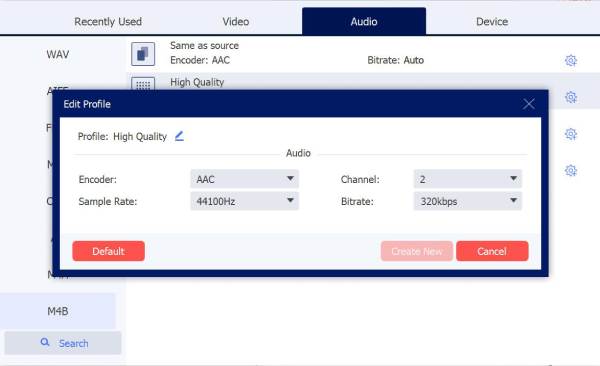
If needed, click the "Custom Profile" button to customize the audio bitrate, sample rate, or encoder for better sound quality.
Step 3.After that, go back to the main screen, and select the destination folder where to store your converted MP4 to MP3 file. Finally, click the "Convert All" button to get the MP3 audio right away.
Secure Download
Secure Download
2. VLC Media Player
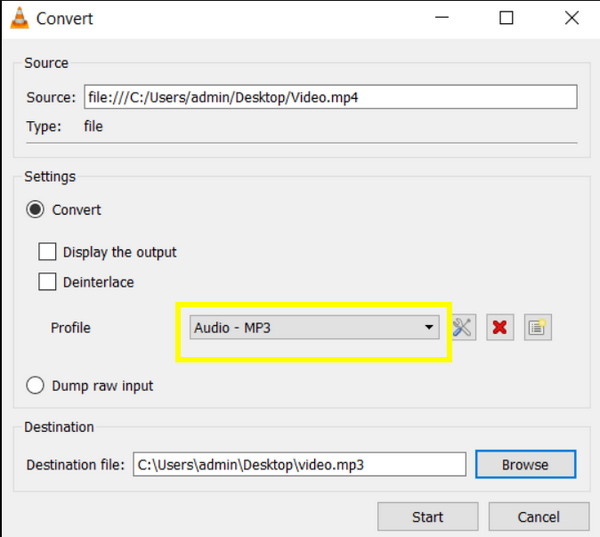
Aside from being a great media player, VLC can also help convert MP4 to MP3 by extracting audio from video files. It works completely free and works across platforms, making it a handy choice if you already have it installed.
3. Freemake Video Converter
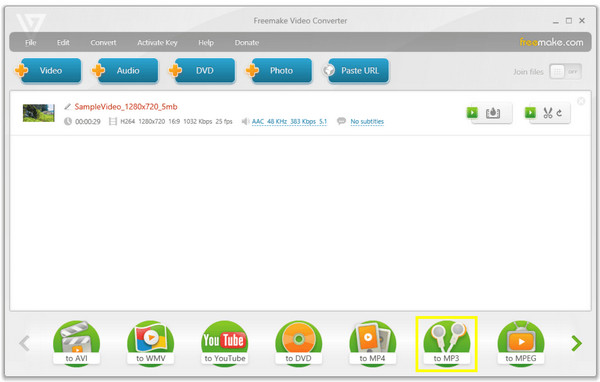
Famous for its simple interface, Freemake Video Converter allows you to easily convert MP4 video to MP3 and other audio formats. Plus, it provides various presets for devices as well as basic editing tools.
4. Handbrake
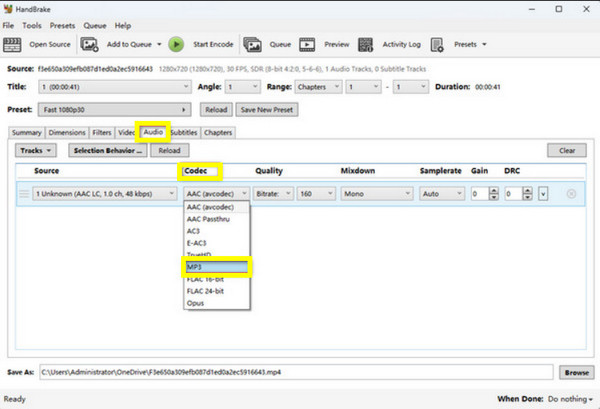
It is an open-source tool that lets you convert MP4 to MP3 using audio extraction. Handbrake is a bit technical, but it is highly customizable for anyone who wishes for detailed control over codecs and bitrates.
5. VideoProc Converter
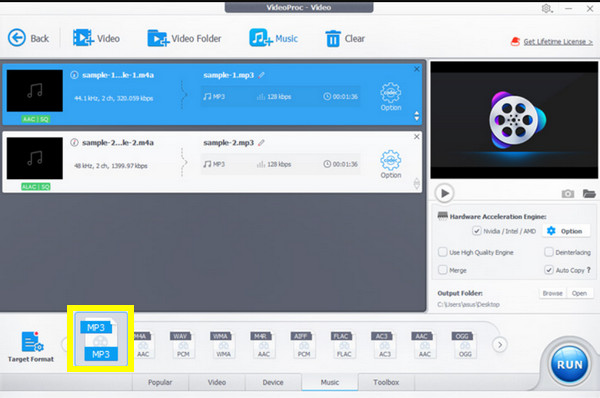
This all-in-one MP4 to MP3 converter utilizes GPU acceleration for quicker processing. It transforms MP4 to MP3 in just seconds while keeping high audio fidelity, perfect for large and multiple files.
Conclusion
Both MP3 and MP4 formats play essential roles in how you enjoy and share digital media today. You've seen here that MP3 is the top choice for pure audio playback, while MP4 stands out for high-quality video and audio together. Thus, the winner between MP3 vs. MP4 depends on whether your focus is on music listening, video editing, or multimedia playback. If you ever need to switch between the two, among so many options, AnyRec Video Converter offers the fastest and easiest solution to do so. It delivers exceptional speed with excellent quality, making it perfect for converting and editing your media without extra steps.
Secure Download
Secure Download



