Aiarty Video Enhancer Review: Features & Pricing in 2026

A shaky recording or a heavily compressed video can look even worse on a large, high-resolution screen. Aiarty Video Enhancer is designed to improve footage like this with AI tools, without requiring a full video-editing program. But how well does it work in practice? This Aiarty Video Enhancer review looks at its main features, pricing, and limitations to help determine whether it's worth buying.
Guide List
What Aiarty Video Enhancer Actually Is Aiarty Video Enhancer Pricing - What You Actually Pay Core Features - What Aiarty Video Enhancer Does Honest Limitations of Aiarty Video Enhancer Best Aiarty Video Enhancer AlternativeWhat Aiarty Video Enhancer Actually Is
Aiarty Video Enhancer steps in to rescue your low-resolution or blurry footage and give it new life. Instead of just stretching pixels, which results in blown-out video, its machine-learning models reconstruct missing details. It sharpens the facial features to bring back natural skin textures and cleans up background noise.
Who is it for?
It is ideal for content creators and filmmakers. You can upscale your old family clips, grain-heavy night footage, or standard-definition videos to crisp 4K for modern platforms. Aiarty Video Enhancer is built for anyone who wants professional-looking restoration without needing a complex pro video editing suite.
Aiarty Video Enhancer Pricing - What You Actually Pay
When you're looking clearly at it, you may want to check its subscription, of course. Fortunately, Aiarty Video Enhancer keeps its pricing simple, offering everyone a nice alternative to monthly fees charged by many rivals.
Here's the breakdown of its pricing:
- • Free trial. While you check out the software first, it comes with catches like being limited to a short duration, a watermark on the final render, and disabled batch processing.
- • Standard license ($79/year). Built for single-user setups, this annual subscription gives you access to all features and software updates for one PC in a year.
- • Lifetime license ($149 one-time). To use it long-term, you need the best value. For a simple upfront fee, you get permanent access to it with all future AI model updates, across up to three different PCs.
Core Features - What Aiarty Video Enhancer Does
Aiarty Video Enhancer does not depend on a single algorithm. It is full of a suite of specialized AI tools for different video imperfections. Here's a closer look at what its core features bring to the table:
AI Video Upscaling
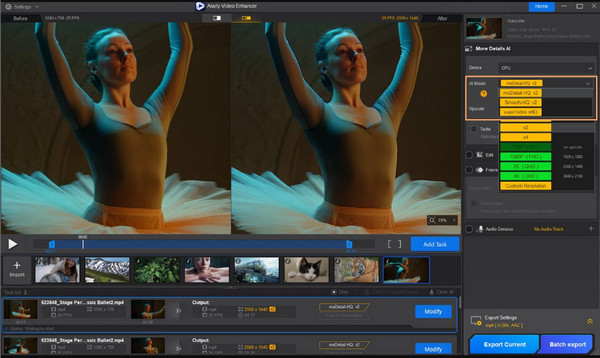
Instead of a simple digital zoom, Aiarty upscaling models analyze your frames to generate and reconstruct missing data. It smoothly scales up lower-resolution clips to sharp 4K.
Noise Reduction and Denoising
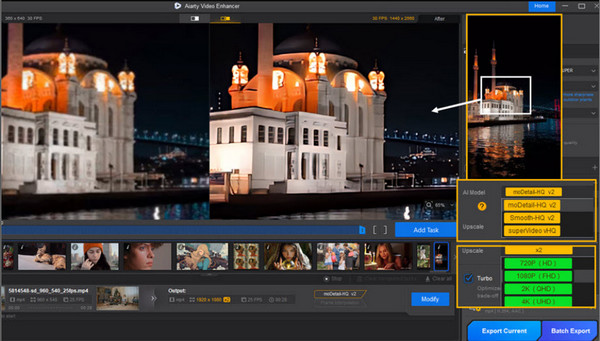
Your grainy footage often suffers from ugly digital noise, so thanks to Airty's features, you can intelligently separate unwanted grain from the actual picture details.
Deblurring
Out-of-focus camera work can ruin your great shot. Using Aiarty's deblurring engine, you can reconstruct soft clips so all subjects, text, and lines will get back into sharp, defined focus.
Compression Artifact Removal
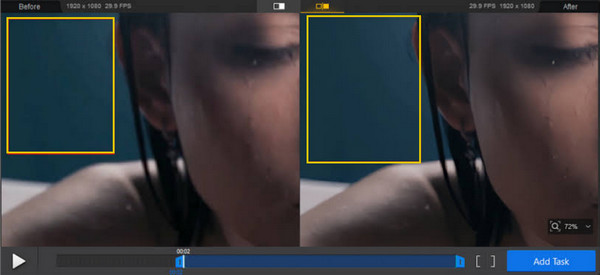
Videos downloaded from the web often suffer from heavy compression. This feature of Aiarty Video Enhancer targets those ugly clicks and smooths them out to restore a clean look.
Color and HDR Conversion
Aiarty has some basic color tools alongside its enhancement features. These include color correction and an option to give SDR videos an HDR-like look.
Honest Limitations of Aiarty Video Enhancer
While Aiarty Video Enhancer has a solid set of tools for video restoration, it is not without limitations. It does not magically handle every piece of your low-quality source footage.
The following are the most common limitations you should keep in mind before adding it to your toolkit:
Portrait Overexposure and Skin Shift
For human subjects, the AI might overcalculate facial highlights, leading to unnatural tones, minor color shifts, and overexposure on faces.
Heavy Processing Hardware Requirements
Don't expect the same processing speed on every computer. Aiarty analyzes and enhances video frame by frame using local AI models. It runs more smoothly on newer systems with dedicated RTX graphics, but older PCs can take a while to complete a job.
Noise Removal Underperforms at Extreme Levels
For mild to moderate camera gain, Aiarty does its job fantastically. But when it is a severely degraded clip, its denoise engine can leave uneven noise or create distracting edge artifacts if it fails to separate noise from the actual details.
Color and Saturation Shifts
The colors may look a little different once the video has been enhanced. For example, the software might add warmth or make colors more intense. That can make a dull landscape look better, but it may also change the look of people or objects in the frame.
Best Aiarty Video Enhancer Alternative
Aiarty may be more than needed if the goal is to fix a few blurry or damaged clips. AnyRec Video Enhancer is worth a look. It offers video enhancement alongside basic editing tools. This can be convenient when the goal is simply to make a blurry or damaged clip look better. There is no need to operate complex editing process.
One-click AI restoration and upscaling for your easy low-res-to-4K processing.
Advanced video stabilization to remove unwanted camera movements.
Built-in editing tools to crop, trim, rotate, apply effects, and convert videos.
Adjusts uneven lighting, exposure, and dark shadows.
Secure Download
Secure Download
Conclusion
At the end of the day, Aiarty Video Enhancer is a powerful tool for anyone looking to fix flawed footage and breathe new life into your vintage clips. Despite all its great features, it is not without its limits. That said, you can try AnyRec Video Enhancer, a much lighter alternative for one-click AI enhancement with daily video editing tools. Indeed a hassle-free choice for polishing your video content quickly and smoothly.
Secure Download
Secure Download
Related Article
About Our Author