Hot

AnyRec Screen Recorder
Capture every moment. Record like a pro.
Secure Download
Is VLC Media Player Safe? Risks, Warnings, and More Tips

VLC Media Player has been around for so many years, so it’s safe to assume that it is completely safe, but is it? Too many questions regarding its safety leave you wondering whether you should trust the player. To know more, today’s post revolves around the question "Is VLC Media Player safe?" The following sections cover why users think it is unsafe, how to download it safely, what it can and can’t do, and more.
Guide List
Is VLC Media Player Safe Why Do People Think VLC Is Unsafe How to Download VLC Safely Can Video Files Infect Your Computer Through VLC What VLC Can and Can't DoIs VLC Media Player Safe
If you’re about to get VLC Media Player, it’s usual to ask some questions about its safety. After all, VLC handles your local files, has access to your storage, and is available from so many download sites. In the following, you’ll look closely at VLC’s security, open-source nature, and privacy reputation.
The Short Answer
Yes, VLC Media Player is safe to use when you download it from the official VideoLAN website or other trustworthy sources. The player is a long-established, open-source media player with a huge developer and user community. However, like any other software, it commonly has security vulnerabilities, so keeping it up to date is important.
Why Millions of Users Still Use VLC
VLC Media Player has stayed popular for years. Because it combines a lightweight design with broad format support. Besides regular video and audio files, VLC can handle DVDs, Blu-rays, network streams, and various uncommon formats. The cross-platform support also makes it convenient to use on different devices. For anyone looking for a totally free media player, VLC is a good choice.
Is VLC Open Source
Yes. VLC Media Player is an open-source software, which means its source code is publicly available for developers to check, modify, and contribute to. This transparency makes it very easy for researchers and the community to see how it works and determine potential problems. The player is developed by VideoLAN, a nonprofit organization, and is distributed under the GPL.
Is VLC Spyware
Actually, there’s no good basis for calling the VLC Media Player spyware. VLC itself is not made to secretly monitor your activity or collect your personal data. However, privacy concerns for VLC Media Player can sometimes come from extensions or network streaming rather than from itself being spyware. The bigger risk is downloading a VLC from an unofficial website.
Why Do People Think VLC Is Unsafe
Is VLC player trustworthy? If so, why are some users still hesitant about installing it? Most of your concerns may come from old security issues, antivirus alerts, and risky downloads. See below the common reasons behind the confusion.
- Antivirus Warnings. Security software may flag a BLC installer, plugin, or media file as suspicious, leading to false positives, especially if it's from an unofficial source.
- Fake Download Websites. Some websites copy the official VLC page and offer installers that can contain malware, making the source as important as the software itself.
- Past Security Vulnerabilities. Like any other software, VLC has faced security issues, and these can make headlines.
- Pirated Software Bundles. Pirated versions can contain malicious files or other unwanted software, so if it asks you to disable your antivirus, that is a red flag.
How to Download VLC Safely
Where you download VLC really matters. Remember to go to the official source. Don't visit random download websites or click pop-up ads. Follow the steps below.
Step 1.Head to the official VideoLAN website of https://www.videolan.org/. Choose the best version for your operating system, such as Windows, macOS, Linux, and others.
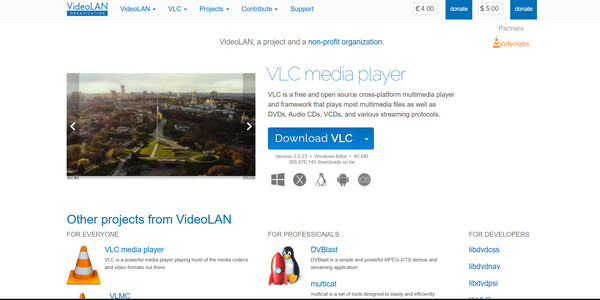
Step 2.Download the installer directory, read the screens, and decline any extra pop-ups unrelated to VLC. Once you get it, don't forget to keep it updated whenever available.
Can Video Files Infect Your Computer Through VLC
VLC Media Player is generally safe to use, but that does not mean that every video file of yours is harmless. It has to process complex formats and codecs, and an especially crafted malicious file could exploit a vulnerability. The good news? Being careful with files from an unknown source can greatly lessen the risk.
How Malicious Media Files Work
A malicious video is not dangerous simply due to its formats, such as MP4, MKV, or others. The risk starts from how the player processes specially crafted content. If a certain file is made to trigger a vulnerability in VLC Media Player, opening it could cause unwanted behavior or enable malicious code to run.
Why Outdated Media Players Increase Risk
Older versions may have security weaknesses that have already been resolved in newer updates. Using an outdated version of VLC Media Player gives attackers a chance of abusing known weaknesses. So, regularly update your player; one of the simplest ways to enhance your security.
Can Converting a Video Remove Potential Threats
Converting a suspicious video file to another format may change or remove the problematic parts of your original file, but it isn’t an assurance for security. If you don’t trust your file, do not open it just to convert it. It is much safer to get the video from a known source, scan it with up-to-date security software, and use an up-to-date media player.
What VLC Can and Can't Do
VLC is packed with useful features, but it is still mainly a media player, not your all-in-one video tool. Before ending this VLC player review, here’s a quick look at what VLC can do, what it cannot, and where a dedicated tool may be a better fit.
What VLC Can Do:
- Play several video and audio formats like MP4, AVI, MKV, MOV, MP3, and FLAC.
- Support subtitles with an option to change timing, size, and appearance. (See solutions to fix VLC subtitle delay.)
- Can play DVDs, CDs, and supported network streams with extra codecs.
- Adjust playback settings such as speed, audio effects, video effects, and aspect ratio.
- Help convert media files into many supported formats.
- Allow you to record screen activities.
- Play some incomplete files that other players may have trouble with.
- Stream and share media through a network.
What VLC Can't Do:
- Remove protection from content simply by playing or converting it.
- Repair severely corrupted videos in all situations.
- Ensure that your video file is safe if it itself is malicious.
- Replace a video editor for cutting, transitions, effects, and multi-track editing.
- Upscale poor-quality videos with a dedicated enhancer.
- Bypass every Blu-ray protection or decrypt every disc.
- Offer advanced recording tools beyond those of dedicated software.
Better Alternative for Screen Recording: AnyRec Screen Recorder
Want more control over your screen recordings? Here’s AnyRec Screen Recorder, a more focused alternative to VLC Media Player. It allows you to capture your entire screen or a specific area while capturing system audio, microphone input, or webcam footage. Moreover, you can annotate and manage recordings within the program. Instead of digging through VLC's built-in settings, you can get an easier and smoother workflow from this program.
Flexible screen recording with full screen, window, or a selected area support.
Audio and webcam recording, individually or together.
Easy recording management to preview and edit with customizable settings.
Real-time annotations to add text, shapes, and more while recording.
Secure Download
Secure Download
Conclusion
For most users, VLC Media Player is safe. Make sure you get it from the official source, keep it updated, and be careful with the files you open. Older security problems and fake VLC websites are often behind the alarming stories you may come across. Generally speaking, VLC is great for playback, but it has fewer options when it comes to editing or screen recording. If you need a dedicated recorder, AnyRec Screen Recorder can be a better fit, with flexible capture areas and more customization options.
Secure Download
Secure Download
Related Articles
About Our Author